

AVIF to JPG
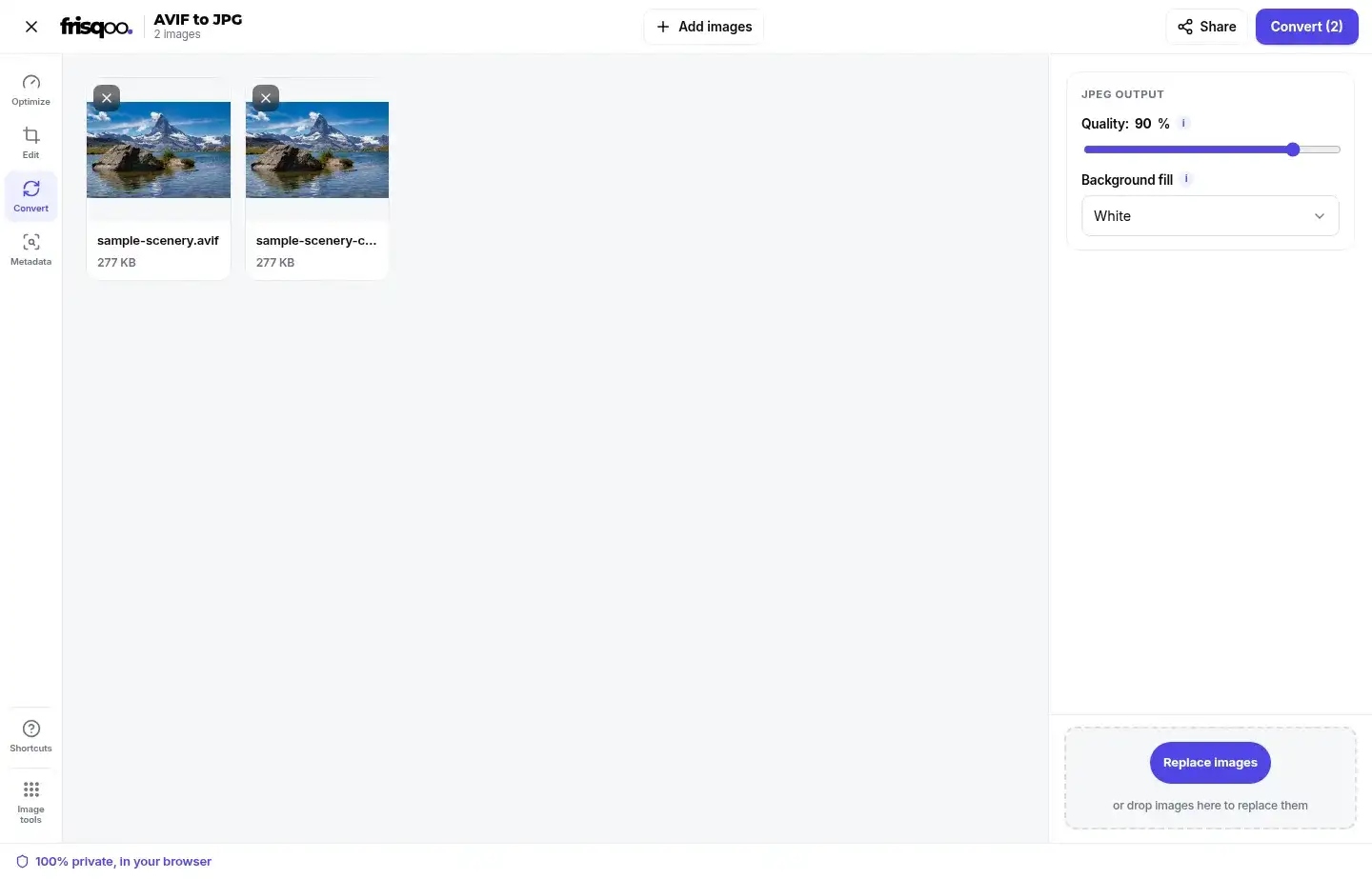
Turn AVIF images into widely supported JPG files. Add one AVIF or a whole batch, set the JPEG quality, and choose a background colour for transparent areas. The conversion runs in your browser. So your images stay on your device.
100% private. Your files are processed entirely in your browser and never uploaded.
Why convert AVIF to JPG with frisqoo
Private on your device
The browser reads and converts each image locally. Your AVIF files are not uploaded to a conversion server.
Wider compatibility
JPG works in many apps, forms and editors that may reject a newer AVIF file.
Background control
Fill transparent pixels with white, black or a custom colour before the JPG is written.
Quality control
Start at 90 percent and adjust the balance between detail and output size.
Batch conversion
Process several AVIF files with one set of options. Then save them together as a zip.
Free to use
This free AVIF to JPG converter needs no account. It adds no watermark or daily quota.
How to convert AVIF to JPG
- Add your AVIF images. Drop them on the box or choose one or more files from your device.
- Set the JPEG quality and choose how transparent pixels should be filled.
- Press Convert. Then download one JPG or save every result in a zip.

When JPG is the better delivery format
AVIF can store images in small files. Some apps, sites and devices still do not read it. JPG helps when a form or older app does not accept AVIF. It also works well in documents and print services.
Conversion is best treated as a delivery step. Keep the AVIF as the compact source. Then make a JPG for the service that asks for it. Renaming the extension cannot change AVIF to JPG. The image data must be read and written again.
JPG is strongest for photographs and other images with smooth colour changes. If the AVIF contains transparency that must stay editable, use AVIF to PNG instead.
AVIF vs JPG: what changes after conversion
Both formats can store a photograph. But they use different compression. AVIF often keeps a similar view in less space. JPEG has broader support, yet it may need more data to hold the same level of detail.
The browser reads the AVIF into pixels. It paints those pixels on a canvas. It then writes a new JPEG. The result is not the original AVIF placed inside a JPG wrapper. It is a fresh image file with JPEG compression.
Detail already removed from the AVIF cannot return during conversion. A higher JPEG setting can reduce new compression damage. But it cannot rebuild texture that is missing from the source.
Choose a JPEG quality for the job
The quality control runs from 40 to 100 and starts at 90. Higher settings usually keep more fine detail and produce a larger JPG. Lower settings may reduce the file size but can soften hair, leaves, fabric and small text.
Start at 90 for a photo that should stay close to the decoded AVIF. Lower the value in small steps for an email or upload limit. Raise it when sharp edges or fine texture matter more than size.
One setting applies to each image in the batch. Group similar photos when they can share one quality value. Put screenshots or detailed graphics in a separate batch if they need a higher setting.
Set a background for transparent pixels
AVIF can contain an alpha channel. But JPEG cannot. Clear and partly clear pixels must be filled before the JPG is saved. White is selected by default. Black and a custom colour are also available.
Choose the colour used by the final page, document or slide when you know it. A matching fill can prevent a visible box around a logo or product cut-out. The fill becomes permanent in the JPG. So keep the AVIF when you may need transparency later.
Changing the background after conversion clears the old results. Press Convert again to apply the new choice to the batch.
What happens to image dimensions
Conversion keeps the decoded pixel width and height. A 1920 by 1280 AVIF therefore becomes a 1920 by 1280 JPG in the tested browser. The page does not crop, rotate or resize the picture during this step.
Use Resize image when a form asks for a specific width or height. The JPG may still be above a file-size limit. Use Compress image when that happens.
Open the download and check orientation as well as dimensions. Browser decoding normally applies the displayed orientation before the new JPG is written.
Why the JPG may be larger than the AVIF
Changing to an older format does not guarantee a smaller file. AVIF is often more efficient than JPEG. So a high-quality JPG can be larger than its source. The result depends on the picture, its size and the quality you choose.
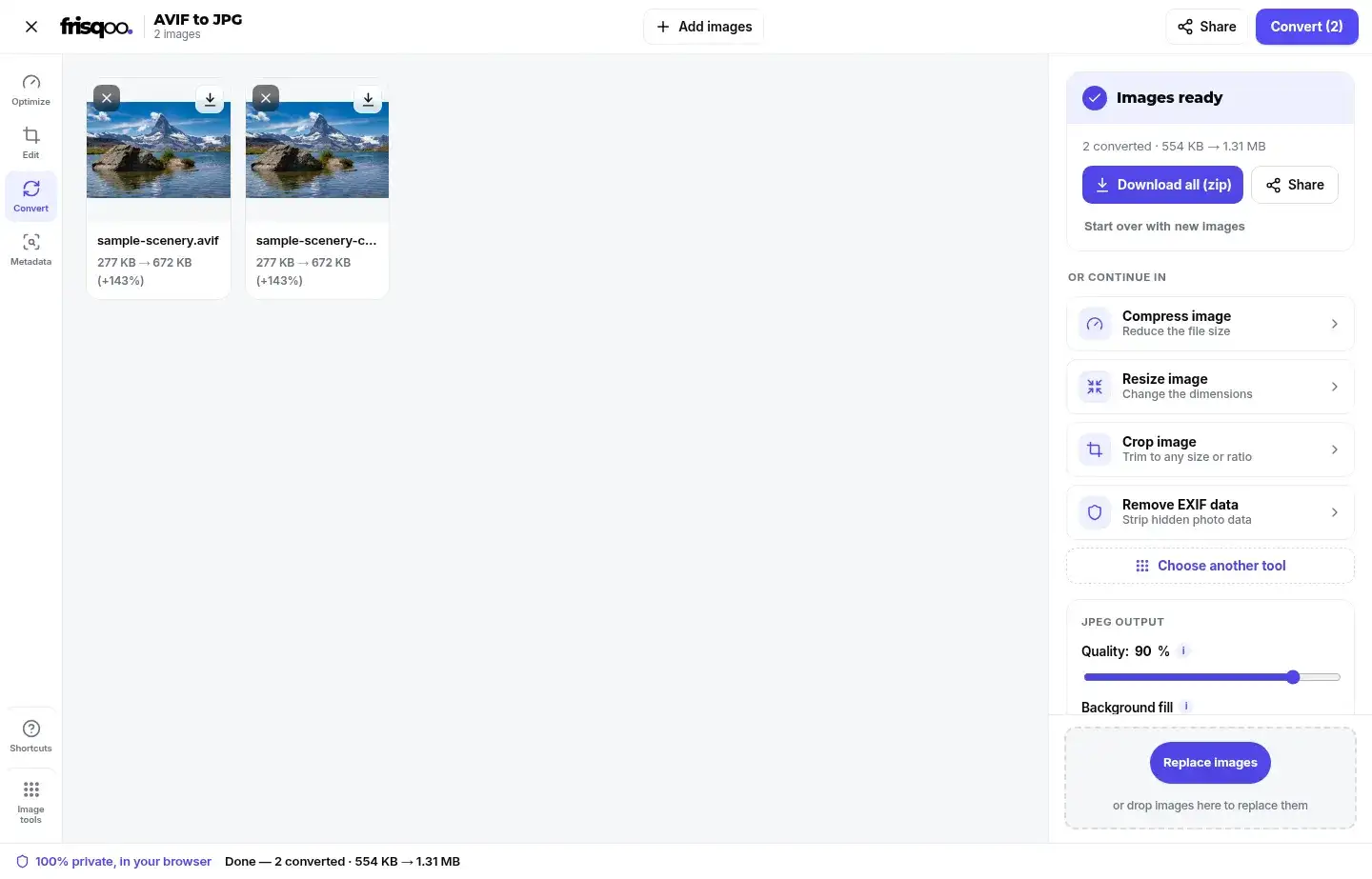
The test image was 1920 by 1280 pixels. It grew from about 277 KB as AVIF to about 672 KB as JPG at quality 90. That is one measured example, not a promised result for every image.
The result card shows the source and output sizes. Keep the AVIF when compact storage matters and the receiving app supports it. Use JPG when compatibility is the reason for the conversion.
Convert a batch of AVIF files to JPG
Add several AVIF images before opening the workspace. The main button shows the queue count, such as Convert (2). You can batch convert AVIF to JPG without repeating the setup for each file.
Every image uses the same quality and background settings. Split the job when product cut-outs need one fill and photos need another. Make a separate batch when detailed images need higher quality.
Each result keeps its base name and receives a `.jpg` extension. Download files separately from their cards, or choose Download all (zip). The batch archive is named frisqoo_avif-to-jpg.zip.
Large files use browser memory while they are decoded and encoded. Smaller groups are safer on older devices than one very large bulk job.
Check the finished JPG before using it
Open the download at full size. Check faces, text and smooth skies. Look closely at sharp edges. JPEG artefacts often appear first around letters, thin lines and sharp colour changes. Convert the source again at a higher quality if the result looks soft or blocky.
Check the filled background on logos and cut-outs. Also test the JPG in the form or app that requested it. A correct extension does not override that service's file-size or pixel-dimension rules.
Keep one untouched AVIF as the master. You may need another size or quality later. Make it from the source instead of converting the JPG again. Repeated JPEG saves can remove more detail.
Metadata in the new JPG
The converter rebuilds the image from decoded pixels. Camera details, GPS data, comments and other source data are not copied into the new JPG.
This behaviour can reduce hidden information in a shared copy. But it is not a backup method. Keep the source when capture details or editing history matter. Use the EXIF data viewer when you want to inspect supported metadata before sharing an image.
Colour handling is managed by the browser while it decodes and writes the pixels. Check key brand colours in the finished file. Do the same for print work. Other apps may show colour in a different way.
Browser support is required to read AVIF
The tool relies on the browser's own image decoder. Most new browsers can read AVIF. An old browser or an unusual file may fail. A file that cannot be decoded is skipped instead of being presented as a successful JPG.
Update the browser and try the original file again if this happens. Also check that the file is complete and really uses AVIF data. Changing a different file's extension to `.avif` does not make it a valid AVIF image.
The browser must also be able to write JPEG. The batch stops if JPEG output is not available. It shows a clear message and does not create another format.
Use AVIF to JPG on a phone
Open the page in a new mobile browser. Tap the drop area. Choose AVIF images from Files or another file picker. Set the quality and background, press Convert. Then use the browser download control to save the JPG or zip.
No app or account is required. The phone performs the conversion. So free memory affects how many large images can be processed together. Close unused apps or choose a smaller batch if the workspace slows down.
Your images stay in the browser
The AVIF is decoded and the JPG is encoded on your device. The tool does not send the image to a remote conversion service. This is useful for personal photos, draft artwork and document images.
The page code still has to load in the browser. Once the tool is open, the image work happens locally. Save the result to the right folder. Remove it from a shared device when local privacy also matters.
Common uses for AVIF to JPG
- Preparing an AVIF photo for a form that accepts JPG only.
- Opening a downloaded AVIF image in an older editor or office app.
- Creating a JPG copy for a document, slide deck or print service.
- Choosing a solid background for an AVIF with transparent pixels.
- Converting a folder of AVIF files and downloading one zip.
FAQs about AVIF to JPG
How do I convert AVIF to JPG?
Add one or more AVIF images, keep or change the JPEG quality and background fill. Then press Convert. Download each JPG on its own or save a batch as a zip.
Is this AVIF to JPG converter free?
Yes. There is no sign-up, watermark or daily quota. Browser memory is the practical limit because your device does the work.
Are my AVIF images uploaded?
No. Your browser reads the AVIF and creates the JPG on your device. The images are not sent to a conversion server.
Does AVIF to JPG reduce quality?
JPEG uses lossy compression. So the pixels are encoded again. The default quality is 90 percent, which suits many photos. Raise it for fine detail or lower it when a smaller delivery file matters more.
What happens to AVIF transparency?
JPG cannot store transparent pixels. The converter fills them with white by default, or you can choose black or a custom colour before conversion.
Does conversion change the image dimensions?
No. The JPG keeps the decoded width and height of the AVIF. Use the resize tool when you need different pixel dimensions.
Why can the JPG be larger than the AVIF?
AVIF often compresses photos more efficiently than JPEG. A high-quality JPG may therefore be larger even though both files show the same dimensions.
Can I convert several AVIF files together?
Yes. Every file in the batch uses the same quality and background settings. The Convert button shows the number of queued images.
What is the batch zip called?
When more than one result is ready, Download all creates frisqoo_avif-to-jpg.zip.
Can I convert AVIF to JPG on a phone?
Yes, if the mobile browser can decode AVIF. Use smaller batches on an older phone because large images need more working memory.
Why was an AVIF file skipped?
The browser may not have been able to decode that file, or the file may be damaged. Try a current browser and check that the source is a valid AVIF image.
Is source metadata copied to the JPG?
The converter rebuilds the image from decoded pixels. Camera details, GPS data and source comments are not copied as an archive of the original metadata.
Are JPG and JPEG the same format?
Yes. JPG is the common three-letter extension for JPEG. This tool writes the finished image with a .jpg extension.