

XML to JSON
Paste XML and read the JSON straight away. The conversion runs inside your browser, so nothing is uploaded. Attributes, nested elements and repeated tags are all handled properly, and values stay as text by default so a leading zero or a version number is never quietly changed.
100% private. Your XML is converted entirely in your browser and never uploaded.
Why convert XML with frisqoo
100% private
XML often holds invoices, records and credentials. Yours is converted in your browser and never uploaded.
Structure kept
Attributes, nested elements, repeated tags and namespace prefixes all survive the conversion.
No silent damage
Values stay text unless you ask, so leading zeros and versions like 1.10 are never mangled.
Read it or ship it
Indented JSON for checking by eye, minified for the smallest output.
No internet needed
Once this page has loaded, the conversion itself runs with no connection at all.
Any device
Runs in any modern browser on a phone, tablet or computer. Nothing to install.
How to convert XML to JSON
- Paste your XML into the left box, or tap Load sample to try it.
- Choose Indented or Minified, and decide whether numbers and true or false should become real JSON values.
- Tap Copy result or Download to save the JSON.
Everything runs on your device, so it is fast and your data stays private, even with no internet once the page has loaded.
Why convert XML to JSON?
XML is still everywhere that data moves between organisations. Invoices, bank feeds, government returns, sitemaps, publishing formats and the config of a lot of older software all use it. JSON is what almost every modern API, script and front end wants to read instead. So this is a small job that turns up all the time, and it is dull to do by hand.
The conversion is not quite mechanical, though, because XML can express things JSON cannot. An element can carry attributes and children at the same time, and it can repeat. Any converter has to make choices about that, and the useful thing is knowing exactly which choices it made.
How attributes and text become keys
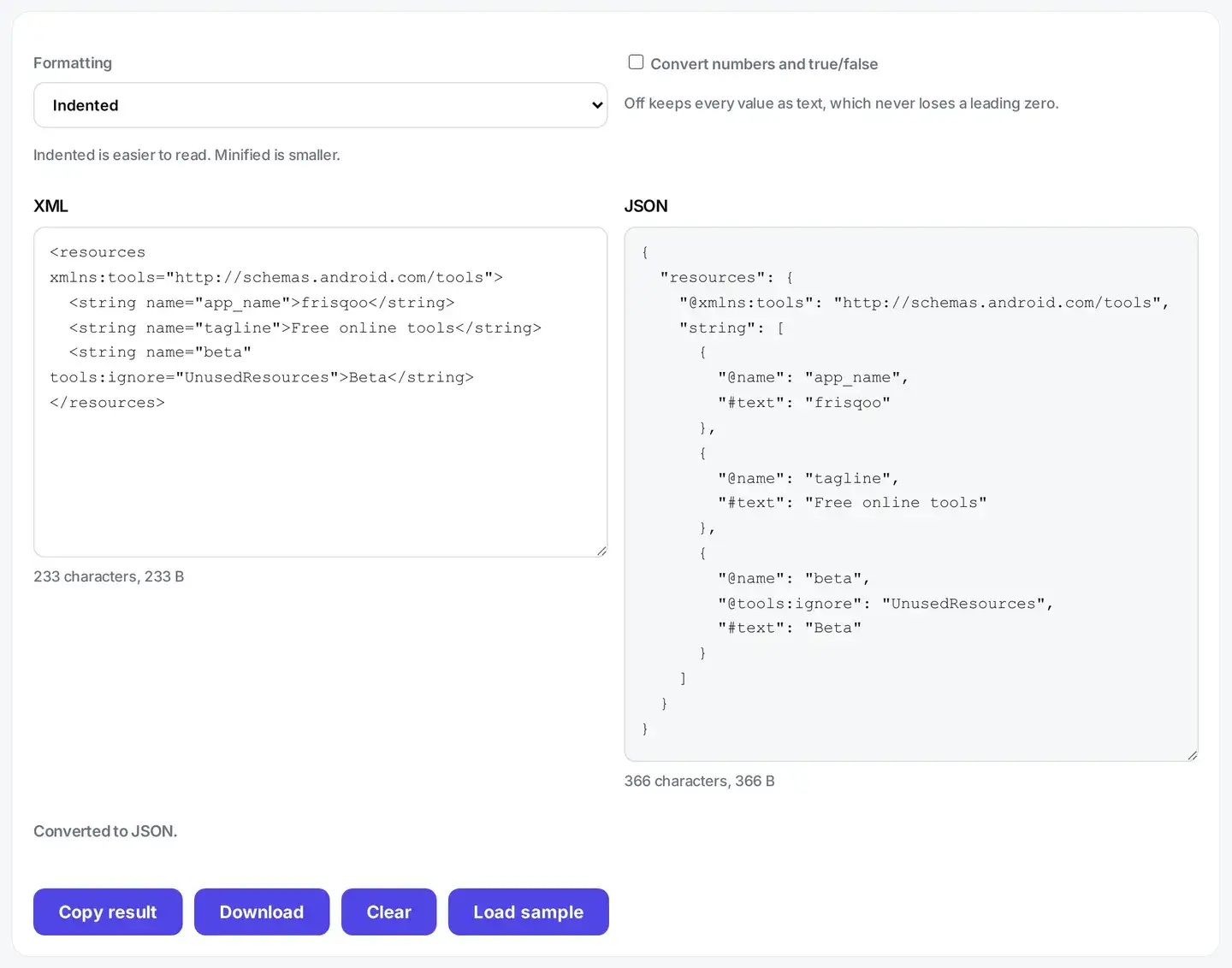
An attribute becomes a key with an @ in front of it. So an element written as a book with an id of 1 produces a key called @id next to the rest of its content. The prefix exists because XML happily allows an element to have an attribute and a child element with the same name, and JSON has no way to hold two keys called the same thing.
When an element holds text as well as child elements, the text is kept under a key called #text. It is never quietly dropped. When an element holds nothing but text and has no attributes, it becomes a plain string instead. Wrapping every simple value in an object would only make the output harder to read.
One limit is worth knowing. Text can sit on both sides of a child element. When it does, the pieces are joined into one #text value. Text written as Free <b>online</b> tools gives a b key of online and a #text of Free tools, joined by one space. Nothing is thrown away. The order is not kept, though, so the JSON no longer shows that online sat between the two words. For data documents that is fine. For prose with inline tags in it, it is not.
Why are numbers text unless you ask?
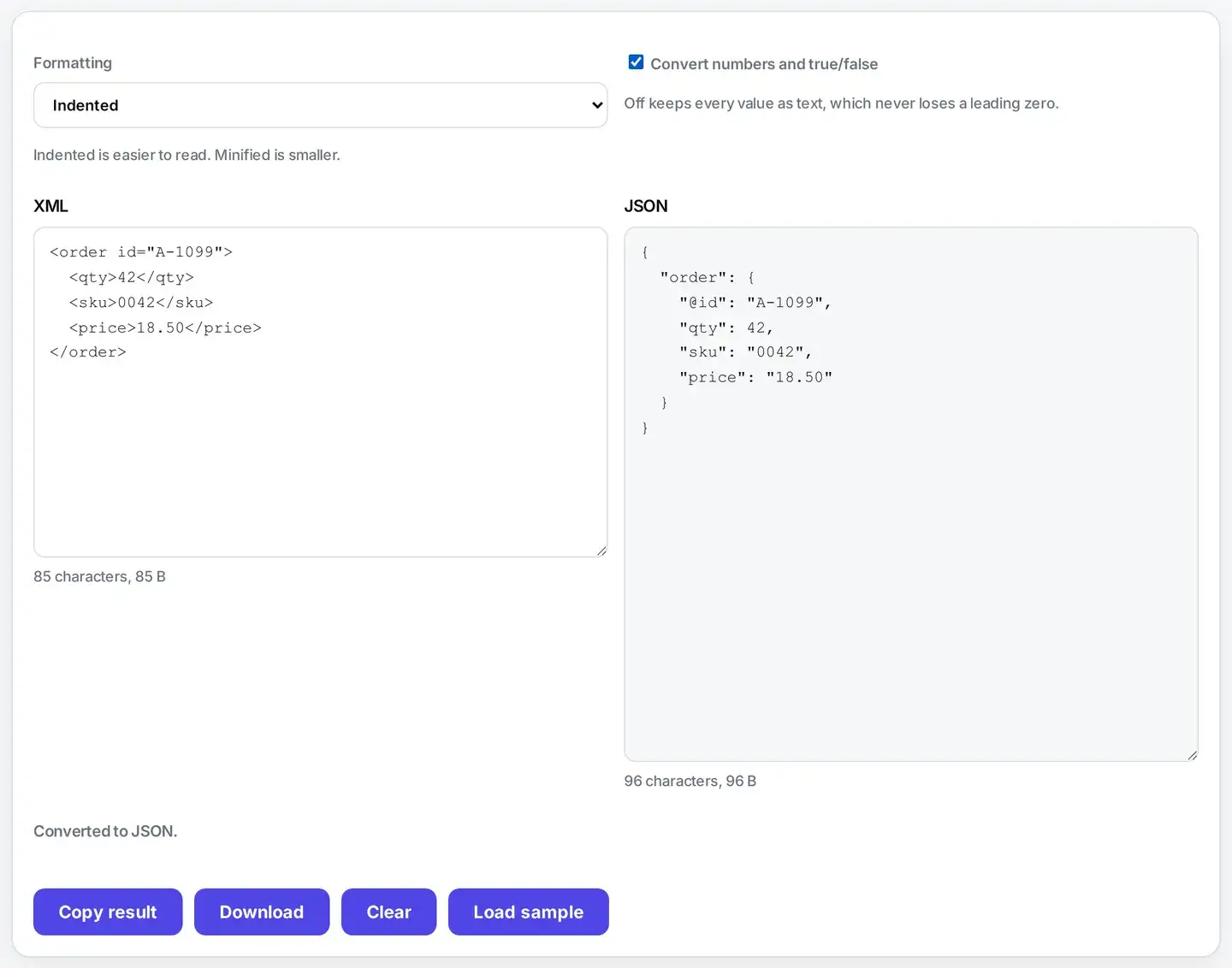
Because guessing here destroys real data. A postcode with a leading zero becomes a smaller number. A phone number loses its leading zero entirely. An order reference like 007 becomes 7. A version string like 1.10 becomes 1.1, which is a different version. Every one of those is a genuine bug that has shipped in production somewhere because a converter was helpful without being asked.
So the default is to leave every value exactly as the XML had it. When you know your values are truly numeric, tick the option. Numbers and true or false then become real JSON types. Even then a value is only converted if it survives the trip unchanged, so anything doubtful stays as text. In practice 42 becomes a number, while 0042, 18.50 and 1e3 all stay text, because turning any of those into a number and back would not give you the characters you started with.
What happens to repeated elements?
If the same element name appears more than once inside a parent, it becomes a JSON array. If it appears exactly once, it stays a single value. That is the honest reading of the document in front of it, since nothing in the XML itself says whether a list is involved.
It is worth knowing about. A file with three items and a file with one item produce slightly different shapes, so code that expects an array can trip over the single case. If you control the code that reads the JSON, the usual fix is to treat a single object as a list of one.
Why does my XML fail to convert?
Almost always because the document is not well-formed. A tag that was never closed, two root elements instead of one, a stray ampersand that should have been written as an entity, or a smart quote pasted in from a word processor. The parser reports the line and column where it gave up, which is usually a line or two after the real mistake.
A parse failure is reported rather than patched over. A converter that quietly repairs your document is a converter that quietly changes your data, and with an invoice or a bank feed that is much worse than being told to fix the source.
Is it safe to paste private XML here?
Yes, and it matters more here than for most tools. The XML people need to convert is rarely a toy document: it is a real invoice with real customer names, an export from a payroll system, a bank statement, or a config file with a live password in it. Many free converters post whatever you paste to their own server, which means all of that ends up in someone else’s logs.
This page parses and converts in your browser, so the document never leaves your device. For related work that runs the same way, see the developer tools, encode a value with Base64, or fix a link with the URL encoder.
FAQs about XML to JSON
Is my XML uploaded to a server?
No. The conversion runs inside your browser on your own device. XML often carries invoices, patient records, bank statements or config with credentials in it, and none of that leaves your machine here. Closing the tab leaves nothing behind.
How are XML attributes handled?
An attribute becomes a normal key with an @ in front of it, so an id attribute turns into a key called @id. That keeps attributes and child elements apart, because XML allows an element to have both an attribute and a child with the same name and JSON does not.
What happens to text inside an element that also has children?
The text is kept under a key called #text alongside the child keys, so nothing is silently thrown away. If an element only contains text and has no attributes, it collapses to a plain string instead, which is what you almost always want.
Why are numbers strings by default?
Because converting them can quietly destroy data. A postcode, a phone number, an order reference and a version like 1.10 all break the moment they are treated as numbers: leading zeros vanish and 1.10 becomes 1.1. Turn the option on when you know your values are genuinely numeric.
What happens to repeated elements?
When an element appears more than once inside the same parent, it becomes a JSON array automatically. When it appears exactly once it stays a single value, which is the honest reading of that XML but does mean a document with one item and a document with three produce slightly different shapes.
Does it validate my XML?
It parses your XML properly using the browser engine, so anything malformed is reported rather than guessed at, with the line and column of the problem. It does not check your document against a schema or a DTD, which is a different job.
What about namespaces and prefixes?
Prefixed names are kept exactly as written, so an element like inv:total becomes a key called inv:total. Nothing is stripped or rewritten, because dropping a prefix can silently merge two different fields that only differ by namespace.
Can it convert JSON back to XML?
Not on this page. The two formats do not map onto each other cleanly in both directions, and a round trip that quietly changes your data is worse than no round trip at all. This tool does one direction properly.
Is there a size limit?
Only what your own device can comfortably hold. Because the work happens in your browser rather than on a server, there is no upload limit and no queue. Very large documents are limited by your available memory, not by us.
Is it free?
Yes. No sign-up, no watermark, and no account. It works the same on phones, tablets and computers in any modern browser.