

EPUB to PDF
Convert one EPUB with a live PDF preview, or process several books as a batch. Spine documents stay in reading order while common text styles, lists, simple tables, and supported images are rebuilt for fixed PDF pages. Processing runs locally in your browser, and Frisqoo does not upload the source file for processing.
100% private. Your files are processed entirely in your browser and never uploaded.
Why convert EPUB to PDF with frisqoo
Local processing
Processing runs locally in your browser. Frisqoo does not upload source files for this task.
Spine order
Content documents follow the EPUB spine, including a cover document when the book lists one there.
Real text layer
Supported words are written as selectable, searchable PDF text.
Many languages
Latin, Chinese, Japanese, Korean, and Arabic, with right-to-left shaping for Arabic.
Single or bulk
Convert one book, or drop several and download each PDF, or all of them as a ZIP.
Free to use
No sign-up or watermark. Very large jobs depend on available device memory.
How to convert an EPUB to PDF
- Drop your
.epube-book onto the box, or browse for one. - The book is unzipped on your device and rebuilt as a flowing PDF, keeping the cover, reading order, styling, and images.
- Check the preview and click Download PDF, or continue in another tool.
Processing runs locally in your browser. Frisqoo does not upload the source file for processing. Offline use depends on the page and required assets loading first.
What you get when the PDF is ready
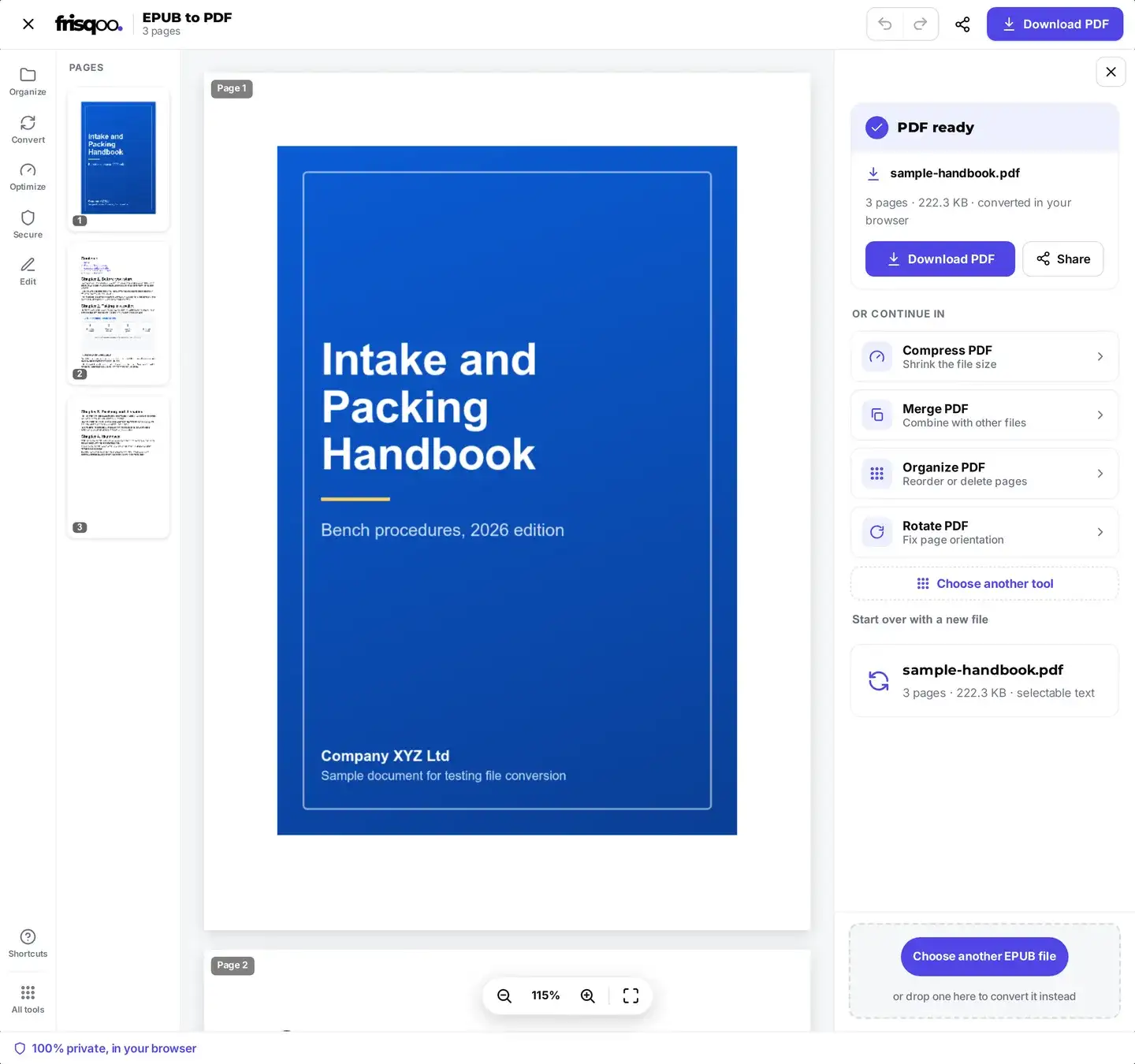
One book opens the full editor. The rebuilt PDF appears in the preview so you can turn pages and check the cover, the chapter starts, and any images before you save anything. Above it a short line confirms the file is ready and tells you its page count, its size, and that it was converted in your browser rather than on a server.
The PDF keeps the source base name, so my-novel.epub becomes my-novel.pdf. Use Download PDF to save it. When the browser supports file sharing, Share can pass the generated PDF to an available app or service.
Once it has saved, a short status line confirms the download by name, which is useful on a phone where the file goes straight into Downloads without asking. Start over with a new file clears the book and hands you an empty box for the next one.
The same panel can hand the finished PDF to the next tool without adding the file again. Compress PDF shrinks a picture-heavy book before you email it, Merge PDF joins several volumes into one file, and Organize pages drops the front matter you do not want to print.
Review the converted book before sharing
Use the single-file preview to inspect the parts most affected by reflow. Start with the cover and opening chapter, then move through chapter boundaries, long lists, tables, full-width images, captions, and pages containing accented or non-Latin text. Finish with the last spine document so missing or unreadable sections are easier to notice.
The result panel reports the generated page count and file size. It also displays a notice when the converter encounters unsupported image formats or characters that have no matching bundled font. These notices identify content that needs attention; they do not modify the source EPUB. Open the downloaded PDF in a reader and repeat the important checks before printing, publishing, or distributing it.
Hyperlinks, external stylesheets, fixed-layout coordinates, scripts, audio, and video are outside the current PDF renderer. If the EPUB depends on those features, keep the EPUB as the primary reading format or use an e-book application with the required layout and media support. The browser converter is intended for a readable, fixed-page copy of supported spine content.
How many pages will the PDF have?
An EPUB usually stores reflowable content. An e-reader calculates pages from its screen size, font, spacing, and user settings, while a PDF stores fixed page dimensions. The count in the generated PDF can therefore differ from the count shown by a reading app.
Frisqoo lays supported content onto fixed A4 pages with bundled fonts and its own wrapping rules. Longer sections use additional pages, and large images can consume substantial page space. Inline styles are interpreted where supported, while external stylesheets and fixed-layout positioning are outside the current renderer.
Review chapter starts, image placement, lists, tables, and the first and last pages before using the PDF. Font substitutions and unsupported layout rules can also change line lengths and pagination.
Convert several EPUB files at once
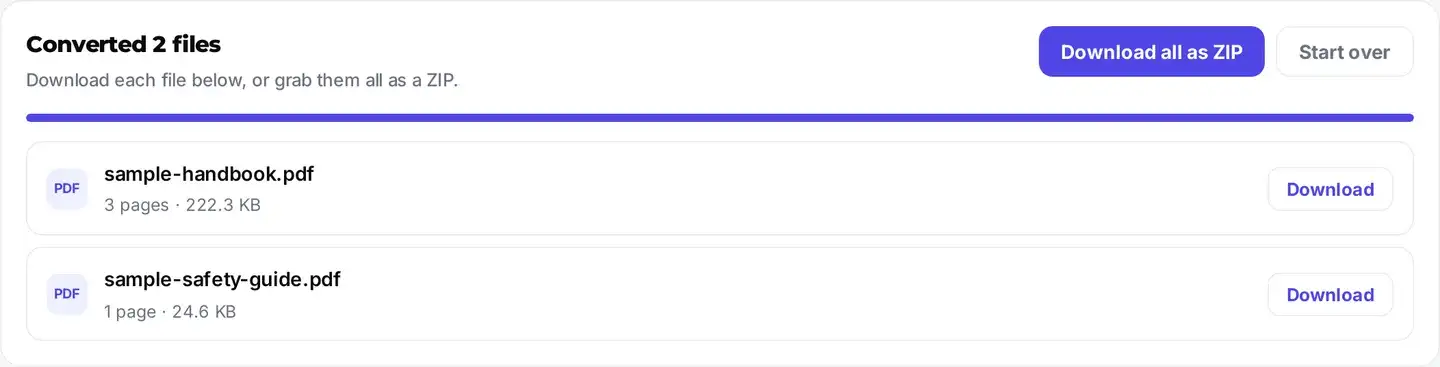
Need to convert a whole shelf? Drop more than one .epub file and frisqoo switches to bulk mode: every book is rebuilt as a PDF in turn, and each finished file gets its own download button. There is also a Download all as ZIP button to grab them together. Drop a single book and you get the full preview instead. Frisqoo does not upload the source file for processing, so your library stays on your device.
Bulk mode shows a results list instead of the page preview. Each row names the generated PDF and reports its page count and file size. Books are processed sequentially, but every conversion still uses browser memory; a large illustrated batch may work better as several smaller groups.
The ZIP is named after the tool rather than after any one book, so it lands in your downloads as a single tidy bundle you can unpack later. Downloading the files one at a time is worth it when you only wanted two books out of ten, since nothing is bundled until you ask for it.
Which EPUB files will work
The input must contain a readable EPUB package and spine. DRM markers on encrypted content documents or Adobe rights data cause the tool to report the book as locked. A DRM-free EPUB can still fail when its package is damaged or uses a feature outside the current reader.
- Books you wrote or exported yourself, from a word processor or publishing app.
- Free titles from public-domain libraries, which ship without DRM.
- DRM-free books from shops and authors that sell them that way.
- Manuals, reports, and course notes handed out as .epub files.
- Store-bought titles locked with DRM, which report themselves as protected.
- Library loans, which stay locked for the length of the loan.
The original reading app or store account can confirm whether a title includes DRM. This converter does not remove access controls.
If a book will not convert
Check the file type, access restrictions, and package structure when conversion stops.
- The file ends in .acsm. Open it with its compatible reading app to obtain the title. Continue here only when the resulting file is a DRM-free EPUB.
- The EPUB is protected. The tool reports detected DRM and stops before building a PDF. Access controls are outside this converter’s scope.
- The package is invalid or damaged. The converter needs the EPUB package document and its referenced spine files. Changing a filename extension does not create that structure.
If the book is genuinely a DRM-free .epub and still refuses, try it on a computer rather than a phone. A very large illustrated book needs more memory than a phone browser can spare.
Local conversion without a source-file upload
EPUB conversion runs locally in your browser. Frisqoo does not upload the source book for processing, add a watermark, or require a sign-up. Keep the tab open until the PDF or batch ZIP finishes downloading.
- Your book is processed locally and is not uploaded to Frisqoo.
- Conversion can continue after the page, application code, and required fonts have loaded.
- No watermark or sign-up. Practical job size depends on browser memory.
Choose the workflow for the book
This browser converter is designed for a direct EPUB-to-PDF result with fixed A4 pages and no layout controls. It works well when spine order, readable text, supported images, and a quick preview are the main requirements.
- Use the single-file preview when chapter flow and image placement need review before download.
- Use batch mode when several books can share the same automatic A4 layout.
- Use a desktop publishing or e-book application when exact typography, custom margins, fixed-layout positioning, media, or detailed stylesheet control is required.
Processing remains local in this tool, and Frisqoo does not upload the source EPUB for conversion.
EPUB features in the PDF
An EPUB is really a small zip of styled web pages, so frisqoo rebuilds those pages as a real PDF in the book's own reading order. The full breakdown:
- Readable spine documents in their declared order, including a cover document when listed there.
- Headings, bold, italic, underline, font sizes, colour, and alignment.
- Nested lists and bordered tables.
- Inline PNG and JPEG images, including cover art wrapped in SVG.
- Currency symbols plus Chinese, Japanese, Korean, and Arabic text.
- Selectable, searchable text using bundled fonts supplied under their stated licenses.
- Detected DRM-protected content; the converter reports the lock and stops.
- Fixed e-reader page breaks: a reflowable book becomes one clean, flowing PDF instead.
- GIF, WebP, and decorative SVG vector images, which the current renderer skips.
- External fonts and stylesheets, fixed-layout positioning, JavaScript, audio, and video.
Is the text real, selectable text?
Yes. Supported words are written into the PDF as a text layer, so they can be searched, selected, and copied in a PDF reader. Embedded artwork remains image content. If you later need the text in a separate file, PDF to text can read the generated text layer.
Browser and device support
A current desktop or mobile browser can run the converter without a separate app. On a computer, drag the EPUB into the drop area. On a phone or tablet, use the file picker and save or share the generated PDF through the options offered by the browser and operating system.
Available memory and processing speed vary by device. Large books, high-resolution images, and multi-book batches may work better on a computer or as smaller groups. Keep the page open while the EPUB is unpacked, rendered, and downloaded.
FAQs about EPUB to PDF
Is my EPUB uploaded for conversion?
No. Processing runs locally in your browser. Frisqoo does not upload the source file for processing. Keep the page open until the PDF or ZIP has finished downloading.
Can I convert several EPUB files at once?
Yes. Drop more than one .epub file and each one is converted in turn, right on your device. You get a separate download button for every finished PDF, plus a Download all as ZIP button to grab them together. Drop a single book and you get the full preview instead. Either way, Frisqoo does not upload the source file for processing.
What is kept from the book?
Spine documents are processed in reading order. The converter rebuilds common headings, inline text styles, colours, alignment, lists, simple bordered tables, and embedded PNG or JPEG images. A cover document is included when it appears in the spine, and raster cover art wrapped by SVG can be extracted.
Why can the PDF page count differ from my e-reader?
EPUB content reflows to the reader’s screen, font, and settings. Frisqoo creates fixed A4 PDF pages with its bundled fonts and layout rules, so line lengths and page breaks can differ while the spine order stays the same.
Can it open DRM-protected books?
No. When the EPUB package marks content documents as encrypted or includes Adobe rights data, the tool reports that the book is locked. Use a DRM-free EPUB that you created, exported, or obtained with permission.
Can an ACSM file be converted here?
The input must be an EPUB. An ACSM file is a license or download record used by a compatible reading app to obtain the book. Open the ACSM in that app first, then use this tool only if you receive a DRM-free EPUB.
Which images are embedded?
PNG and JPEG files stored inside the EPUB can be embedded. Raster cover art referenced inside an SVG wrapper can also be recovered. The current converter skips GIF, WebP, decorative SVG vectors, and external images, then shows a notice when unsupported image content was found.
Can it handle other languages?
Yes. Latin and European accented text work out of the box, and Chinese, Japanese, Korean, and Arabic use a matching open-license font loaded only for that book. Arabic is shaped and joined. Bold and italic apply to Latin text; some scripts use a single regular weight.
Is the text in the PDF selectable?
Yes. Supported text is written as a PDF text layer, so it can be searched, selected, and copied in a PDF reader. Image content remains raster content.
Can I use the bundled fonts commercially?
The bundled fonts are supplied under the SIL Open Font License or Bitstream Vera license, and the full license texts ship with the site. Use them in line with the applicable license terms.
Is there a file size or page limit?
The tool does not add a watermark or show a page limit. Practical limits depend on the number of spine documents, images, and the memory available to your browser and device.
Does it work offline?
Conversion can continue after the page and its required fonts and application assets have loaded. Reloading the tool may require a connection again.
Is the EPUB to PDF converter free?
Yes. There is no sign-up or watermark. Current desktop and mobile browsers can run the tool, while conversion time and practical job size depend on the device.