

Recover PDF Password
Forgot a PDF password? Test common passwords or rebuild a known document password from details you already know. Recovery runs in your browser, and a successful match downloads an unlocked copy. Strong, random passwords cannot be recovered.
100% private. Your files are processed entirely in your browser and never uploaded.
Why recover a PDF password with frisqoo
Local password tests
The PDF, your details, and every candidate stay in the browser. No recovery server receives them.
Automatic search
The default mode checks common passwords, short numbers, recent years, and popular PINs in likely order.
Document patterns
Guided modes rebuild likely passwords for Aadhaar, income-tax documents, bank statements, and card statements.
Password shown
A successful match appears in the details panel so you know which password opened the file.
Unlocked copy
The recovered PDF downloads with -unlocked added to its original filename.
Permission check
Recovery stays disabled until you confirm that you own the document or have permission to access it.
How to recover a PDF password
- Choose the locked PDF, or drop it onto the box above.
- Confirm that you may access it, then select a document type and enter any useful details.
- Select Recover password. Save the unlocked copy if a candidate opens the file.
Start with Automatic when you do not know how the password was made. Choose a guided type when the sender used a document rule you recognise.
Start with the locked PDF
Choose one PDF at a time. The tool first checks what kind of protection is present. A file that needs a password moves into the recovery workspace. A PDF that already opens is handled differently because there is no open password to find.
The original stays on your device. Selecting a file gives the browser a local copy to read for the current session. The page does not send the PDF to a remote password service, and the recovery engine does not need an account.
To recover a password from a PDF, the correct candidate must still be found. Free PDF password recovery here means testing a limited set in the browser, with no software to install. If you forgot a PDF password that is strong and random, a local search cannot turn unknown encryption into readable pages.

How does automatic password recovery work?
Automatic recovery tests a bounded list of weak and common passwords on your device. It starts with candidates people often use, including common words and short numbers. It also covers likely years and popular four-digit PIN patterns.
The Name and Date of birth fields are optional in Automatic mode. Add them when the password may use part of your name or a date. Those details create extra document-style candidates and place useful patterns ahead of the generic list.
Candidate order matters because a browser should not waste time on random guesses. The tool checks more likely values first and keeps the search limited. It does not promise to brute-force every possible password, and it does not claim to break PDF encryption.
Use Automatic when you remember little about the password or when you may have chosen a simple password yourself. If the PDF came from a government portal, bank, or card issuer, the matching guided mode is usually a better starting point.
Formats you can recover
- Automatic: common and weak passwords, short numbers, years, and PIN patterns, with optional name and birth date details.
- Aadhaar: the first four letters of the printed name in capitals followed by the four-digit birth year.
- Income tax: PAN followed by the date of birth in DDMMYYYY order for supported ITR-V, Form 26AS, and AIS files.
- Bank or card statement: common combinations of the account name, birth date, and optional last four account or card digits.
- Custom details: combinations built from a remembered name, date, PIN, number, or word.
- Common passwords: a focused list of frequently used passwords, recent years, and popular PINs.
- Strong or unknown passwords: random passwords outside the tested candidates cannot be recovered.
Choose the recovery method
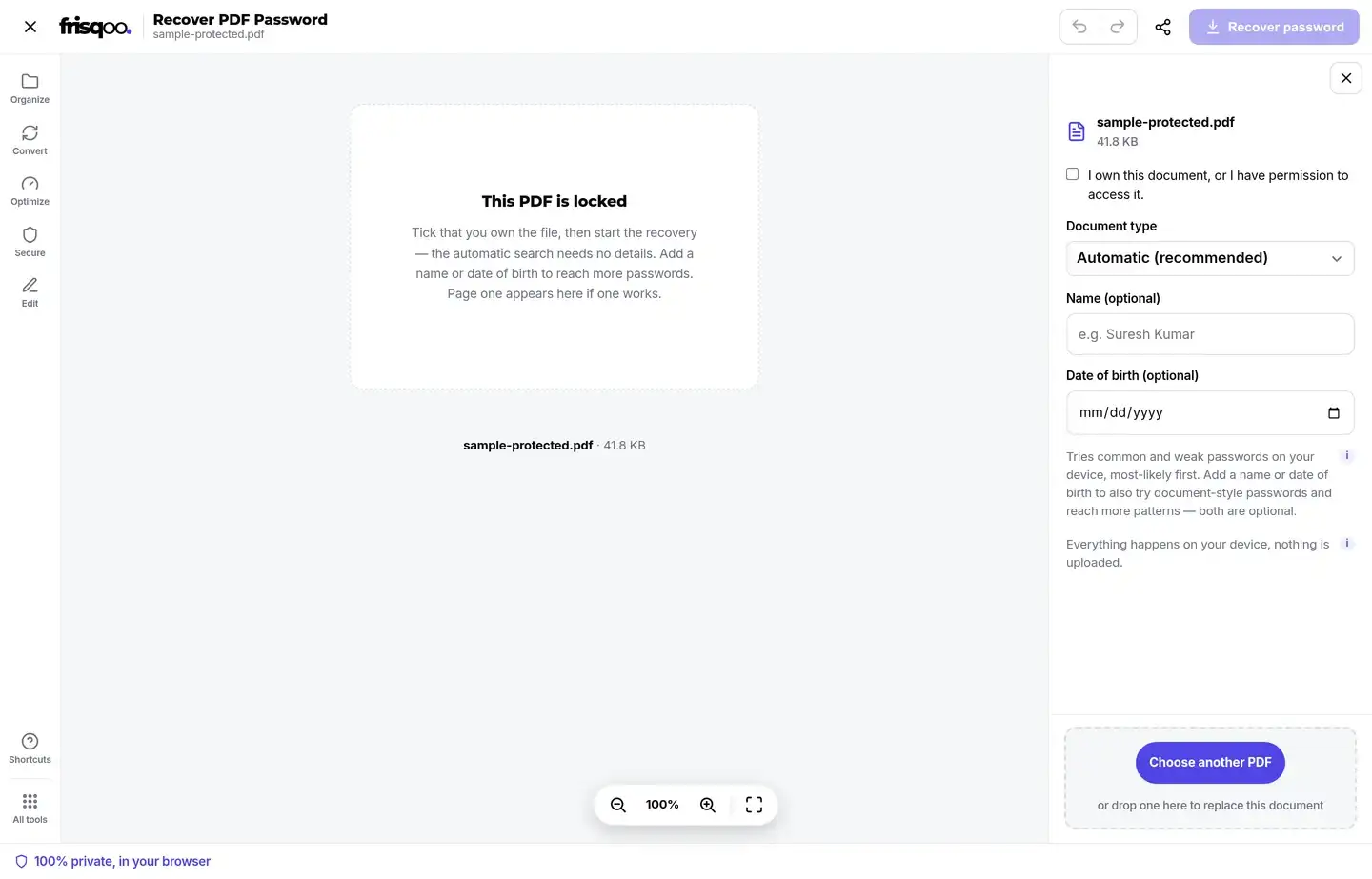
The workspace opens with Automatic (recommended) selected. Before recovery can run, tick I own this document, or I have permission to access it. The main Recover password button then becomes available when the selected mode has enough information.
Aadhaar asks for the name as printed and the year of birth. Income tax asks for PAN and date of birth. Bank or card statement asks for the account name, date of birth, and optional last four digits. Custom accepts whatever pieces you remember. Common passwords needs no personal details.
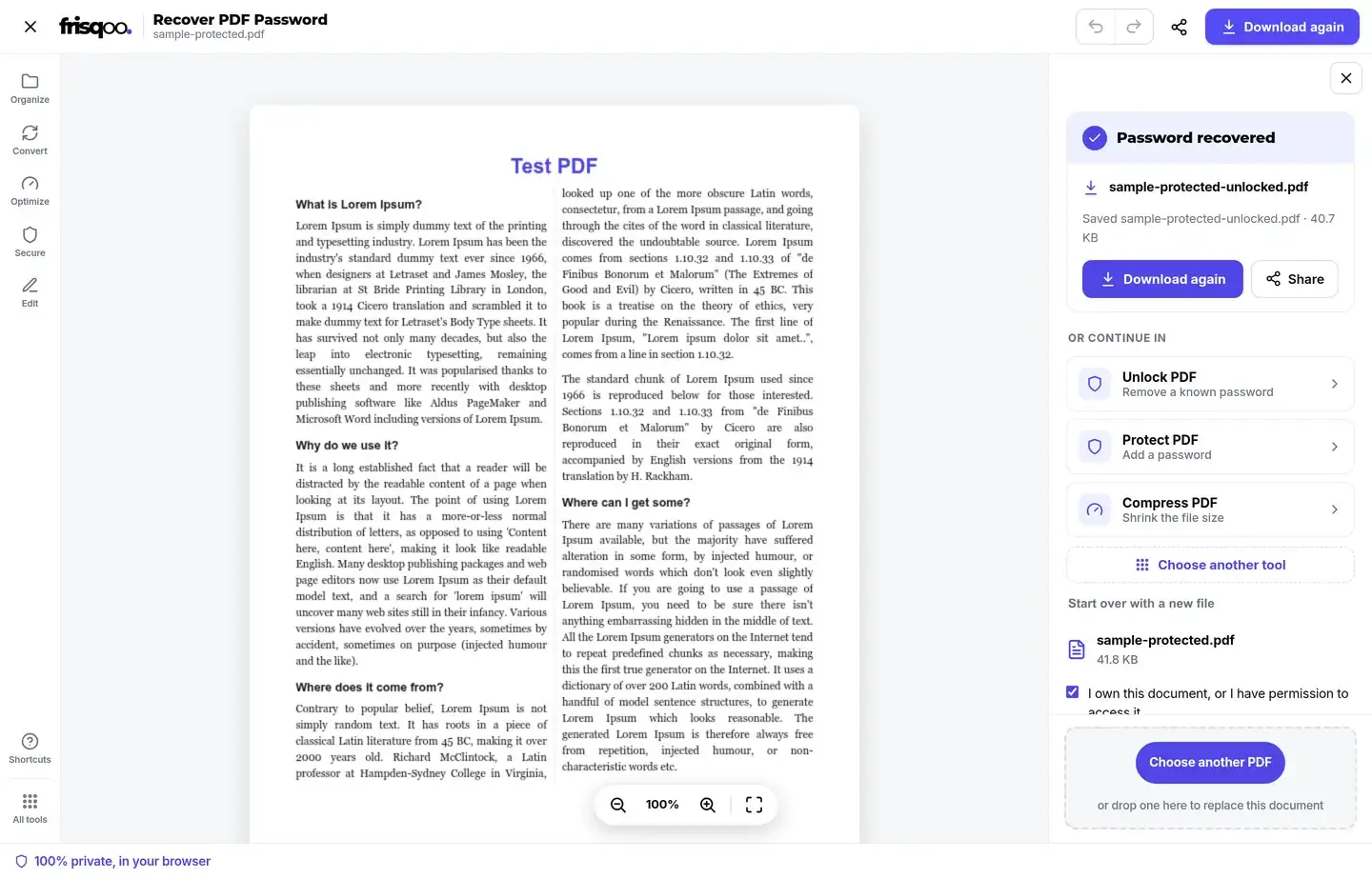
The centre of the workspace says that the PDF is locked while the form appears on the right. A successful password replaces that locked placeholder with page one, so there is a visible check that the file can now be read.
How to enter details without guessing
Use the exact details that the document issuer knew when it created the PDF. For an Aadhaar file, enter the printed name rather than a nickname. For an income-tax file, use the PAN and birth date tied to that record. For a bank statement, start with the account holder name and the date of birth held by the bank.
Capital letters and date order can change a password. The guided modes handle the expected case and date layout for their supported patterns. They also remove spaces where the format calls for a compact value. You do not need to type every final password yourself.
The optional last four digits in Bank or card statement can come from the account or card, depending on the issuer. If one set does not fit the statement instructions, review the original email or download page before testing another. Do not enter a full account number when the form asks only for four digits.
Custom mode helps when you remember the ingredients but not their order. Add a name, birth date, PIN, number, or word that may have been used. The tool combines those inputs into common arrangements and tests the resulting candidates. It does not send the values elsewhere or save them as a password list.
Correct inputs narrow the job and make a useful match more likely. Extra details that were never part of the password can create irrelevant candidates, so begin with the document instructions and add only what applies.
What happens when a password is found?
The result panel reports Password found and displays the matching password. The tool then passes that one password to the local PDF decryption step and writes a new copy without the open password.
The output keeps the base of the input filename and adds -unlocked.pdf. For example, statement.pdf becomes statement-unlocked.pdf. The first download starts after recovery, and Download again remains available in the completed view.
The original locked PDF is not overwritten. Keep it if you want the protected source, and store the unlocked copy with care because anyone who receives that new file can open it without the recovered password.
What if no likely password works?
A no-match result means none of the tested candidates opened the file. Change the selected document type or correct the details before trying again. A miss can come from a different issuer pattern, a spelling difference in the name, a wrong date, or digits taken from the wrong account or card.
Do not treat a long search as proof that the PDF is damaged. Password recovery and PDF repair solve different problems. Recovery needs the correct open password. Repair deals with broken PDF structure after a file can be read.
A strong, random password may be impossible to recover with this tool. The practical options are to check a password manager, find the original message, download the document again, or ask the sender how its password was formed.
The running search includes a Stop button. Stop it when you notice wrong details or want to switch methods. The form stays available so you can change the inputs and start another bounded search.
Open passwords and permission restrictions
An open password is required before the pages can be read. Recover PDF Password is for that locked state. The tool tests each candidate by asking the PDF reader whether the document can open with it.
An owner password is different. Some PDFs open normally but restrict printing or copying. When a file opens without a password, this page reports that there is nothing to recover. Use Unlock PDF for a file that opens but carries those restrictions.
A plain PDF also has no password to recover. The initial inspection reports that state instead of running pointless guesses. Those checks keep password recovery focused on files that genuinely need an open password.
Is online PDF password recovery private?
Recovery is private here because the work runs inside the browser. The PDF bytes, personal details, password candidates, and recovered password are used locally. No file upload or server-side cracking job is part of the flow.
Local processing matters for identity documents, tax records, and financial statements. Those files may contain addresses, account details, tax identifiers, or transaction history. Keeping the job in the browser avoids giving a second service a copy merely to test a password.
Browser-local does not remove the need for care. Use a device you trust, close the tab when finished, and protect the unlocked output. The new copy no longer has the open password that protected the source.
Recovery is not password removal
Recover PDF Password helps when the open password has been forgotten and may be weak or built from known details. Unlock PDF is for a password you already know, or for supported restrictions on a file that opens. Protect PDF adds a new password.
Keeping those jobs separate avoids a misleading promise. A remover cannot decrypt a locked file without the correct open password. Recovery first has to find a candidate that the PDF accepts. Only then can the tool create the unlocked copy.
Choose the page that matches the state of the document. Use recovery when the password is missing, unlock when the password is known, and protect when the goal is to add encryption to a readable PDF.
FAQs about Recover PDF Password
What can I do if I forgot my PDF password?
Try Automatic first. It tests a bounded list of common and weak passwords in likely order. If the password came from personal details, choose the matching document type and enter the details used to build it.
Can this recover every PDF password?
No. It can find a weak or common password, or rebuild one made from details you know. It cannot discover a strong, random, or otherwise unknown password.
How do I recover an Aadhaar PDF password?
Choose Aadhaar, enter the name printed on the document and the birth year, then run the recovery. The tool tests the documented pattern of the first four letters of the name in capitals followed by the year.
Can it recover an income-tax PDF password?
Yes, when the file follows the supported ITR-V, Form 26AS, or AIS pattern. Choose Income tax, enter the PAN and date of birth, and the tool tests PAN plus the birth date in DDMMYYYY order.
Can it recover a bank-statement password?
It can test common statement patterns built from the account name, date of birth, and optional last four account or card digits. Bank rules vary, so a match is possible but not guaranteed.
Is my PDF or password uploaded?
No. The file, the details you enter, each password test, and the recovered password stay in the browser. Nothing is sent to a recovery server.
What file downloads after recovery?
A successful run downloads a decrypted copy. If the input is named report.pdf, the output is report-unlocked.pdf. The result panel also offers Download again.
What if the PDF opens but printing is blocked?
The tool reports that the file has restrictions rather than an open password. Use Unlock PDF for a file that already opens but limits printing or copying.
Will recovery change the PDF pages?
The successful password is passed to the decryption step, and the tool writes a copy without the password. The verified flow renders page one from that unlocked copy and leaves the original file in place.
Is PDF password recovery legal?
Use it only for a document you own or are allowed to access. The interface requires that confirmation before the Recover password button becomes available.