

CSV to PDF
Turn one CSV spreadsheet, or a whole batch, into clean, selectable PDF tables. Columns size themselves to fit the page, the header row is detected after any short title or date lines, and numbers line up on the right. Choose the page size, orientation, and text size, preview it live, and download. Everything runs inside your browser, Frisqoo does not upload the source file for processing, and there is no watermark.
100% private. Your files are processed entirely in your browser and never uploaded.
Why convert CSV to PDF with frisqoo
Local processing
Processing runs locally in your browser. Frisqoo does not upload source files for this task.
Clean tables
Short title lines stay above the table, the real header is detected, and number columns line up on the right.
Layout options
Pick A4, Letter, or Legal, portrait or landscape, and a compact, normal, or comfortable text size.
Many languages
Latin, Chinese, Japanese, Korean, and Arabic, with right-to-left shaping for Arabic.
Single or bulk
Convert one CSV in the editor, or drop several and download each PDF, or all of them as a ZIP.
Free to use
No sign-up or watermark. Very large jobs depend on available device memory.
How to convert a CSV file to PDF
- Drop your
.csvfile onto the box, or browse for one. - The data is parsed in your browser, with short preamble lines preserved and the real header row detected.
- Check the preview, adjust the layout if you like, and click Download PDF.
Everything runs on your device, so the export is fast and your data stays private, even with no internet once the page has loaded.

What you get when the PDF is ready
As soon as the file is read, the table appears in the preview and the panel names the new PDF, counts its pages, and gives the size. The PDF keeps the base name of your spreadsheet, so invoices.csv is saved as invoices.pdf. Press Download PDF to save it, and if the file needs another step the same panel hands it to Compress PDF, Merge PDF, Organize pages, or Rotate PDF without adding it again. Nothing is sent anywhere at any point, so a customer list or a finance export stays on your own machine.
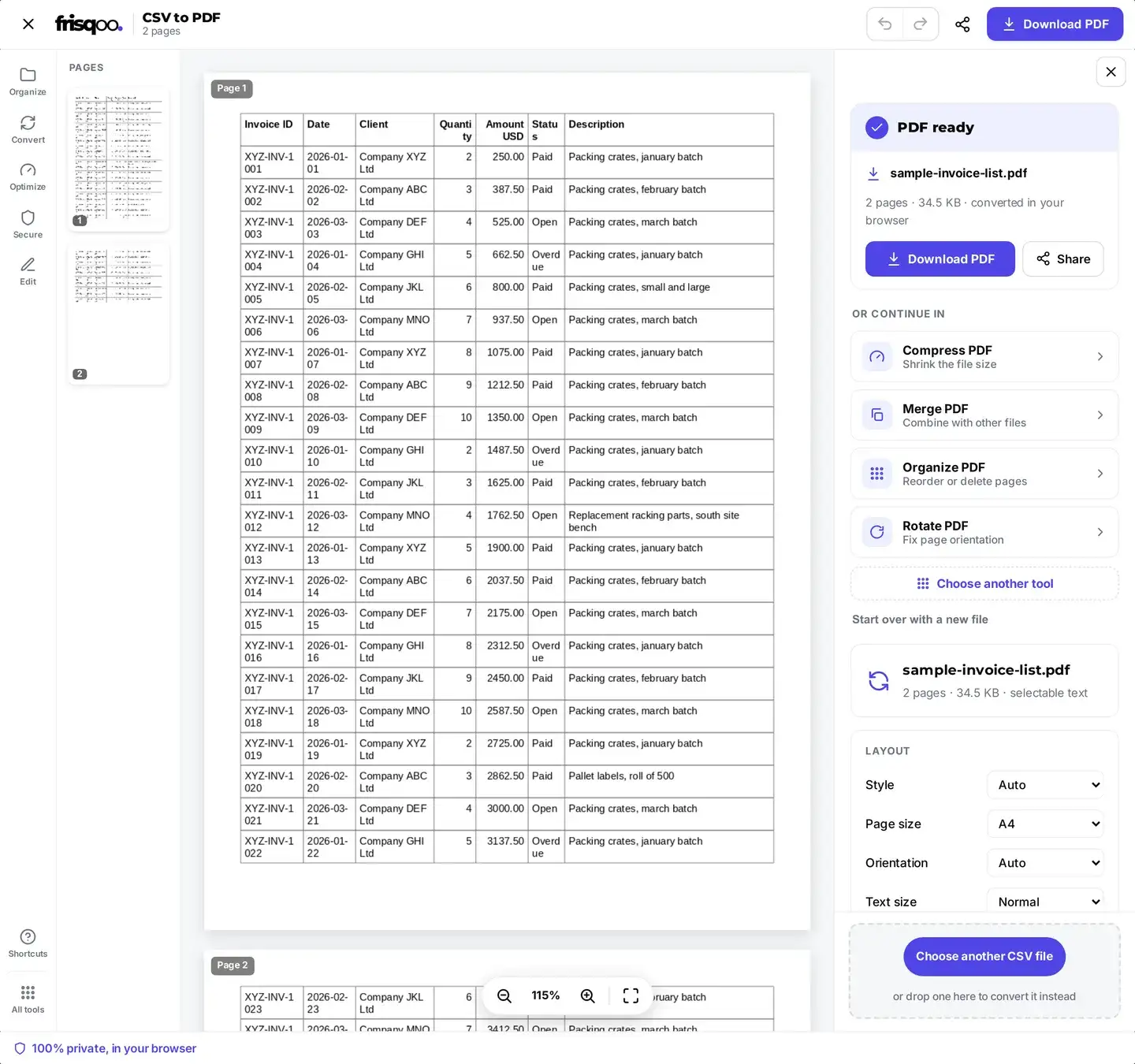
Choose a layout that fits your columns
Four controls decide how the table sits on the page, and the preview redraws as you change them.
- Style: leave it on Auto, force a bordered Table, or pick List to stack each row as a label and value block, which suits a file with only two or three columns.
- Page size: A4, Letter, or Legal. Legal buys extra height for a long table without shrinking the text.
- Orientation: Auto, Portrait, or Landscape. Switch to Landscape when a wide export starts squeezing its columns.
- Text size: Compact, Normal, or Comfortable. Compact fits more columns across the page, Comfortable is easier to read on paper.
If a column looks cramped, try Landscape first and Compact second. Anything past roughly seven or eight columns reads better in Landscape, because every column is sized from its own content and the widest ones take the room they need.
Convert several CSV files at once
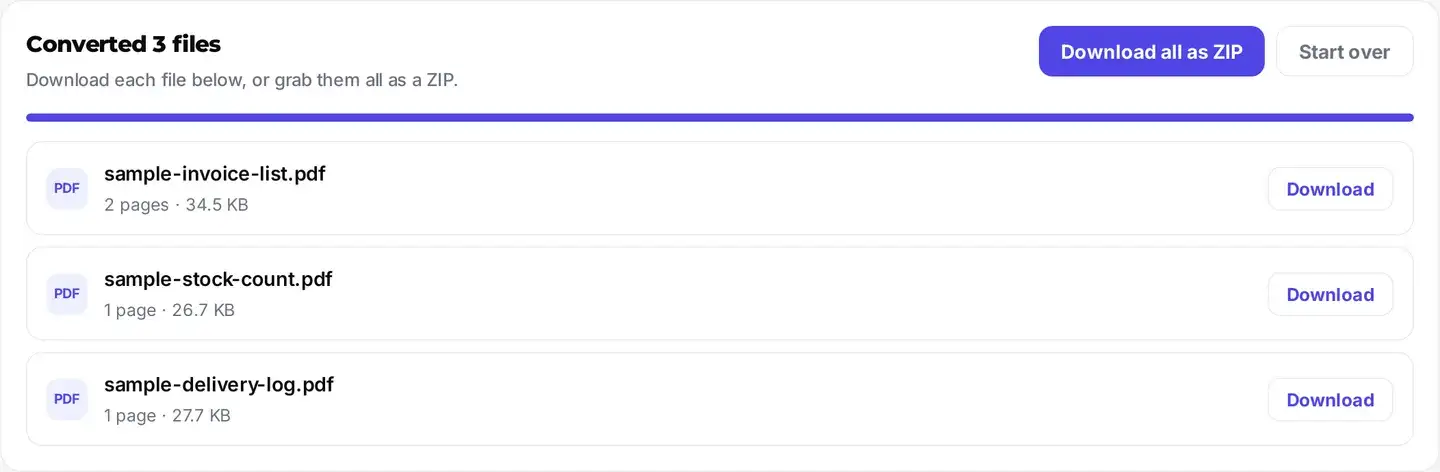
Need to convert a whole batch? Drop more than one .csv file and frisqoo switches to bulk mode: every file is converted in turn, right on your device, and each finished PDF gets its own download button. There is also a Download all as ZIP button so you can grab the lot in one click. Drop a single file and you get the full editor with a live preview and layout options instead. Frisqoo does not upload the source files in either mode.
The heading above the list tells you how many files finished, such as Converted 3 files, and every row shows that file’s page count and size beside its own Download button. Bulk mode uses the standard layout rather than the four controls, so when a particular export needs Landscape or a compact text size, convert that one on its own.
Free with local processing
CSV conversion runs locally in your browser. Frisqoo does not upload the source data, add a watermark, or require a sign-up. The parser reads the rows, detects the delimiter and header, and builds the preview in the current tab. You can check the table before downloading, then adjust the page size, orientation, or text size and rebuild it without an upload queue.
The downloaded PDF is a separate output file, so the original CSV remains unchanged. Keep the source and result according to your own storage and sharing requirements, especially when a spreadsheet contains customer, financial, or internal business data.
- Your CSV is processed locally and is not uploaded to Frisqoo.
- No upload and no queue, so the work starts the moment the file opens, and it works offline.
- No watermark, no sign-up, and no row limit.
How the table is built
The full breakdown:
- Short title or date lines are kept above the table, and the next populated row becomes the bold header.
- Each column is sized from its own content, so wide columns get more room.
- Columns that hold mostly numbers are aligned to the right.
- Long cell text wraps onto more lines instead of being cut off.
- Tall tables flow onto more pages automatically.
- Commas, semicolons, and tabs are detected automatically.
- Quoted fields, and commas or line breaks inside a field, are handled.
- Selectable, searchable text with embedded fonts, including CJK and Arabic.
Leave First row is a header selected for normal exports. If the CSV has no column names, clear it so the first data record is not styled as a heading. In Auto style, sheets that cannot stay readable as a grid switch to a record list with one labelled block per row. Table and List let you override that choice.
Is the text real, selectable text?
Yes. The values are written into the PDF as a genuine text layer rather than a flat image, so the finished file can be searched with Ctrl+F, selected, copied, and read by screen readers. If you later need the values back out, PDF to text reads that same layer.
Does it work on my phone?
Yes. This tool works in current desktop and mobile browsers on iPhone, Android, tablets, and computers, with nothing to install. Add your CSV, watch the preview, tap Download PDF, and the file saves straight to your device.
FAQs about CSV to PDF
Is my CSV file uploaded anywhere?
No. The whole conversion happens inside your browser on your own device. Your data never leaves your computer, which makes this safe for private exports, reports, and customer lists. Close the tab and nothing is left behind.
Can I convert several CSV files at once?
Yes. Drop more than one .csv file and each one is converted in turn, right on your device. You get a separate download button for every finished PDF, plus a Download all as ZIP button to grab them together. Drop a single file and you get the full editor with a live preview and layout options instead. Either way, Frisqoo does not upload the source file for processing.
How is the table laid out?
Short report-title or date lines are kept above the table, then the first row with enough populated columns becomes the bold header. Every column is sized from its content, number columns align to the right, long cells wrap, and tall tables flow onto more pages. Choose A4, Letter, or Legal, switch orientation, and set a compact, normal, or comfortable text size.
Which delimiters are supported?
Commas, semicolons, and tabs are detected automatically, so files exported from any spreadsheet or region usually just work. Quoted fields, commas and line breaks inside a field, and doubled quotes are all handled, following the common CSV rules.
Can it handle other languages?
Yes. Latin and European accented text work out of the box, and Chinese, Japanese, Korean, and Arabic use a matching open-license font loaded only for that document. Arabic is shaped and joined.
Is the text in the PDF selectable?
Yes. Every value is written as a genuine text layer, so the PDF can be searched, selected, and copied in any reader, and read by screen readers.
Can I use the bundled fonts commercially?
The bundled fonts are supplied under the SIL Open Font License or Bitstream Vera license, and the full license texts ship with the site. Use them in line with the applicable license terms.
Is there a file size or row limit?
There is no fixed cap and no watermark. Because everything runs in your browser, a very large spreadsheet simply uses more of your device’s memory.
Does it work offline?
Yes, once the page has loaded. The PDF is built on your device, not on a server, so you can turn off your internet and it still works.
Is it really free?
Yes. No sign-up, no watermark, and no row limit. It works the same on phones, tablets, and computers in current desktop and mobile browsers.