

Repair PDF
Try to recover a PDF with damaged internal structure. Frisqoo first attempts a structural repair, then rebuilds readable pages only when needed. The report shows what the run recovered. Processing stays in your browser, and Frisqoo does not upload the source file for processing.
100% private. Your files are processed entirely in your browser and never uploaded.
Why repair your PDF with frisqoo
Local processing
Processing runs locally in your browser. Frisqoo does not upload source files for this task.
Progressive recovery
The gentlest fix is tried first, going deeper only when a file needs it.
Keeps recoverable text
A structural repair keeps the existing text layer. Deeper damage may require image pages.
OCR rebuilt pages
Optionally make any rebuilt image pages searchable again, in the languages you pick.
Clear repair report
See the outcome, recovered-page counts, file-size change, and what was fixed.
Free to use
No sign-up or watermark. Very large jobs depend on available device memory.
How to repair a PDF
- Add your damaged PDF by dropping it in the box above, or tap to browse.
- Leave OCR off for a normal repair, or turn on OCR rebuilt pages and pick the languages to make any pages that must be rebuilt as images searchable.
- Tap Repair PDF. If recovery succeeds, download the result and use the report plus your own checks to confirm what survived.
Processing runs locally in your browser. Frisqoo does not upload the source file for processing.

What the repair screen shows
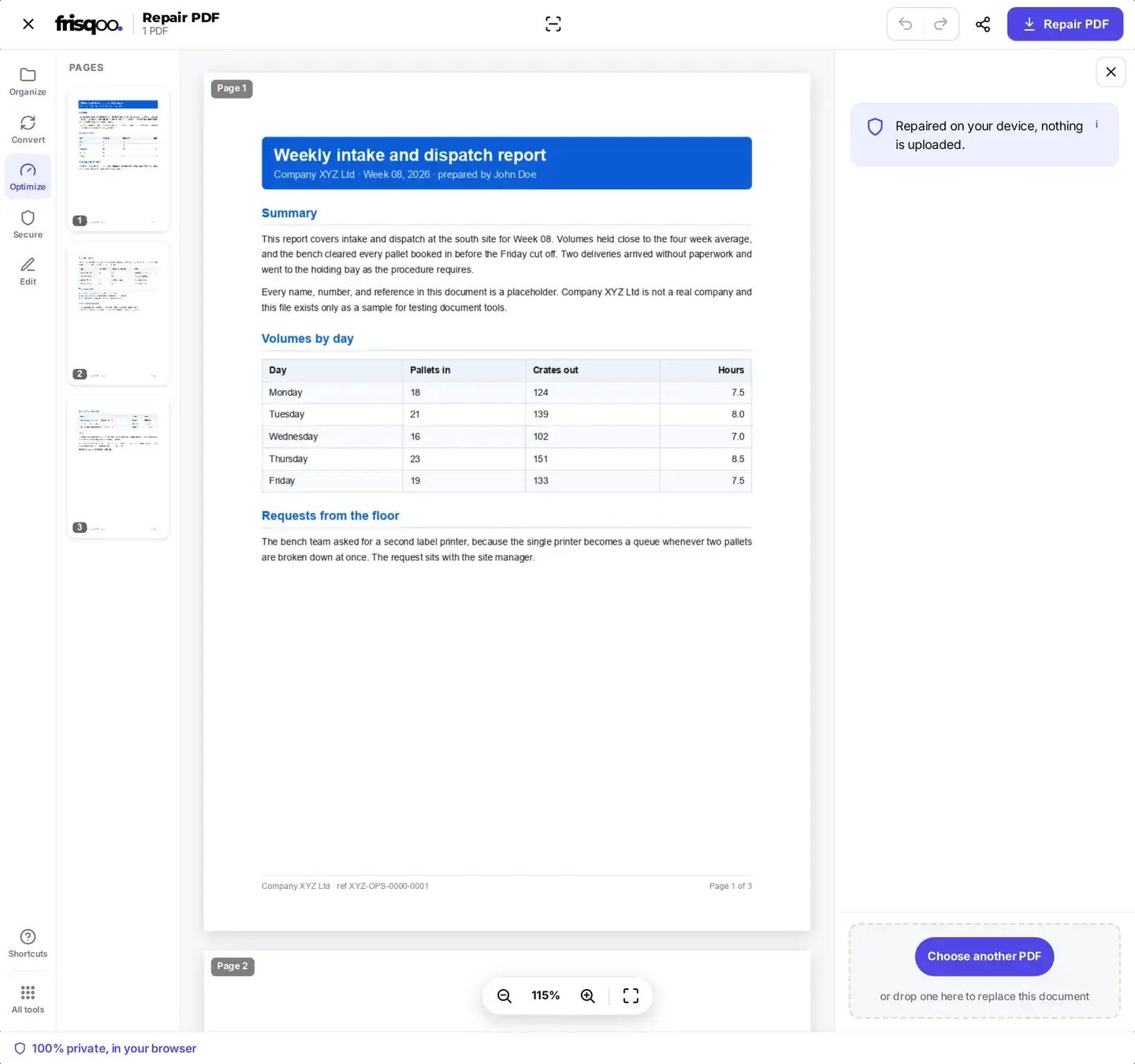
A damaged file may not produce a usable preview. The repair screen keeps the controls available even when the preview area cannot render the pages. Instead of a page preview you get the file itself listed with its name and size, the OCR rebuilt pages switch, the language picker that goes with it, and one clear Repair PDF button. That is the whole decision: repair it as it is, or ask for OCR on any page that has to be rebuilt as a picture.
Take the OCR choice seriously before you press the button, because it is the one setting that changes what you end up with. Leave it off and a rebuilt page comes back as an image you can read but not search. Turn it on and the words in that page are read on your device and written back as real text. OCR takes longer, since every rebuilt page has to be re-rendered and read, so switch it on when the words matter and leave it off when you only need the pages back.
How the recovery pipeline works
The tool works from the gentlest fix to the most thorough, stopping as soon as one succeeds so it keeps as much of your original file as possible:
- Structural rewrite rebuilds the file's internal index while keeping text and page objects that still parse.
- Deep recovery digs into the objects when the structure alone is not enough.
- Stream recovery decodes and repairs damaged internal streams.
- Page-by-page rebuild is the last resort: it reconstructs readable pages one at a time, keeps text on pages that still parse, and renders other recoverable pages as images.
What you get when the repair finishes
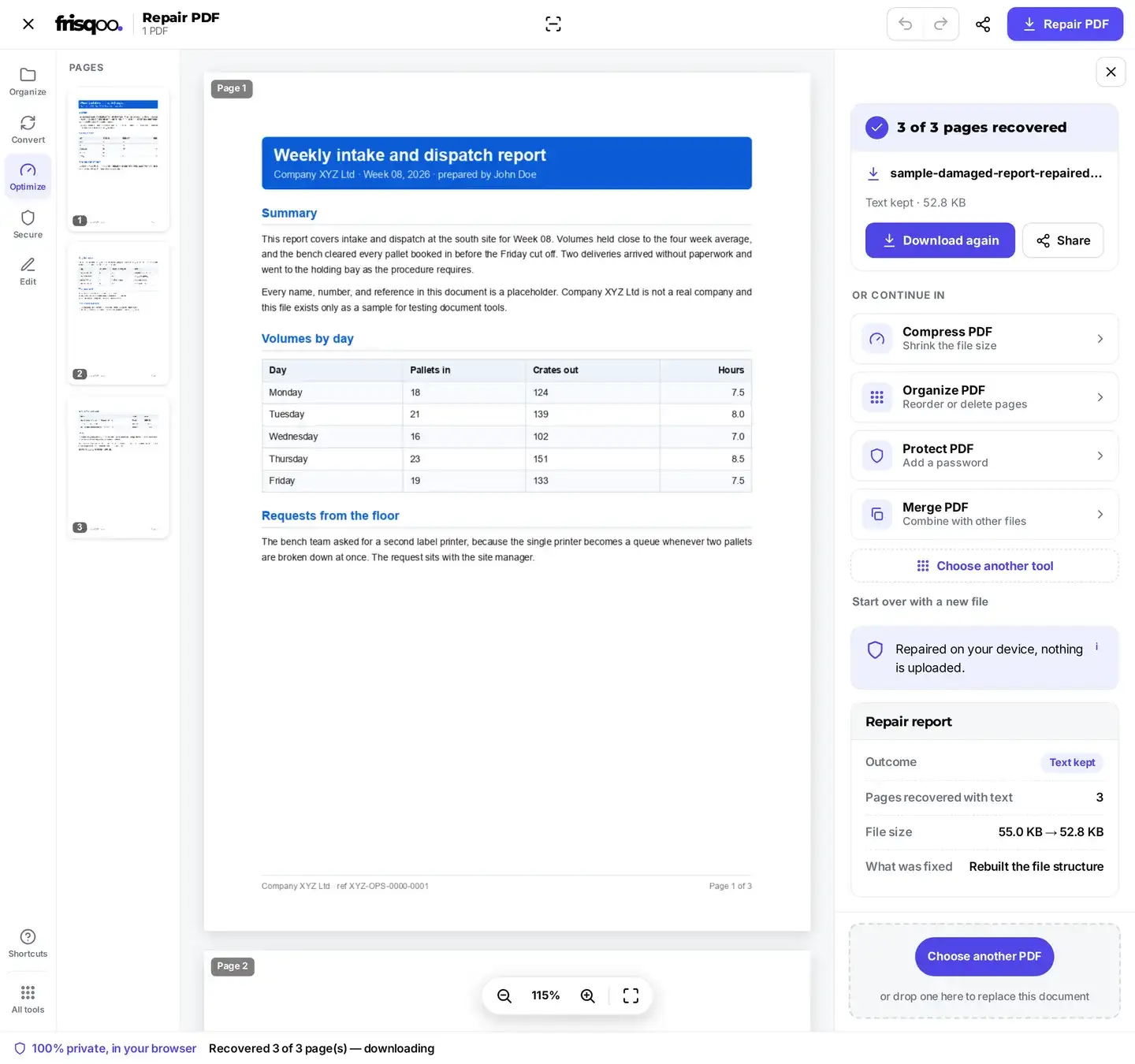
While it works, the status line moves through reading, structural repair, and page rebuilding when needed. A successful run downloads the repaired copy and opens a short report. It shows the outcome, pages recovered with text or as images, the file-size change, and what was fixed. The completed panel names the repaired file and summarizes whether text was kept.
The fixed copy downloads on its own, and the tool adds a -repaired suffix, so report.pdf is offered as report-repaired.pdf. Keep the source file until you have verified the result. If the download did not reach your device, Download again saves it a second time without redoing the repair, and Share passes it to another app on a phone or tablet.
From there the same panel can hand the recovered file straight to another tool without adding it again. Compress PDF brings the size back down after a page rebuild, Organize pages drops any page that came back empty, Merge PDF joins it to a good copy of the missing part, Rotate PDF fixes a page that came back sideways, and Protect PDF puts a password back on if the original had one.
Why some repairs keep your text and others rebuild pages
A PDF holds your words as text plus an index that says where everything lives. Most damage hits the index, not the words. When that is all that is wrong, the fix is to write a fresh index around your untouched content, and you get a file that is as searchable and selectable as the day it was made. That is the repair you want, and it is why the report says Text kept.
Sometimes the words themselves are damaged. Then the only way to save a page is to draw whatever can still be read and store it as a picture. You get the page back and it looks right, but the text inside it is no longer text, so searching will not find it. Switch on OCR and those pictures are read back into real text, which is the closest you can get to the original.
So a repair that keeps your text is a light repair, and a repair that rebuilds pages means the damage went deeper. The report tells you which one you got, and that is the single most useful line on the screen.
Damage it can fix
- Broken or missing cross-reference tables
- Files that will not open at all
- Downloads with recoverable page data but a damaged index or ending
- Junk bytes before the header
- Missing end-of-file markers
- Damaged internal streams
Is your PDF damaged, or just locked?
These two problems look alike and need different tools, so it is worth telling them apart before you start. A damaged file usually fails on its own terms: your reader shows an error, opens a blank grey page, or says the file cannot be opened because it is not a supported format. A locked file opens far enough to ask you for something, either a password box before you can see any page, or a warning that you cannot print or copy from it.
If you are asked for a password and you know it, Unlock PDF is the right tool. If the file will not open at all, or the pages are there but scrambled, repair is the right tool. One more clue: a file that used to open on this same device and now does not is almost always damaged rather than locked.
What no repair tool can bring back
Repair recovers what is still inside the file. It cannot recreate data that is no longer there:
- Content that was overwritten or truncated away when the file broke
- Pages whose data was fully deleted, not just mis-indexed
- A password you have lost (use Unlock PDF for a known password)
The repair report summarizes what the run recovered. Open the result and check its page count, text search, images, links, and forms before relying on it.
What to do when a file cannot be recovered
Sometimes the answer is that the data is gone, and the tool says so plainly rather than handing you an empty file. If that happens, a few things are still worth trying, in this order.
- Download or copy the file again from wherever it came from. A cut-off transfer is the most common cause of a PDF that will not open, and a second copy is often whole.
- Check the file size against the source. A file that is far smaller than it should be lost its ending, and the missing part was never saved to your device.
- Look for the program's own recovery copy. Editors and scanners often leave an autosave or a temporary file beside the original.
- Check your email, cloud folder, or phone gallery for an earlier version. A slightly older copy that opens beats a newer one that does not.
- Try the repair once more on a computer if the first try was on a phone. A big rebuild needs memory, and a phone can run short on a very large file.
If none of that works, the missing content may no longer exist in the file. Keep the original in case another copy or a newer recovery method becomes available.
The OCR option for rebuilt pages
When a page is too damaged to read normally, it is rebuilt as an image so you at least get it back visually. Turn on OCR rebuilt pages before you repair, pick your languages, and the tool reads the words in those rebuilt pages on your device, so the recovered text stays selectable and searchable rather than locked in a picture. Leave it off for the fastest repair when a plain visual recovery is enough.
Reading the repair report
A successful repair ends with a short report. Outcome shows whether text was kept. The page rows separate pages recovered with text, pages rebuilt as images, and pages that could not be recovered when those counts apply. File size compares the source and result, while What was fixed records the structural action or recovery notes.
Check the repaired file before you delete the original
A repaired PDF opens, which is a relief, but opening is not the same as being complete. Keep the broken original until you have checked four things, and the whole check takes about a minute.
- Compare the page count in your reader with the count in the report, and with what the document should have.
- Look at the last page. Damage that came from a cut-off download shows up at the end of a file first.
- Search for a word you know is in there with Ctrl+F, or Command+F on a Mac. If it is found, your text layer survived.
- Skim for pages that came back blank or sideways. Organize pages removes the blank ones and Rotate PDF straightens the rest.
Only when all four look right is it safe to throw the broken copy away. Because the repaired file is saved under a new name, you can keep both side by side while you decide.
Why it repairs one file at a time
Unlike the converters on frisqoo, Repair PDF takes a single file per run, and that is on purpose. Every broken file is broken in its own way, so each one needs its own path through the recovery steps, its own decision about OCR, and its own report. Batching them would hide exactly the information you came for.
Repairing several is still quick. Add the next file when the last one has downloaded and the screen resets itself, ready to go again. Frisqoo does not upload source files on any run, so a folder of damaged files can be worked through one by one.
Is it private and safe?
Processing runs locally in your browser. Frisqoo does not upload the source file for processing. The repaired copy downloads with a -repaired suffix, so the tool does not intentionally overwrite the source file. Your browser, device, extensions, storage, and any app you share the result with remain outside that processing claim.
Common ways people use Repair PDF
- Opening a file that suddenly shows a blank page or an error.
- Rescuing a download that was cut off partway and will not open.
- Recovering an important document a program crashed while saving.
- Getting a readable copy of a scan that another tool corrupted.
- Salvaging as much as possible of an old, partly damaged archive.
FAQs about Repair PDF
Do my files get uploaded?
No. Your PDF is repaired locally in the browser. Frisqoo does not upload the source file for processing.
How does the repair work?
It tries the gentlest fix first, rebuilding the file structure so all your real text stays intact. If that is not enough it tries deeper object and stream recovery, then a page-by-page rebuild as the last fallback. The result depends on which data remains readable.
Will my text stay selectable?
A structural repair keeps the existing text layer. If the tool has to rebuild a page as an image, that page is no longer searchable unless you turn on OCR rebuilt pages before starting. Always check the result because damaged content may still be incomplete.
What does the OCR option do?
If a page is so damaged it has to be rebuilt as a picture, OCR reads the words in that picture on your device and adds a searchable text layer to the rebuilt page. Turn on OCR rebuilt pages and pick the languages first.
Can it recover any broken PDF?
No repair method can recover every damaged file. Frisqoo tries structural repair first and can fall back to rebuilding readable pages, but it cannot restore content that was overwritten, deleted, or never finished downloading.
What kinds of damage can it fix?
It can repair some broken cross-reference tables, junk bytes before the PDF header, missing end-of-file markers, and readable pages inside a damaged structure. A download that is missing page data may remain unrecoverable.
Can I repair several PDFs at once?
Not in one go. Repair PDF takes one file at a time, because each broken file needs its own recovery path and its own report. Repair them one after another; the tool resets itself as soon as you add the next file, and Frisqoo does not upload the source file at any point.
How long does a repair take?
A structural fix is usually a few seconds. A deep or page-by-page rebuild of a large or badly damaged file takes longer, especially with OCR on, because every page is re-rendered and read on your own device.
What is in the repair report?
A successful run reports whether text was kept, how many pages were recovered with text or as images, the original and repaired sizes, and a short note about what was fixed.
Will the repaired file be much larger?
A structural repair stays close to the original size. A page-by-page rebuild can be larger, because rebuilt pages are stored as images. If size matters, run the result through Compress PDF afterwards.
What is the repaired file named?
The tool adds a -repaired suffix to the download name. Keep the damaged source until you have checked the repaired copy.
Does it work offline and on a phone?
Repair runs in the browser after the required tool assets have loaded. Offline reuse and large-file support depend on the browser, available memory, and whether those assets remain cached. A computer is usually the better choice for a large rebuild or OCR.
Is it free?
Yes. There is no sign-up or watermark. The practical limit is the memory available to the browser, so a large or heavily damaged PDF may work better on a computer than on a phone.