

Bank Statement Converter
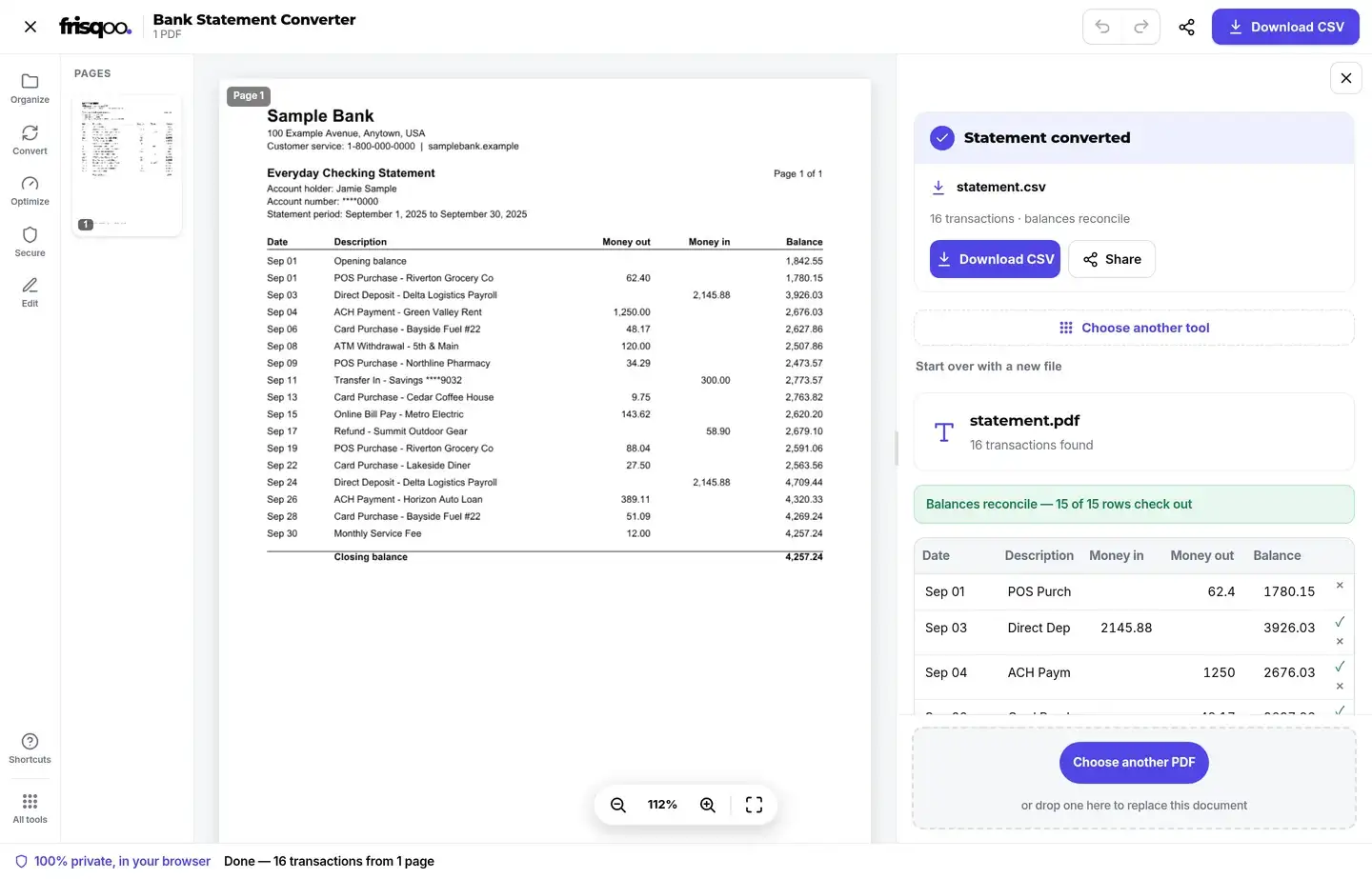
Turn a bank statement PDF into a clean, editable table of transactions and export it to CSV, Excel, JSON, OFX, or QIF. It reads the statement on your device, separates money in from money out, and checks each row against the running balance so misreads stand out. Frisqoo does not upload the source file for processing, there is no watermark, and it is free.
100% private. Your files are processed entirely in your browser and never uploaded.
Why convert a bank statement with frisqoo
Private by design
Your statement is read and converted inside your browser. Frisqoo does not upload the source file for processing, which matters more here than almost anywhere.
Clean transactions
Every row is recovered with its date, description, money in, money out, and balance, ready to use.
Balance checked
Where the statement prints a balance, each row is checked against it so a misread is easy to spot.
Editable before export
Fix any cell, add or remove a row, and the balance check updates as you go.
Five export formats
Download a spreadsheet-ready CSV, a genuine Excel workbook, JSON for a script, or OFX and QIF for accounting apps.
Free to use
No sign-up or watermark. Very large jobs depend on available device memory.
How to convert a bank statement PDF
- Drop your bank statement PDF onto the box, or browse for one.
- Review the transactions the tool reads out, and check the balance flags.
- Edit anything that needs it, then download as CSV, Excel, JSON, OFX, or QIF.
Everything runs on your device, so your banking data stays private, even with no internet once the page has loaded.

Local processing for bank statements
The statement is parsed locally in your browser. Frisqoo does not upload the source PDF or keep a server copy.
Because the reading and the file building both happen locally, there is nothing to delete afterwards and no account to trust with your records. Close the tab and the statement is gone from memory. If you are converting a statement for a landlord, an accountant, or a loan application, the numbers only ever exist on the machine in front of you.
- Your statement is processed locally and is not uploaded to Frisqoo.
- No upload and no queue, so the work starts the moment the file opens, and it works offline.
- No watermark, no sign-up, and no row limit.
- Every value is editable, so you always have the final say.
How it reads the statement
The transactions are recovered from the text your bank already placed in the PDF, using where each word sits on the page to rebuild the table:
- The header row is found from labels like Date, Description, and an amount or balance column.
- Each transaction keeps its date exactly as the bank wrote it, with no reformatting to guess at.
- Separate debit and credit columns become money out and money in; a single signed amount is split by its sign.
- A description that wraps onto a second line is joined back to its transaction.
- Where a running balance is printed, each row is checked against it and mismatches are flagged for you.
Column labels vary from bank to bank, so the tool treats common wordings as the same thing. Paid in, Money in, Deposits, and Credit all map to money in. Paid out, Withdrawals, and Debit map to money out. It also copes with statements that print the balance once per day rather than on every line. And it skips repeated page headers, footers, and opening or closing balance rows, so they do not turn into stray transactions.
Formats you can export to
Once the table looks right, pick the format that suits where the data is going. Every file is built on your device the moment you click download:
- CSV opens in Excel, Google Sheets, Numbers, or any spreadsheet, and is the safest choice for a quick import.
- Excel (XLSX) is a genuine workbook with typed columns, ready to sort, filter, and total without a conversion step.
- JSON gives you structured records for a script, an app, or your own tooling.
- OFX and QIF are the formats accounting and personal-finance apps expect, so the transactions drop straight into your books.
You can also choose how the money columns are labelled before you export. The same transactions can come out as Money in and Money out, Credit and Debit, Deposits and Withdrawals, or a single signed Amount, whichever your spreadsheet or accountant is set up to read.
The running-balance check that catches misreads
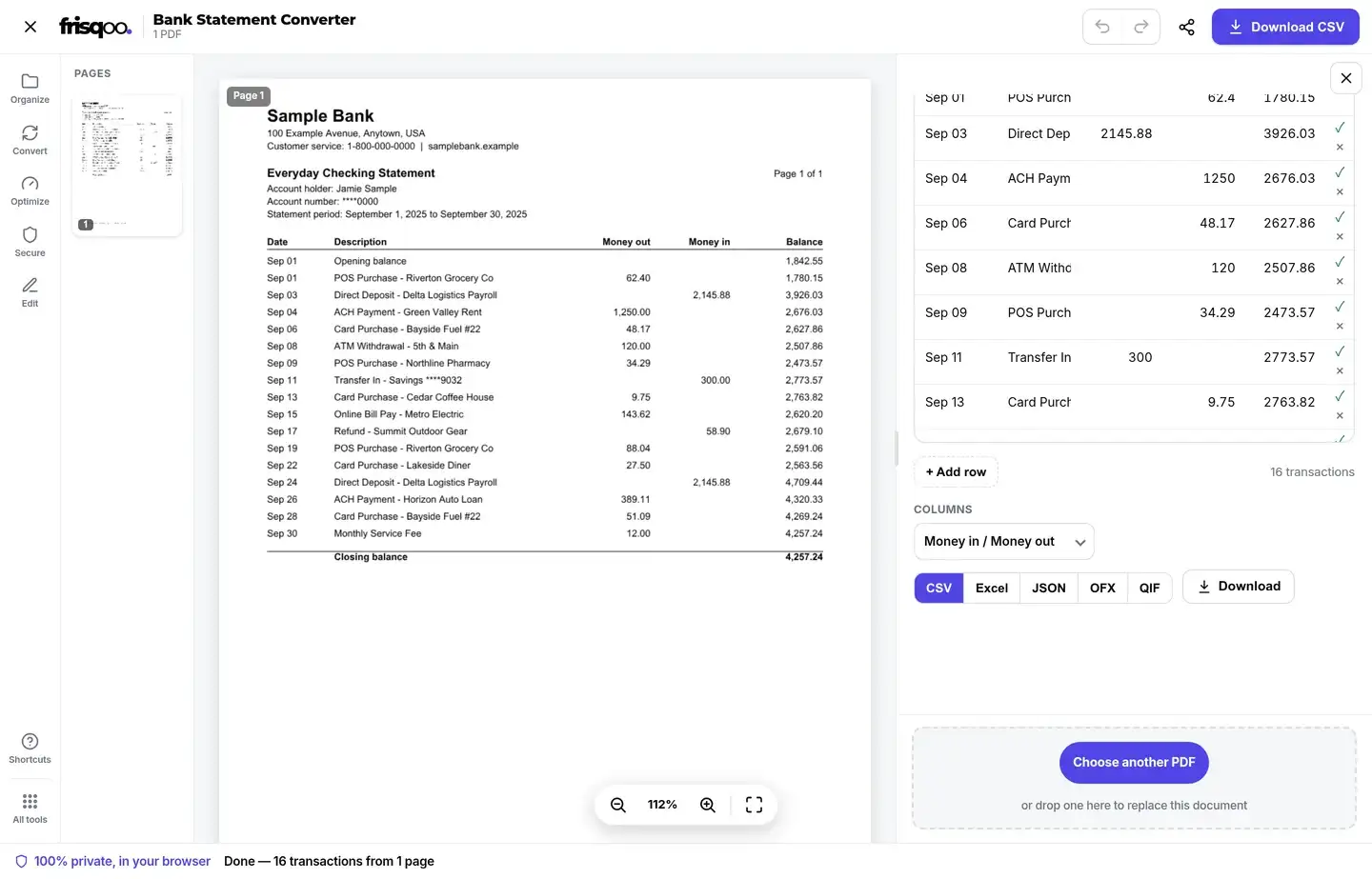
Reading numbers off a PDF is only useful if you can trust them. Where your statement prints a running balance, the tool adds each row's money in and takes away its money out. It then compares that with the balance the bank printed on the next line. When they agree, the row is marked as reconciled. When they do not, the row is flagged so you can look at it before you export.
The header of the results panel shows the count for you, for example telling you that fifteen of fifteen rows check out. A flag usually means one figure was read slightly wrong, or a fee or interest line was laid out differently from the rest. Every cell is editable, so you can fix it in place and watch the check turn green. Statements that print the balance only once a day are checked for the whole day rather than line by line. That way they do not raise false alarms. When there is no printed balance to check against, the transactions still come through in full. You can total them yourself in the spreadsheet once they are exported.
Statements this converter handles
Bank layouts differ, so the reader is built to handle the common shapes rather than one bank's template:
- Statements with two money columns, one for debits and one for credits.
- Statements with a single amount column where a minus sign or brackets mark money leaving the account.
- Multi-page statements, where the transaction table continues across several pages.
- Statements grouped into sections such as deposits and withdrawals, or dated day by day.
- Long descriptions and reference numbers that would otherwise spill into the wrong column.
If a statement is unusual enough that the table does not come out cleanly, the editable grid is your safety net. Add a missing row, delete a stray one, or fix a cell, and the balance check keeps up as you go.
What you can do with the converted data
Turning a statement into a spreadsheet opens up the work that a PDF makes tedious. A few common jobs it saves time on:
- Bookkeeping and tax, where transactions need to be sorted into categories and totalled.
- Expense claims and reimbursements, where you only need a few rows pulled out and added up.
- Loan, mortgage, and rental applications that ask for figures in a spreadsheet rather than a PDF.
- Budgeting, where months of statements are easier to compare side by side once they are rows.
- Feeding transactions into accounting software through OFX or QIF instead of typing them in.
Whatever the reason, the point is the same: the figures your bank locked inside a PDF become numbers you can sort, filter, and total in seconds.
Password-protected statements
Banks often email statements as password-protected PDFs, with a password built from something like your date of birth, account number, or postcode. Add one here and the tool notices it is locked and shows an unlock box in the editor. Type the open password, and the PDF is unlocked in your browser so the transactions can be read. The password is used locally and is not sent to Frisqoo. If you would rather not unlock it here, skip the file and remove the password another way first.


What about scanned statements?
If your statement is a scan or a photo rather than a downloaded PDF, there is no text layer to read, so the tool will tell you and hand the file to OCR PDF. Run that first to add a text layer, then bring the result back here to convert it.
Does it work on my phone?
Yes. The converter can run in a current desktop or mobile browser, with nothing to install. A phone has less working memory and a smaller review area than a computer, so large or complex statements are easier to check on a larger device.
FAQs about Bank Statement Converter
Is my bank statement uploaded anywhere?
No. The whole conversion happens inside your browser on your own device. Your statement never leaves your computer, which is what makes this safe for something as sensitive as your banking. Close the tab and nothing is left behind.
Which statements does this work on?
This first version reads PDF statements that carry a real text layer, the kind your bank gives you when you download a statement from online banking, English first. It finds the table from a labelled header such as Date, Description, and an amount or balance column. A statement that is a scan or a photo has no text to read, so run OCR PDF on it first and then convert the result.
Which formats can I export?
CSV, Excel (XLSX), JSON, OFX, and QIF. CSV opens in any spreadsheet, the Excel file is a genuine .xlsx workbook, JSON is there for feeding another tool or a script, and OFX and QIF import straight into accounting and personal-finance software. That covers spreadsheets, bookkeeping, and code in one place.
How accurate is the conversion?
It reads the text the bank already wrote into the PDF rather than guessing, and where the statement prints a running balance it checks every row against it and flags any that do not add up, so a misread is easy to catch. It is still worth a quick look before you rely on the figures, and every value is editable, so you stay in control.
Does it separate money in from money out?
Yes. When the statement uses separate debit and credit columns those are kept as money out and money in. When it uses a single signed amount column, each row is split into money in or money out by its sign, and the running balance is carried across so the totals line up.
Can I import the result into QuickBooks or Quicken?
Yes. Export OFX or QIF and most accounting and personal-finance apps, including QuickBooks and Quicken, can import it as a batch of transactions with dates and amounts already set. For a plain spreadsheet import, CSV works everywhere.
How do I convert a bank statement to Excel?
Add the PDF, let the tool read the transactions, then pick the Excel option and download. You get a real .xlsx workbook with a column for the date, description, money in, money out, and balance, ready to sort, filter, or total.
Can it open a password-protected statement?
Yes. Many banks send statements as password-protected PDFs. When you add one, an unlock box appears; type the open password and it is unlocked in your browser so the transactions can be read. The password is used locally and is not sent to Frisqoo.
Is it really free?
Yes. There is no sign-up, watermark, or row limit. It can run in a current desktop or mobile browser, but large statements are easier to review on a computer with more memory and screen space.
Does it work offline?
Yes, once the page has loaded. The statement is read and the files are built on your device, not on a server, so you can turn off your internet and it still works.