

Edit PDF
Use a free PDF editor to change a document without installing software. Add or edit text, fill forms, manage pages, draw, sign, watermark, redact, and annotate in one workspace. Processing runs locally in your browser, and Frisqoo does not upload the source file for processing.
100% private. Your files are processed entirely in your browser and never uploaded.
Edit a PDF in one workspace
Text tools
Add text, edit available text objects, or find and replace document text.
Forms and signatures
Fill supported forms or add fields, checkboxes, choices, and signature controls.
Page controls
Insert, reorder, rotate, duplicate, delete, crop, or view two pages together.
Markup and graphics
Draw, highlight text, add shapes and images, or edit supported graphics.
Separate output
The original stays unchanged and the new filename ends in -edited.pdf.
Local processing
The PDF is read and rewritten in the browser without upload to Frisqoo.
How to edit a PDF
- Choose one PDF. A digital text PDF opens directly, while an encrypted file asks for its known open password first.
- Choose a toolbar action, place or edit the content, then use Select to move, resize, or remove an editor object.
- Select Save and download. Review the file ending in
-edited.pdfin a separate PDF reader.
The downloaded copy contains the saved changes. Keep the source PDF when later revisions may be needed.
Tools available in the editor
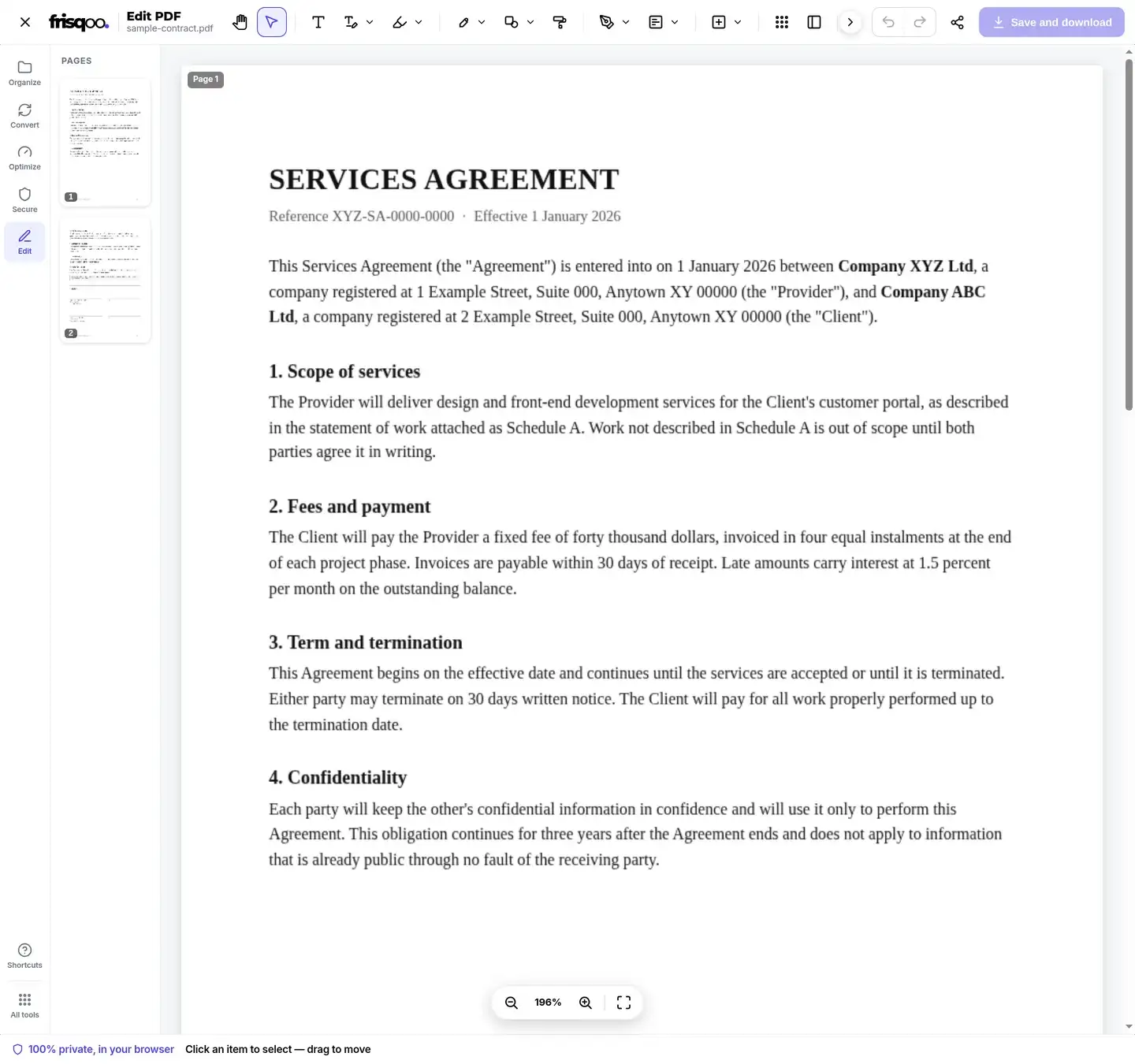
To edit a PDF document, use the top toolbar groups for Text, Edit, Markup, Draw, Shapes, Whiteout, Sign, Form, Insert, Pages, Two pages, and Crop. Select is used to pick editor objects after they are placed. Undo and Redo track changes, and Clear all removes editor additions.
The left page rail shows thumbnails for navigation. Pages can be reordered, rotated, duplicated, deleted, or combined with blank pages and pages imported from another PDF. Two-page view places a pair of pages together for comparison, while Crop can apply one crop to the current page or reuse the last crop across pages.
How to edit PDF text
This PDF text editor has several paths because page text is not stored like text in a word processor. Edit text targets a text object. Make whole page editable prepares the page content for broader changes. Separate options target supported images and vector shapes. Find & replace searches the document text layer.
The standard text edit uses an overlay that covers the old appearance and places the replacement on top. Precise edit (beta) attempts a true text change when the source structure is safe and falls back to the overlay path otherwise. Fonts, character maps, clipping paths, and tightly arranged layouts can affect the result, so compare the downloaded page with the source.
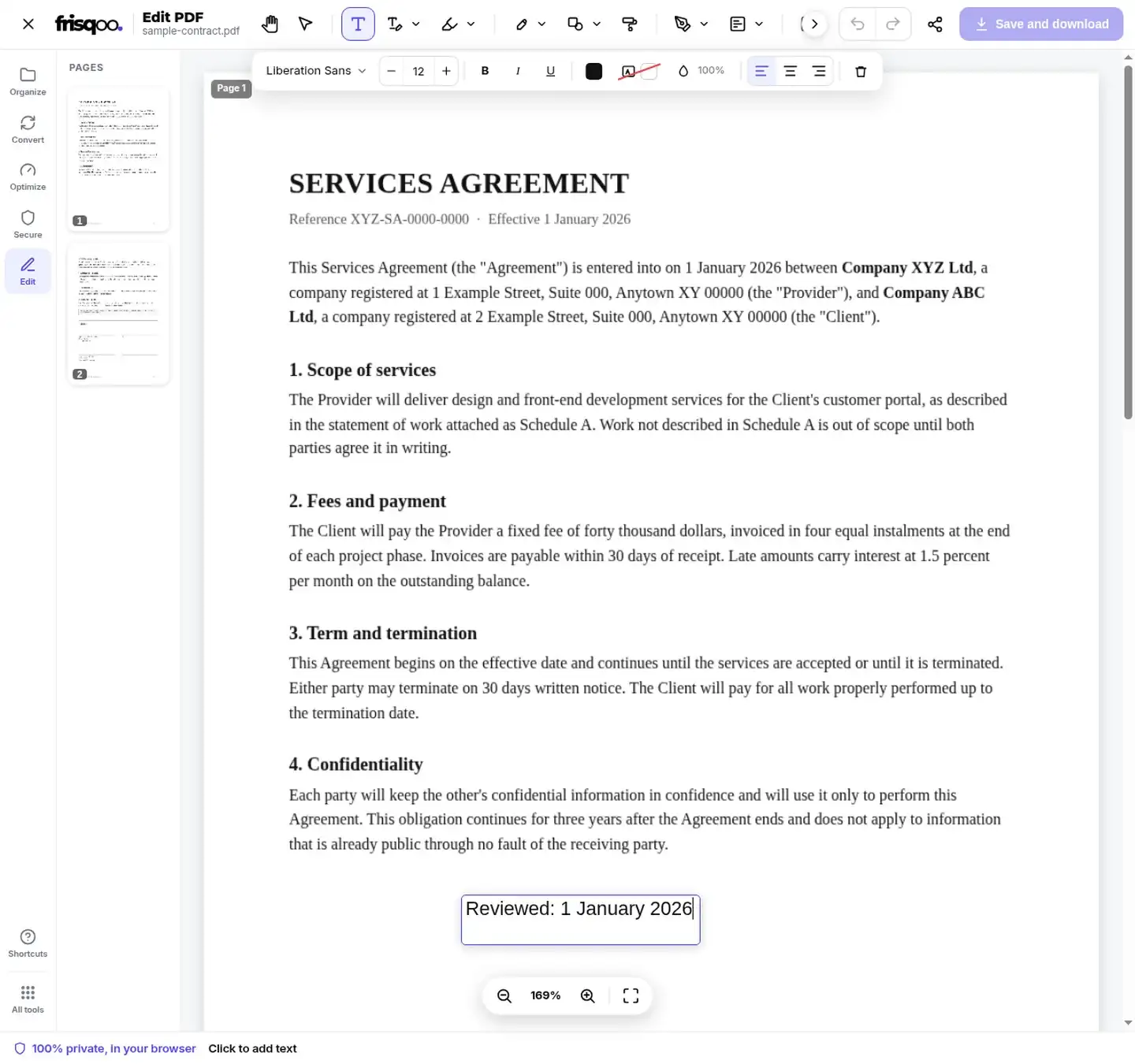
To add text without changing an existing object, select Text and click the page. The text panel controls font, size, bold, italic, underline, color, background, opacity, and alignment. Added text is drawn into the saved PDF rather than left as an unsaved browser layer.
Find and replace document text
Find & replace is useful when the same name, date, reference number, or term appears more than once. Enter the search text and its replacement, review the matches, and apply the change to the document text layer. The command does not read lettering that exists only as pixels inside an image.
Search results can depend on the way a PDF encodes spaces, punctuation, ligatures, and separate text runs. A phrase that looks continuous on the page may be stored as several objects. If a match is not found, try a shorter distinctive fragment or edit the target object directly.
Make whole page editable exposes supported page objects together when several items need adjustment. Use Select after the conversion to pick an object, then review every nearby line. Converting a complex page into editable objects can change wrapping or spacing when the original font is unavailable.
Edit images and vector shapes
The Edit menu has separate choices for graphics stored as images and shapes stored as vectors. This distinction matters because a photograph, logo, line, and filled rectangle can be represented by different PDF objects even when they overlap visually. Supported items can be selected for adjustment without flattening the entire page into one picture.
Select shows the active editor object and allows it to be moved. Use the object controls to change its supported properties or remove it. Added images, shapes, arrows, lines, checkmarks, and crosses remain editor objects until the PDF is saved, which allows Undo or Redo during the session.
Whiteout draws a visual cover over an area. It is useful for hiding part of a background before placing replacement text, but it is not the same as verified redaction. Use Redact for sensitive content and test the exported PDF by selecting, searching, and copying around the marked area.
Digital PDFs and scanned pages
A digital PDF contains text objects that the editor can inspect. A scanned page is a picture, even when words are visible to a person. Existing-text editing and Find & replace therefore work best on digital PDFs with a usable text layer.
For a scan, run OCR PDF first when searchable text is needed. Another option is to use Whiteout to cover a visual area and Text to place new wording. That changes the page appearance, but it does not reconstruct the original font or paragraph layout.
Add forms, signatures, and tables
The Form menu can place text fields, checkboxes, dropdowns, radio buttons, and signature fields. Existing supported form fields can also be completed before saving. Review tab order, field names, default values, and required-field behavior when the edited copy will be used as a reusable form.
Sign supports a new signature or initials. Insert can add an image, stamp, watermark, page numbers, file attachment, comment, link, redaction, table, blank page, or pages from another PDF. Tables support rows, columns, a header row, text alignment, and resizable dividers.
Form behavior can vary between PDF readers. After creating fields, test text entry, checkboxes, radio groups, dropdown choices, and signature areas in the reader used by the recipient. Confirm that fields do not overlap printed content and that long answers fit inside their boxes.
A drawn or typed signature placed through the editor is a visible page element. It is not the same as a certificate-based digital signature that can be validated cryptographically. Use the signing method required by the document workflow and check the exported file before distribution.
Markup, shapes, and page changes
Markup tools operate on selected text and include highlight, underline, strike through, and squiggle. Draw adds freehand ink. Shapes include rectangles, ellipses, lines, arrows, checkmarks, and crosses. Comments, links, attachments, stamps, and images are available through Insert.
Page actions change the document structure, so check page order, orientation, crop boundaries, links, bookmarks, forms, and signatures after export. Rewriting a digitally signed PDF can invalidate the existing signature. Apply document signatures after editing when the workflow allows.
Redaction and sensitive documents
The editor includes a Redact control for preparing marked areas in the exported copy. Do not judge redaction only by the black appearance in the workspace. Open the downloaded result in another reader, try selecting and searching the covered text, inspect the surrounding page, and confirm that the intended content is absent before sharing.
Processing runs locally in your browser, and Frisqoo does not upload the source file for processing. Local processing does not by itself establish compliance with a legal, regulatory, retention, or evidence-handling requirement. Apply the review and storage rules required by the document owner.
Save and review the edited PDF
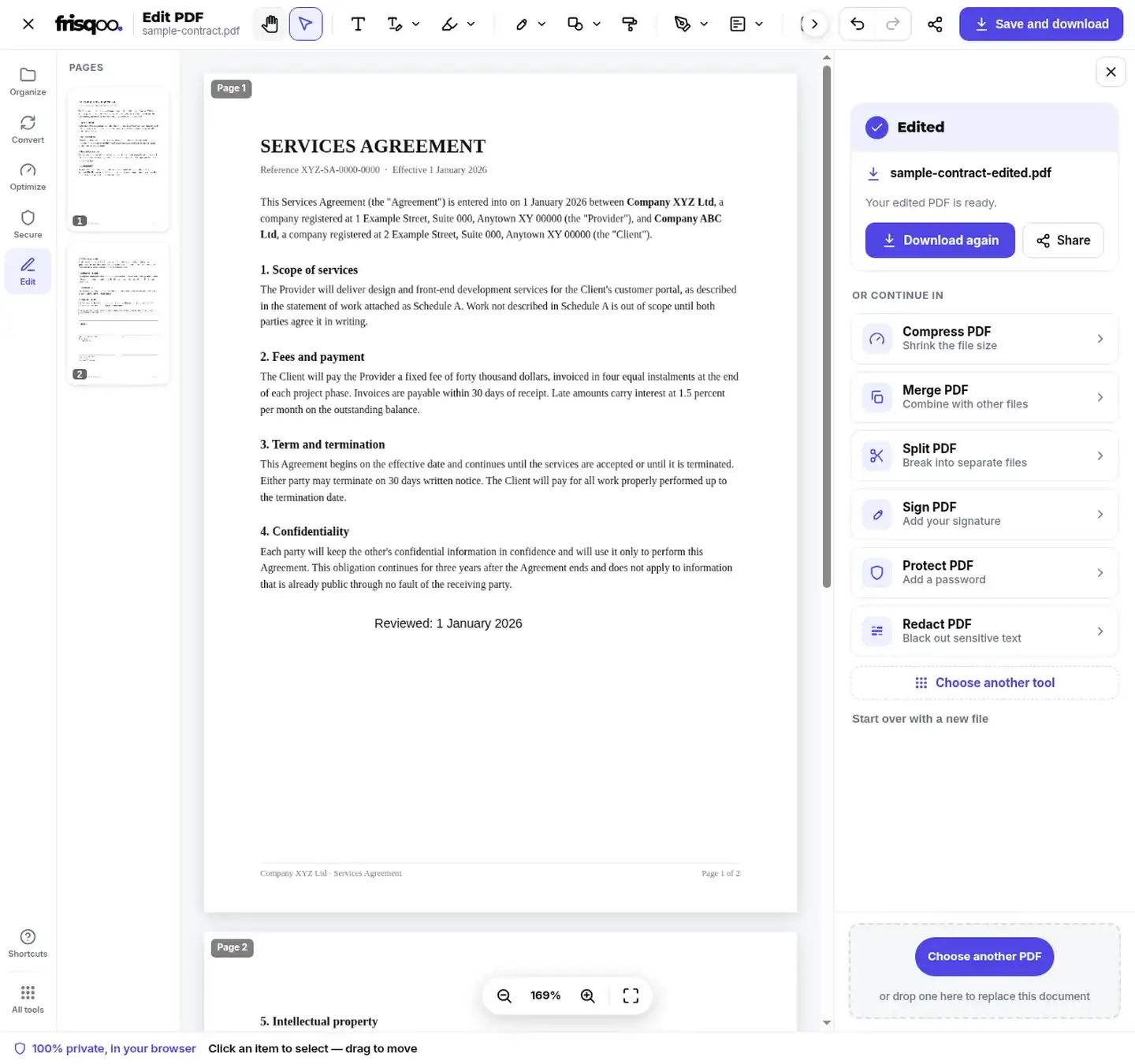
Select Save and download after the intended changes are visible. The filename keeps the source base name and adds -edited.pdf. In the tested workflow, sample-contract.pdf became sample-contract-edited.pdf. The original remains unchanged.
Review every changed page in a separate reader. Check added text, text replacements, graphics, form controls, annotations, links, attachments, page order, crops, signatures, and redactions. The output size can increase or decrease because the document is rewritten, so file size alone does not show whether the edit succeeded.
Edit password-protected PDFs
If the PDF requires a password to open, enter the known password in the inline unlock box. The file then opens in the editor on the device. A file that only restricts printing or copying may open without this prompt.
The edited output is a newly written PDF and is not automatically protected with the source password. Use Protect PDF after reviewing the result when an open password or permissions settings are still required.


Browser limits and keyboard access
You can edit PDF for free without an account or an added watermark. Available browser memory, page complexity, fonts, images, form fields, and annotations determine the practical file size. A computer gives more workspace for complex edits, while touch input can be used for simpler placement and drawing tasks.
Common shortcuts include T for Text, E for Edit text, F for Find & replace, P for Draw, N for page numbers, and Y for Pages. Save uses Ctrl or Cmd plus Enter. Press the question-mark key or select Shortcuts in the side rail to view the current list.
Common Edit PDF tasks
- Correct a date or add a note to a finished PDF document.
- Fill a form, add a signature field, and save a separate response.
- Reorder, rotate, crop, or insert pages in a report.
- Add page numbers, a watermark, links, comments, or attachments.
- Prepare redactions and verify the downloaded copy before sharing.
FAQs about Edit PDF
Does Frisqoo upload the PDF?
No. Processing runs locally in your browser. Frisqoo does not upload the source file for processing.
Can I edit existing text in a PDF?
Yes, when the PDF contains a usable text layer. The Edit menu includes Edit text, Make whole page editable, and a Precise edit beta. Results depend on the source font, character mapping, and page structure, so review the exported copy.
Can I edit scanned PDF pages?
A scan is an image rather than editable text. Run OCR PDF first to add a text layer, or use the Text tool to place new text over the page.
Can I add text to PDF pages?
Yes. Select Text, click the page, type the new content, and use the font, size, style, color, background, opacity, and alignment controls.
How does find and replace work?
Find & replace searches the document text layer for a word or phrase and applies the replacement. It does not read words that exist only inside a scanned image.
Can I fill or create PDF form fields?
Yes. Fill supported fields already in the document, or add text fields, checkboxes, dropdowns, radio buttons, and signature fields from the Form menu.
Can I reorder or add pages?
Yes. The page controls can insert blank pages or pages from another PDF, reorder pages, rotate them, duplicate them, delete them, and switch to a two-page view.
Can I add comments, links, and attachments?
Yes. The Insert menu includes comments, links, and file attachments, along with images, stamps, watermarks, page numbers, redactions, tables, and PDF pages.
Does Edit PDF remove sensitive text?
The Redact control prepares redaction marks for the exported copy. Always download the result and verify the marked content in a separate PDF reader before sharing it.
What is the downloaded filename?
The edited copy keeps the source base name and adds -edited.pdf. For example, sample-contract.pdf becomes sample-contract-edited.pdf.
Can I edit a password-protected PDF?
Yes, when you know the open password. Enter it in the inline unlock box. The edited output is newly written and is not automatically protected with the source password.
Can I undo an edit?
Yes. Undo and Redo are available after a change. Clear all removes editor additions, so confirm the intended scope before using it.
What limits the file size?
There is no displayed fixed page limit, but page complexity, embedded fonts, images, annotations, and available browser memory determine the practical job size. Large files usually work better on a computer.