

Crop image
Crop an image online without sending it to a server. Add a photo, screenshot, logo or other browser-readable picture, set the crop by dragging or by entering pixel values, then save the result. Choose a square or widescreen ratio when the destination has a fixed shape, or keep the original format and transparency.
100% private. Your files are processed entirely in your browser and never uploaded.
Why crop images with frisqoo
Private in your browser
Your image is decoded and cropped on your device. It is not sent to a remote cropping service, which keeps personal photos and work files in your browser.
Freeform or fixed ratio
Drag a free crop, or lock the box to a square, landscape, portrait, widescreen or original ratio before you frame the image.
Exact pixel control
Enter the X and Y position plus the crop width and height when a form, template or design needs exact dimensions.
Choose the output
Keep the original format where supported, or choose PNG, JPG or WebP. PNG output keeps transparency, while JPG fills transparent areas with white.
Crop a full batch
Add several images, give each its own crop rectangle, and process them together. Download results separately or as one zip.
Free to use
No sign-up, watermark or daily quota. Browser memory is the practical limit when working with very large images or a large batch.
How to crop an image
- Add your images. Drop them on the box or choose one or more files from your device.
- Set the crop. Drag the box, choose a ratio, or enter X, Y, width and height in pixels.
- Press Crop. Download a file on its own or save the complete batch in a zip.
Crop image online without an upload
A browser cropper is useful when you need a quick edit but do not want to hand a photo to an online service. This photo cropper keeps the task focused on framing, rather than adding a full editing suite. Frisqoo reads the file from the picker or drop area, decodes it in the browser, and draws the selected rectangle on a local canvas. The page does not upload the source image for processing. This makes the crop image online workflow practical for a personal photo, a screenshot, a scan, a product picture or a client file.
Local processing does not mean the page can work without a browser. The page and its code still need to load from the web. After that, the image operation happens on the device. A shared computer can still keep a downloaded result, so use the normal care you would use for any file saved to a shared device.
The free image cropper has no account step, watermark or daily quota. Its practical boundary is the memory that the browser can use. Very large photos and long batches need more working memory than a small screenshot. If a phone slows down, try fewer images at a time and keep the original files somewhere safe.
Drag the crop box to frame the subject
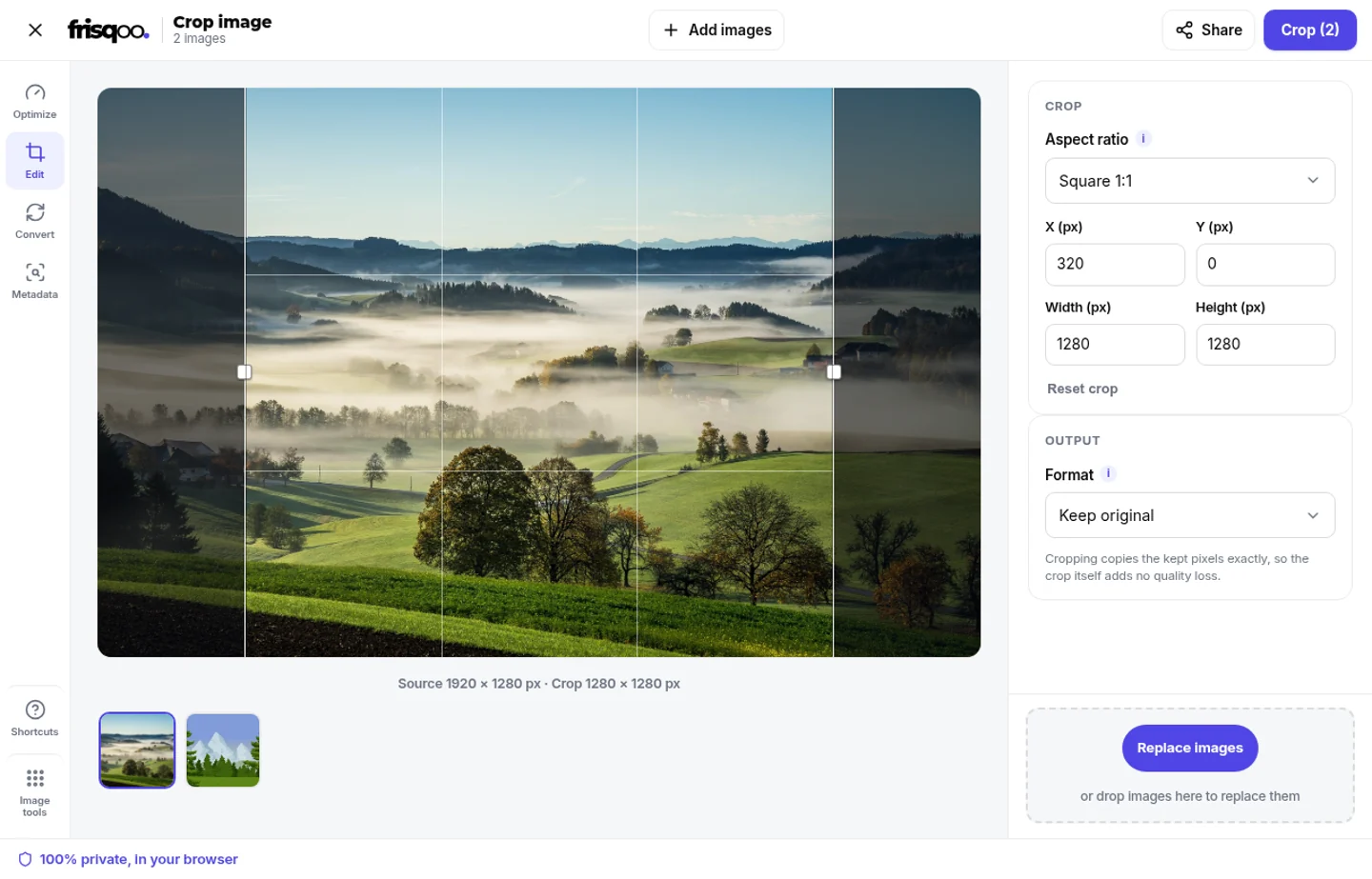
After you add an image, the workspace shows the picture with a crop rectangle over it. Drag inside the rectangle to move the selected area. Drag a side or corner handle to change its edges. The shaded area outside the rectangle is excluded from the result, so you can see the composition before you commit the crop.
Use Freeform when the subject needs a shape that is not tied to a standard frame. This is useful for removing a strip from the top or side of a screenshot, tightening a photo around a product, or cutting a scan down to its useful page area. The Reset crop control returns the active image to its full source rectangle if you want to begin again.
When the queue has more than one image, use the thumbnails below the stage to move between files. The active image has its own rectangle. Changing the crop on one file does not replace the crop you set on another file.
Crop an image to a square or another ratio
Choose an aspect preset when the destination has a fixed shape. Square 1:1 makes a square crop for a profile image, card or thumbnail. Widescreen 16:9 suits a video frame or presentation banner. Landscape 4:3 and Photo 3:2 are common photo shapes, while Portrait 3:4, Portrait 2:3 and Story 9:16 make a tall frame. Original ratio follows the proportions of the source image.
The ratio controls the shape of the crop rectangle, not the final number of pixels. A 1:1 crop from a 4000 by 3000 photo is square, but it is still 3000 by 3000 pixels when the full height is selected. Use the numeric controls when you also need a specific crop image size. Choose Resize image after cropping when you want to scale the selected rectangle to a different output size.
A circular profile picture normally starts with a square crop, but this tool does not draw a circle or create a round mask. Crop the square here, then let the destination app apply its circular frame. That keeps the source image rectangular and avoids promising a shape the tool does not export.
Crop image by size with pixel fields
For a precise crop, use the fields in the side panel. X and Y describe the top-left point inside the source image. Width and Height describe the selected rectangle. The values are measured in source pixels, rather than screen pixels, so a crop remains meaningful even when the preview is scaled to fit the workspace.
Pixel controls are helpful when a template says that an image must be 1200 pixels wide, when a sprite sheet needs a known rectangle, or when you want the same crop coordinates for a set of similarly sized images. Check the displayed source and crop dimensions before pressing Crop. The tool keeps the rectangle inside the source image and enforces a small minimum crop area.
The crop operation selects a source sub-rectangle and draws it at the same width and height. It does not enlarge a small selection or shrink a large one as part of cropping. If you need a crop image and resize result, crop the content first so the subject framing is correct, then use Resize image for the final dimensions.
Crop pictures without unnecessary resampling
The crop itself does not resample the pixels inside the selected rectangle. The engine draws the kept source rectangle at its own width and height, so cropping does not add a scaling step. That is useful when you need to cut away an edge while preserving the pixel dimensions of the area you keep.
The file format still matters. Keep original writes the source format when the browser can produce it. PNG is a lossless choice and keeps an alpha channel. JPG and WebP are encoded outputs with a high quality setting, so they can change the file size and make a small encoding change even though the crop rectangle itself was not resized. A browser that cannot write the requested format falls back to PNG.
For the closest handoff to the source, keep the original file and treat the crop as a new derivative. Check the result at full size when fine text or a sharp edge matters. Cropping cannot restore detail that was already missing in the source, and converting to another format can change how the file is compressed.
Choose PNG, JPG or WebP after the crop
Keep original is the simplest choice when you want the cropped file to stay in the source format. Choose PNG for a transparent logo, an interface screenshot or artwork that needs an alpha channel. Choose JPG for a broadly accepted photo output when transparency is not needed. Choose WebP when the receiving workflow supports it and a compact web image is useful.
When JPG is selected, the canvas is filled with white before the cropped image is drawn. This gives transparent source areas a predictable background because JPG cannot store transparency. PNG output does not need that fill. WebP may keep transparency depending on browser support, so check the saved result if alpha edges are important.
File names make the result easy to identify. The original base name receives -cropped before the output extension. For example, a file named product-photo.png becomes product-photo-cropped.png when PNG is selected. If a requested format is unavailable, the browser-supported fallback uses a PNG extension.
Crop several images in one batch
Add more than one image before opening the crop workspace. The top action shows the queue count, such as Crop (2). Work through the thumbnails and frame each file. A batch can contain different source images, but every one must be a browser-readable image and each one gets its own crop rectangle.
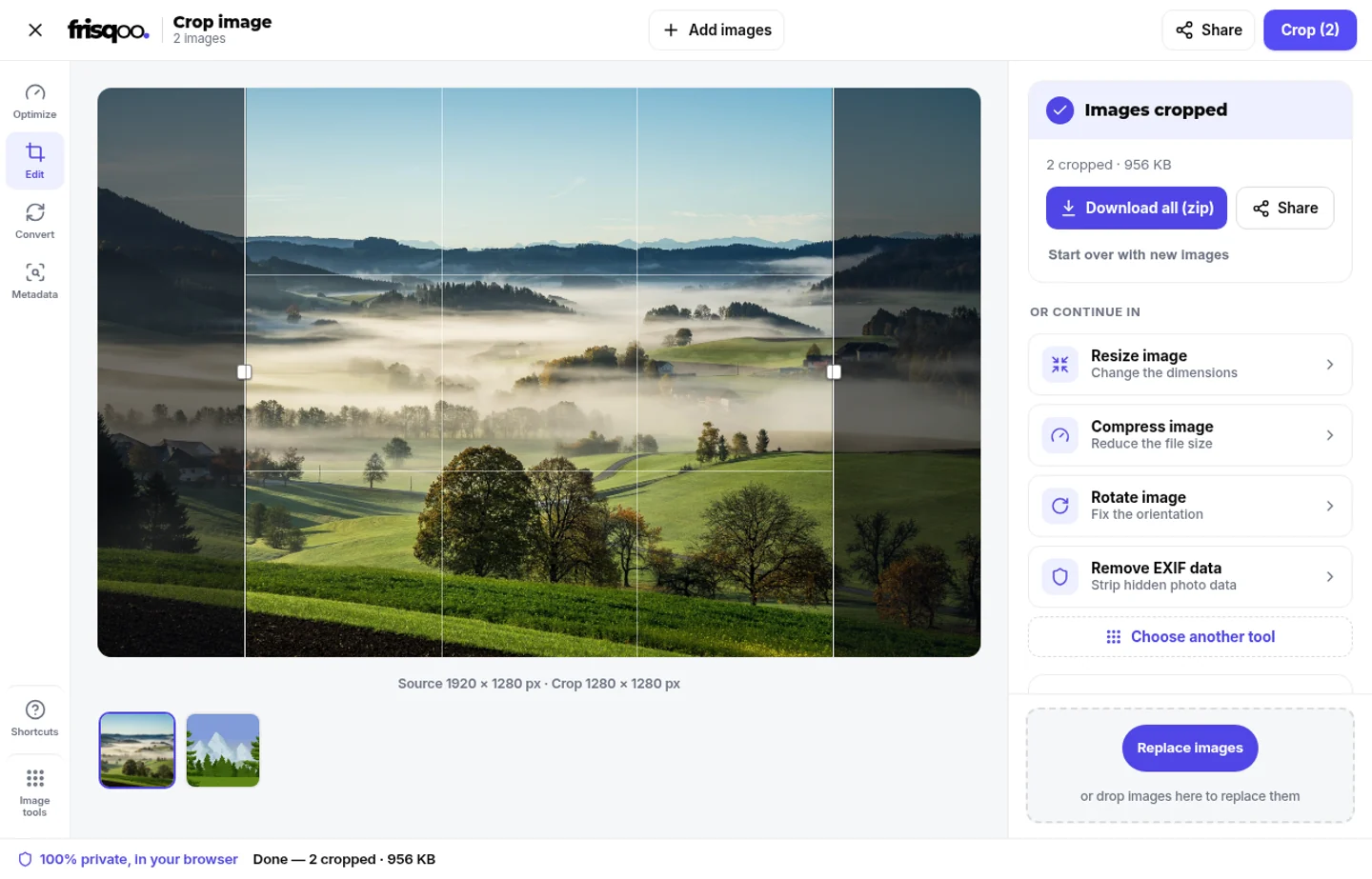
Press Crop when the rectangles are ready. The tool processes the files on the device and reports how many were cropped. If a file cannot be decoded or encoded, it is skipped rather than shown as a successful output. The remaining results can still be downloaded. Try a skipped image separately in a current browser if it matters.
Each result card has its own download action. When two or more results are ready, Download all (zip) creates frisqoo_cropped-images.zip. A zip is useful for a folder of thumbnails, a group of product photos or a set of screenshots. It does not upload the images to assemble the archive. The browser creates the archive from the local output blobs.
Common reasons to crop a picture
People crop a picture when the full frame contains more than the destination needs. A screenshot may include browser chrome or a blank margin. A phone photo may have an unwanted edge. A product image may need the subject centred inside a marketplace frame. Removing the extra area makes the intended subject easier to see without stretching it.
- Crop a photo to a square before using it as a profile image.
- Crop a photo online before placing it in a slide, document or form.
- Trim a screenshot to the message, chart or control that needs discussion.
- Use a 4:3, 3:2 or 16:9 frame for a listing, presentation or video thumbnail.
- Cut a scan to its page edges before sending it to an editor.
- Crop a group of product images and download the results together.
Use the crop image tool on a phone
The same crop image online workflow works on a phone or tablet with a modern browser. Choose a picture from the device picker, move the crop box with touch, or use the numeric fields when the exact dimensions matter. A square preset can be faster than trying to draw a perfect square by hand.
Mobile memory is usually smaller than desktop memory, so start with one image when a photo is very large. Save the result before closing the tab. For a large set, process smaller groups and keep the original files until you have checked the new crops.
Crop first, then continue editing
Cropping solves framing. It does not replace every later image edit. Use Resize image when the selected area needs a new width or height. Use Compress image when the dimensions are right but the file is too large. Use a format converter when another app requires a specific extension.
Keeping these steps separate makes the result easier to check. First confirm that the subject and edges are framed correctly. Next set the output format and inspect transparency. Then resize or compress only if the destination needs it. The crop page offers direct handoffs to the related image tools after a result is ready.
A simple cropper for everyday image work
A good cropping tool should make the rectangle clear, expose exact controls when needed, and avoid hiding what happens to the output. This photo cropper keeps the task focused on framing, rather than adding a full editing suite. This page keeps the main flow short: add an image, set the rectangle, choose a format, and crop. Ratio presets handle common destinations while Freeform leaves room for an unusual frame.
Use the preview to judge composition, the dimension line to check pixels, and the result card to check the saved format and size. The tool is designed for practical edits rather than a full photo editor. It removes the outside of the selected image area, keeps the crop local to the browser, and lets you decide what to do with the resulting file.
What to check before you download
Look at the crop boundary first. Make sure a face, product edge, caption or other important detail is not too close to the cut. If a destination requires a square, 16:9 frame or another ratio, confirm that the correct preset is still selected. If exact dimensions matter, read the displayed crop width and height before pressing Crop.
Then check the output choice. PNG is the safer option for transparency. JPG is useful when the receiving service accepts JPG and a white background is acceptable. WebP can reduce size when it is supported by the next step. If you selected Keep original, confirm that the output extension matches the source and that the browser could write that format.
Common ways people use this crop image tool
- Make a free square crop for a profile photo or thumbnail.
- Crop a photo online to fit a known card or banner ratio.
- Use exact pixel fields to prepare an image for a template.
- Trim a picture before resizing it to a final delivery size.
- Keep a transparent PNG while removing unused canvas space.
- Prepare several images and download one crop image zip.
FAQs about Crop image
How do I crop an image online?
Add an image, move or resize the crop box, then press Crop. You can also enter X, Y, width and height in pixels. The crop is made in your browser, and you can download the result when it is ready.
Can I crop an image to an exact size?
Yes. Enter the top-left X and Y position, then set the Width and Height fields in pixels. Values are kept inside the source image, so the output uses the rectangle you specify.
Can I crop an image to a square?
Yes. Choose Square 1:1 from the aspect ratio menu. The crop box keeps a square shape while you move or resize it. A square crop is useful before an app adds its own circular profile mask.
Can I crop to 16:9 or another ratio?
Yes. Presets include Original ratio, Square 1:1, Landscape 4:3, Photo 3:2, Widescreen 16:9, Portrait 3:4, Portrait 2:3 and Story 9:16. Choose Freeform when you want no ratio lock.
Will cropping reduce image quality?
The crop itself does not resample the kept pixels. Keep original uses the source format where the browser can write it. PNG keeps transparency, while JPG and WebP are encoded at a high quality setting and may be smaller.
What happens to a transparent PNG?
PNG output keeps transparency. If you choose JPG, the transparent areas are filled with white because JPG has no alpha channel. WebP can keep transparency when the browser can write WebP.
What image formats can I crop?
You can add common browser-readable image files, including JPG, PNG, WebP and AVIF. GIF, BMP and SVG filenames are also accepted by the file picker, subject to what the browser can decode.
Can I crop and resize an image at the same time?
Cropping chooses the source rectangle and keeps its pixel dimensions. If you need a different final width or height after the crop, continue to Resize image from the result.
Can I crop several images in one go?
Yes. Add multiple images, switch between their thumbnails and set each crop. Every image remembers its own rectangle. Press Crop once, then download individual files or the batch zip.
What is the crop image zip called?
A batch download is named frisqoo_cropped-images.zip. Individual files keep their original base name and add -cropped before the extension.
Are my images uploaded when I crop them?
No. The browser decodes the image and creates the crop on your device. The files are not sent to a remote cropping service, so the page is suitable for private photos and work files.
Is this free image cropper limited?
The tool is free to use with no sign-up, watermark or daily quota. The practical limit is the memory available to your browser, especially when you add many large images.
Can I crop a picture on my phone?
Yes. Open the crop image page in a modern mobile browser, choose a picture, adjust the crop box or pixel fields, and download the result. Smaller batches use less phone memory.