

RTF to PDF
Convert one Rich Text Format document with a live PDF preview, or process several RTF files as a batch. Common text styling, paragraph layout, lists, simple tables, and supported images are rebuilt as PDF content. Processing runs locally in your browser, and Frisqoo does not upload the source file for processing.
100% private. Your files are processed entirely in your browser and never uploaded.
Why convert RTF to PDF with frisqoo
Local processing
Processing runs locally in your browser. Frisqoo does not upload source files for this task.
Common formatting
Rebuild bold, italic, underline, sizes, colours, alignment, spacing, simple tables, and supported images.
Many languages
Latin, Chinese, Japanese, Korean, and Arabic, with right-to-left shaping for Arabic.
Live preview
Review the reflowed pages and check formatting before downloading a single-file result.
Single or bulk
Convert one RTF in the editor, or drop several and download each PDF, or all of them as a ZIP.
Free to use
No sign-up or watermark. Very large jobs depend on available device memory.
How to convert an RTF file to PDF
- Drop your
.rtffile onto the box, or browse for one. - The document is parsed and rebuilt as a PDF in your browser, keeping its text and inline formatting.
- Check the preview and click Download PDF, or continue in another tool.
Processing runs locally in your browser. Frisqoo does not upload the source file for processing. Offline use depends on the page and required assets loading first.
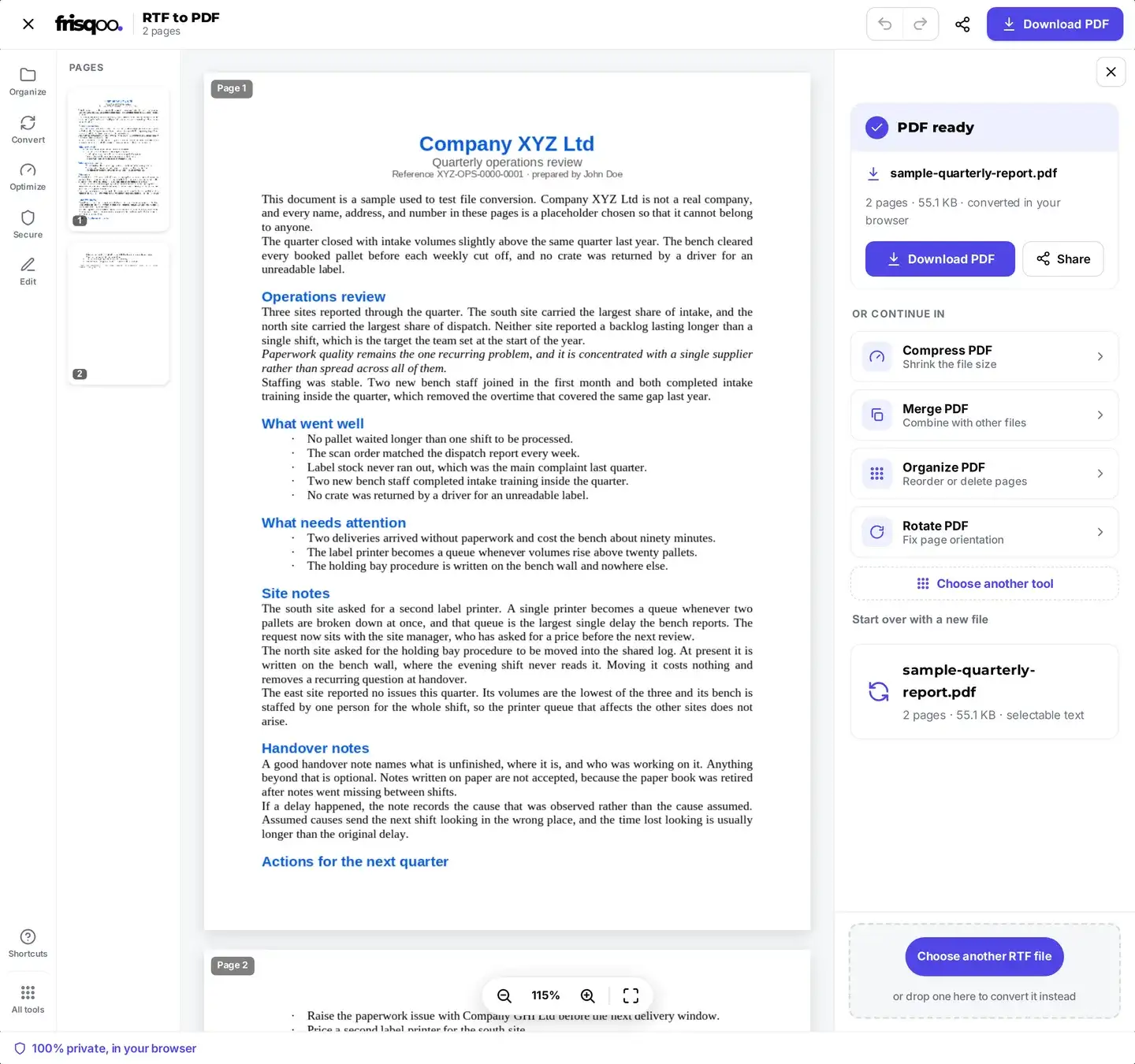
What you get when the PDF is ready
When the conversion finishes, the panel names the new file, counts its pages, gives the size, and confirms the work was done in your browser. The PDF keeps the base name of your document, so notes.rtf is saved as notes.pdf and there is nothing to rename. Press Download PDF to save it. If the file still needs one more step, the same panel hands it straight to Compress PDF, Merge PDF, Organize pages, or Rotate PDF without adding it again. You can also page through the preview and zoom in before you commit to the download.
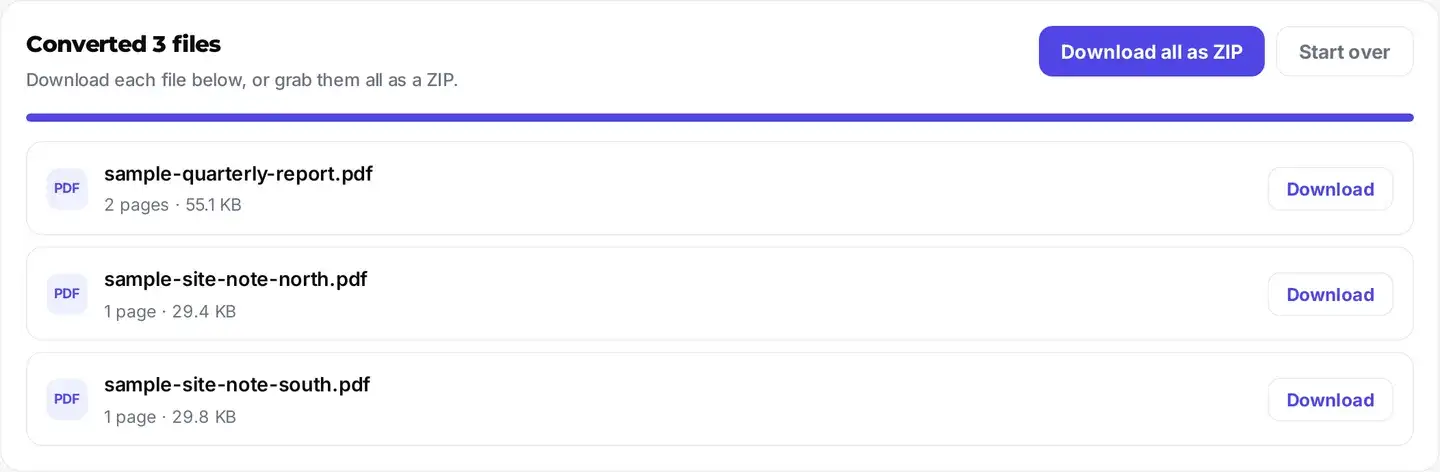
Convert several RTF files at once
Need to convert a whole batch? Drop more than one .rtf file and frisqoo switches to bulk mode: every file is converted in turn, right on your device, and each finished PDF gets its own download button. There is also a Download all as ZIP button so you can grab the lot in one click. Drop a single file and you get the full editor with a live preview instead. Frisqoo does not upload the source files in either mode.
The heading above the list tells you how many files finished, such as Converted 3 files, and every row shows that document’s page count and size beside its own Download button. Bulk mode skips the live preview, so when you want to check the pages of one document before saving it, convert that file on its own.
Local conversion without a source-file upload
RTF conversion runs locally in your browser. Frisqoo does not upload the source document for processing, add a watermark, or require a sign-up. Keep the tab open until the PDF or batch ZIP has finished downloading.
- Your RTF is processed locally and is not uploaded to Frisqoo.
- Conversion can continue after the page, application code, and required fonts have loaded.
- No watermark or sign-up. Practical job size depends on browser memory.
RTF features in the PDF
The full breakdown:
- Paragraphs, line breaks, and automatic page breaks.
- Bold, italic, underline, per-run font sizes, and text colour.
- Left, center, right, and justified alignment.
- The RTF page size and margins, constrained to practical PDF dimensions.
- Selectable, searchable text with embedded fonts.
- Paragraph spacing, indents, and bullet lists.
- Embedded PNG and JPEG images, placed in the document flow using their parsed dimensions.
- Simple bordered tables, rebuilt with columns and wrapped cell text.
- Vector metafile images (WMF and EMF), which a browser cannot render, are skipped with a notice.
- Page headers, footers, exact tab stops, and deeply nested table layout.
- Hard page breaks saved in the file, which are re-flowed to suit the page size rather than kept where they were.
Why the page count can change
An RTF stores flowing document content rather than fixed PDF pages. Frisqoo uses the saved page size and margins, wraps the supported text, and starts a new PDF page when the available area is full. A document can therefore have a different page count from the version shown by a word processor that uses other fonts, layout rules, or printer metrics.
Hard page-break controls are not preserved as fixed break positions. Headers, footers, exact tab stops, unsupported vector images, deeply nested tables, and missing-font glyphs can also affect the result. Review the preview and the downloaded PDF. If a break or advanced layout is essential, adjust the source in its original editor and convert it again.
Review advanced RTF features after conversion
RTF is a broad format, and documents produced by different editors can use different control words. Check the first and last pages, heading styles, list indentation, table widths, image placement, accented or non-Latin text, and the points where pages break. The result panel shows a notice when a WMF or EMF image cannot be rendered, or when a few characters have no matching bundled font.
The converter maps common serif, sans-serif, and monospaced families to bundled PDF fonts rather than embedding the original desktop font by name. Chinese, Japanese, Korean, and Arabic text uses script-specific fallback fonts when needed; Arabic text is shaped for joined display. These fallbacks help retain readable text, but line lengths and page breaks can differ from the source application.
Is the text real, selectable text?
Yes. Supported words are written into the PDF as a text layer rather than a flat page image, so they can be searched, selected, and copied in a PDF reader. Embedded PNG and JPEG content remains image content. If you later need the text in a separate file, PDF to text can read the generated text layer.
Does it work on my phone?
A current desktop or mobile browser can run the tool without installing a separate app. Add the RTF, review the preview, and use Download PDF to save the result through the browser. Available memory and processing speed vary by device, so larger or image-heavy documents may work better on a computer or as smaller batches.
FAQs about RTF to PDF
Is my RTF file uploaded for conversion?
No. Conversion runs locally in your browser. Frisqoo does not upload the source file for processing. Keep the page open until the PDF or ZIP has finished downloading.
Can I convert several RTF files at once?
Yes. Drop more than one .rtf file and each one is converted in turn, right on your device. You get a separate download button for every finished PDF, plus a Download all as ZIP button to grab them together. Drop a single file and you get the full editor with a live preview instead. Either way, Frisqoo does not upload the source file for processing.
What formatting is kept?
The converter rebuilds paragraphs, line breaks, bold, italic, underline, font sizes, text colours, alignment, spacing, indents, lists, simple bordered tables, and embedded PNG or JPEG images. It uses the RTF page size and margins within practical PDF bounds and adds selectable text.
Which RTF features need review?
WMF and EMF vector images are skipped with an on-screen notice. Headers, footers, exact tab stops, deeply nested tables, and hard page-break positions are not reproduced exactly. A few glyphs may also be omitted when no bundled font contains them, and the result panel reports that condition.
Can it handle other languages?
Yes. Latin and European accented text work out of the box, and Chinese, Japanese, Korean, and Arabic use a matching open-license font loaded only for that document. Arabic is shaped and joined. Bold and italic apply to Latin text; some scripts use a single regular weight.
Is the text in the PDF selectable?
Yes. Supported text is written as a PDF text layer, so it can be searched, selected, and copied in a PDF reader. This is different from converting every page into a flat image.
Can I use the bundled fonts commercially?
The bundled fonts are supplied under the SIL Open Font License or Bitstream Vera license, and the full license texts ship with the site. Use them in line with the applicable license terms.
Is there a file size or page limit?
The tool does not add a watermark or impose a displayed page limit. Practical limits depend on the RTF complexity and the memory available to your browser and device.
Does it work offline?
Conversion can continue after the page and its required fonts and application assets have loaded. Reloading the page may require a connection again.
Is the RTF to PDF converter free?
Yes. There is no sign-up or watermark. Phones, tablets, and computers can use the tool in a current browser, while conversion speed and maximum job size depend on the device.