

HTML to PDF
Turn one HTML document, or a whole batch, into clean, selectable PDFs. Your headings, text styles, colours, lists, tables, and inline images are kept, the result previews live, and the whole thing runs inside your browser. Frisqoo does not upload the source file for processing, and there is no watermark.
100% private. Your files are processed entirely in your browser and never uploaded.
Why convert HTML to PDF with frisqoo
Private by default
The first PDF stays on your device and contacts no external host. Fetch linked resources only when you approve them.
Real CSS layout
Class based CSS, flexbox, grid, colours, borders, tables, and clickable links are laid out by your browser and kept in the PDF.
Real text layer
Words are written as selectable, searchable text, not a flat screenshot.
Many languages
Latin, Chinese, Japanese, Korean, and Arabic, with right-to-left shaping for Arabic.
Single or bulk
Convert one HTML page, or drop several and download each PDF, or all of them as a ZIP.
Free to use
No sign-up or watermark. Very large jobs depend on available device memory.
How to convert an HTML file to PDF
- Drop your
.htmlor.htmfile onto the box, or browse for one. - Your browser rebuilds the page as a PDF. If external HTTPS resources are found, review them and fetch only the sources you trust.
- Check the preview and click Download PDF, or continue in another tool.
Frisqoo does not upload the HTML file. Fetching an approved external resource sends a browser request only to that resource's host.
What you get when the PDF is ready
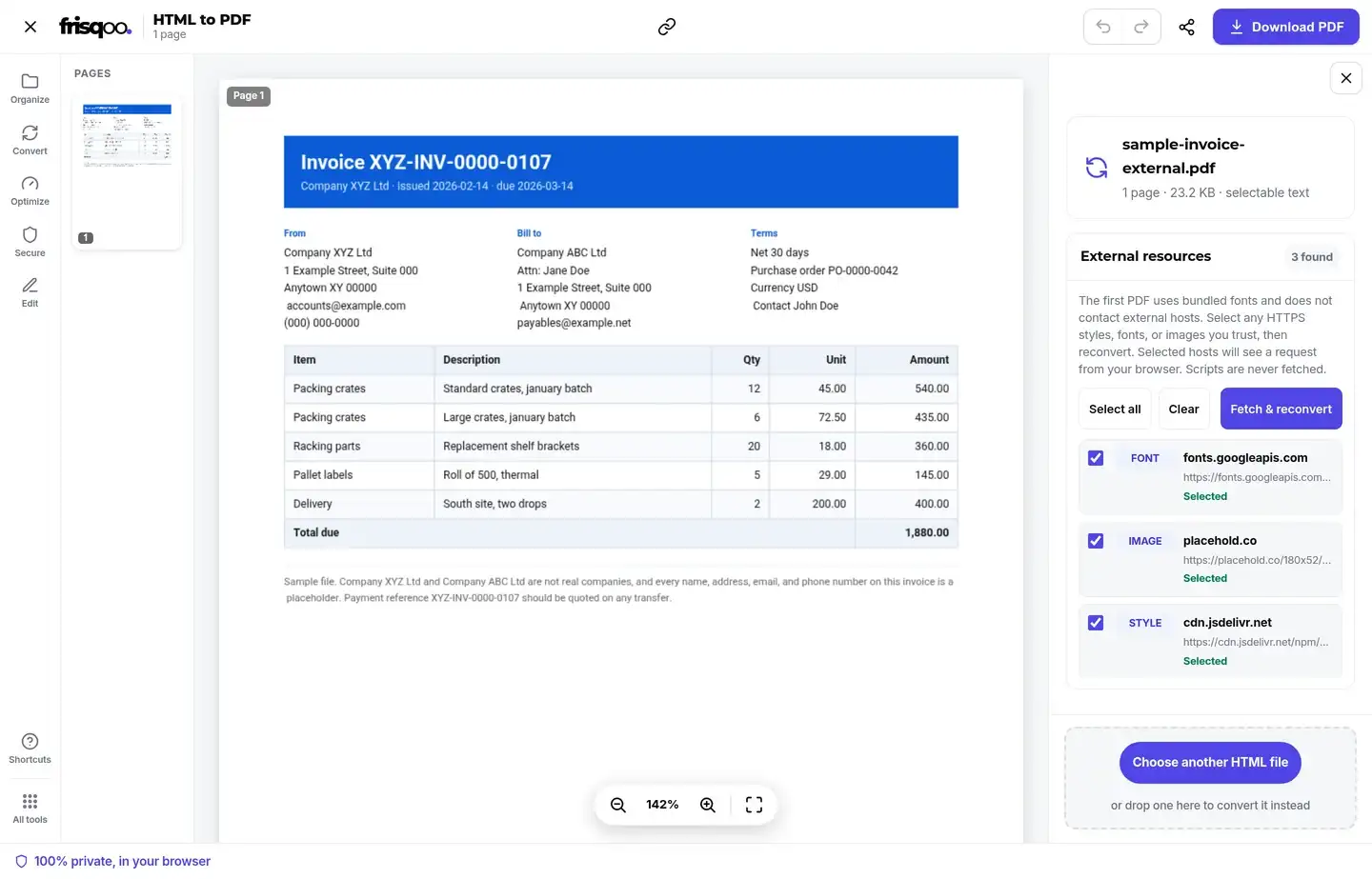
A single file opens the full editor. The rebuilt page appears in the preview, so you can check the layout, the tables, and any images before you save. Above it a short line confirms the PDF is ready and gives you its page count, its size, and a reminder that it was converted in your browser rather than on a server.
The PDF takes the name of the source file, so invoice-034.html becomes invoice-034.pdf, which matters when you are working through a folder of them. Download PDF saves it, and on a phone or tablet Share hands it to Mail, Messages, or your cloud drive. After the save, a status line names the file it wrote, and Start over with a new file clears the screen for the next one.
Do not be surprised by the page count. A web page has no page size of its own, it is simply as tall as its content, so the layout has to be poured onto fixed sheets. A short invoice lands on one page, a long report runs to as many as it needs, and a wide table is fitted to the width of the page rather than cut off at the edge.
From the same panel the finished PDF can go straight into another tool without being added again. Compress PDF brings down a page heavy with images, Merge PDF joins a set of invoices into one document, Add page numbers numbers a long report, and Organize pages drops anything you do not need.
Turning a web page into a PDF
This tool converts an HTML file that is already on your device, so a live web page needs one extra step: save it first, then drop the saved file here.
- On a computer, open the page and press Ctrl+S, or Command+S on a Mac.
- Pick a single-file save if your browser offers one, since it packs the pictures into the file itself. Otherwise choose the HTML-only option.
- Drop the saved
.htmlfile onto the box above.
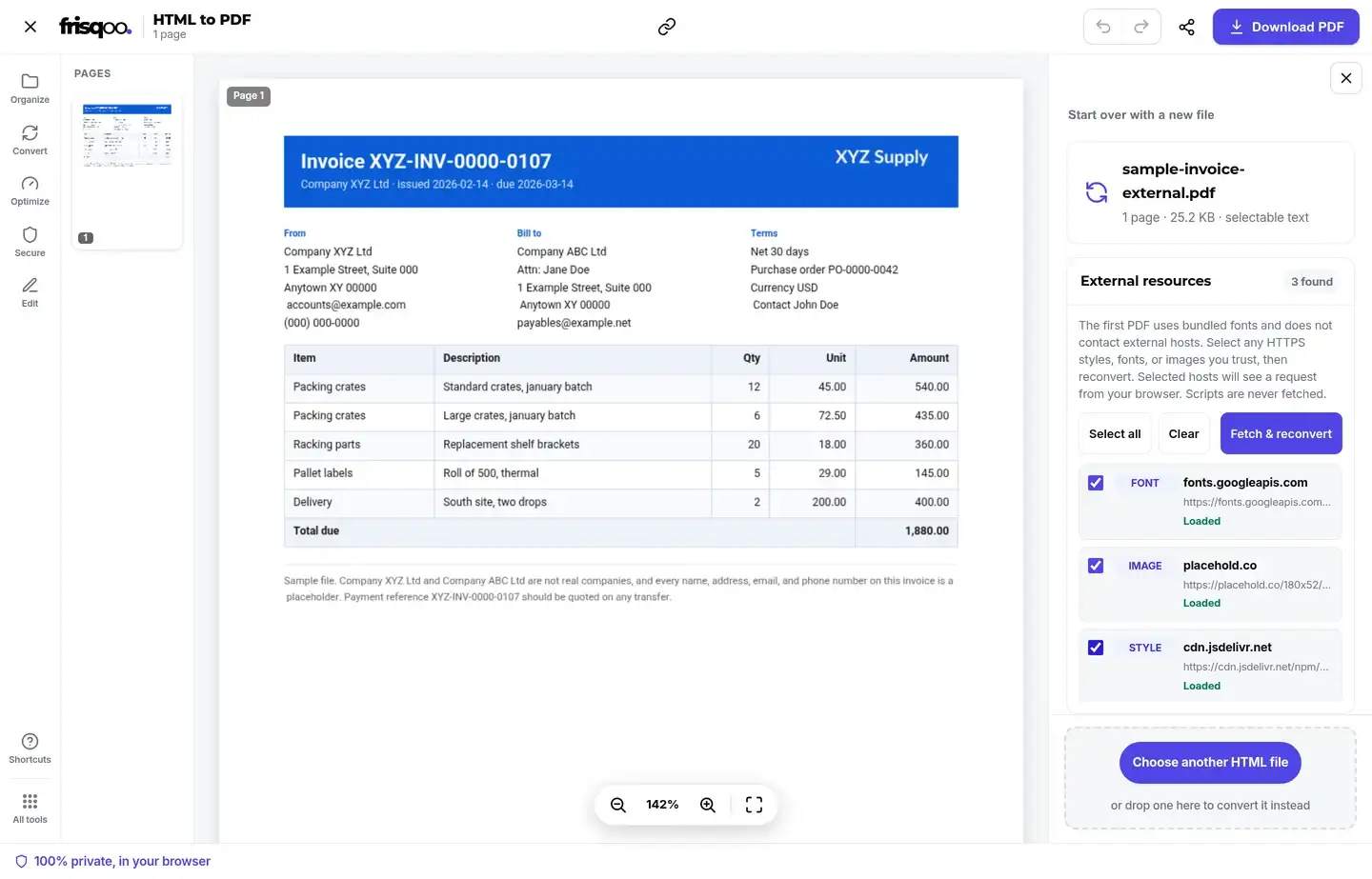
The first conversion contacts no outside host. Text, tables, inline styles, and embedded pictures appear immediately. When the saved file still points to HTTPS images, fonts, or stylesheets, open External resources, inspect the host names, select the items you trust, and choose Fetch & reconvert. The selected hosts receive a request from your browser. The HTML file itself remains on your device.
Where this tool wins is on files you already hold: an exported invoice, a saved report, an email saved as HTML, or a template you are building. Those convert locally and keep their text, while Frisqoo does not upload the source file.
Why the PDF can look different from the browser
Most of the time the PDF matches what you see. When it does not, there are only three real reasons, and each has a simple explanation.
- JavaScript does not run. The page is captured as it first loads, so anything a script would have built, filled in, or revealed after a click is not there.
- External resources start blocked. Review detected HTTPS images, fonts, and stylesheets before allowing the browser to request them.
- A few decorative effects are simplified. Gradients, shadows, transforms, and filters may be flattened or dropped. Structure, spacing, and colour survive.
A page built to be read usually converts closely. A page built around scripts still converts only its static starting state, even when its approved images, fonts, and stylesheets are fetched.
Getting the best result from your HTML
If you control the file, a few small choices make the PDF much closer to what you intended.
- Put essential CSS in a <style> block so the private first conversion has the layout without making a network request.
- Embed important pictures when possible. A linked image can be fetched after approval, but its host may refuse browser requests or later remove the file.
- Write the content into the HTML rather than having a script build it when the page opens.
- Prefer plain layout tools like flexbox, grid, and tables, which are reproduced faithfully, over decorative effects that may be simplified.
- Give tables sensible widths. A very wide table has to fit the page, and narrow columns are easier to read than squeezed ones.
Convert once, look at the preview, then adjust. Because conversion runs locally with no queue, you can adjust the settings and convert again.
Convert several HTML files at once
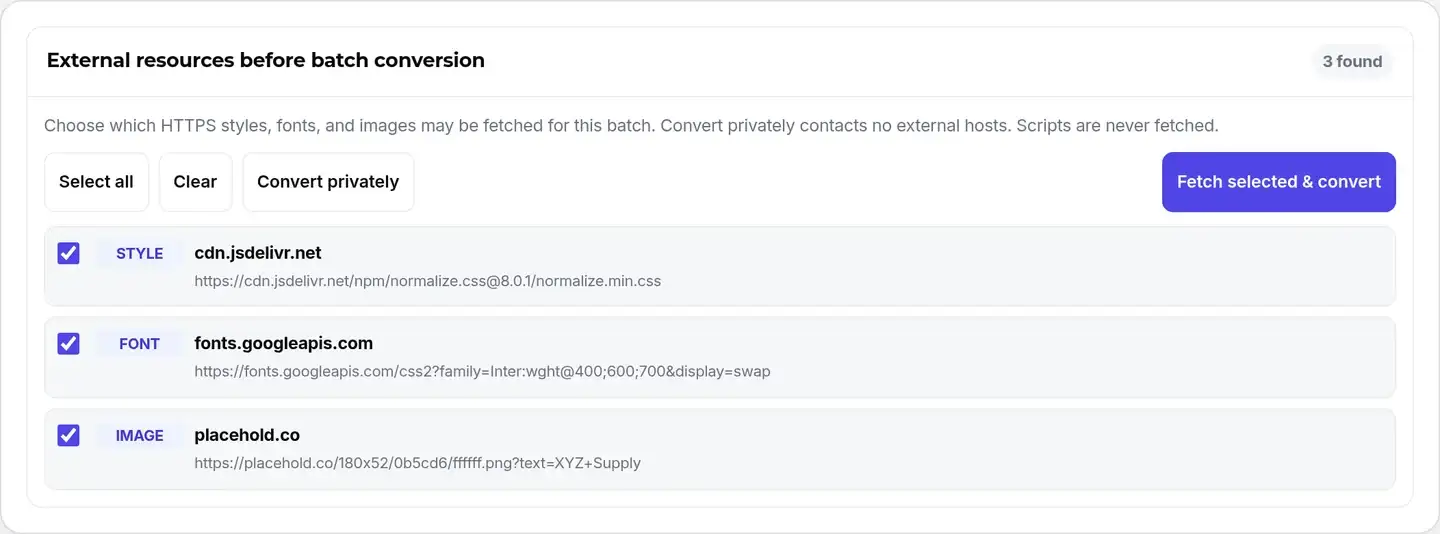
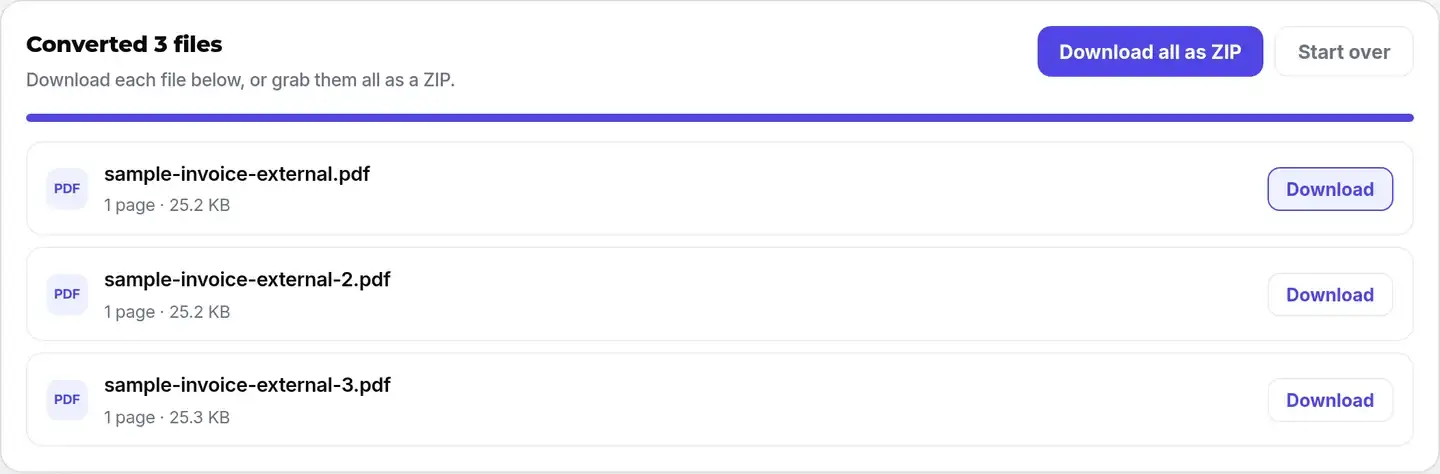
Drop more than one .html or .htm file and frisqoo switches to bulk mode. It scans the set for external HTTPS resources before conversion. Choose Convert privately to contact no outside host, or select trusted items and choose Fetch selected & convert. Every file is then rebuilt in turn, with its own download button and a Download all as ZIP option.
Bulk mode swaps the preview for a list, with each row naming the finished PDF and showing its page count and size. That is usually enough to spot a file that came out wrong, since a page that failed to style itself is normally far shorter than the rest. Files are handled one after another, so a long list takes a little time but will not exhaust the memory on a phone.
The ZIP carries the name of the tool, not of any one file, so a batch arrives in your downloads as one bundle to unpack wherever you want it. Taking the files one by one is the better option when only a couple of them were the ones you actually needed.
Free, with no HTML upload
The HTML file and PDF processing remain in your browser. The private first pass makes no external requests. If you approve linked resources, only the selected HTTPS hosts receive requests for those files. There is no conversion server, queue, watermark, or sign-up.
- Your HTML is processed locally and is not uploaded to Frisqoo.
- No upload and no queue. Embedded content also converts offline after the page has loaded.
- No watermark, no sign-up, and no page limit.
What is kept, and what is not
Styled pages are laid out by your browser's own engine and redrawn as a real PDF, so the result comes very close to the page without uploading anything. The full breakdown:
- Class based CSS and <style> blocks, with colours, backgrounds, and borders.
- Full layout: flexbox, grid, absolute positioning, and multi-column structure.
- Headings, bold, italic, underline, font sizes, colour, and alignment.
- Nested lists and bordered tables.
- Clickable links that stay tappable in the PDF.
- Currency symbols (rupee and more) plus Chinese, Japanese, Korean, and Arabic text.
- Embedded PNG and JPEG images, and SVG icons rasterized in place.
- Selectable, searchable text with embedded, commercial-safe fonts.
- External HTTPS images, fonts, and stylesheets can be reviewed and fetched after explicit approval.
- JavaScript: interactive pages are captured as first loaded, not after clicks or typing.
- External scripts and active embeds are never fetched or run.
- A few advanced CSS effects (gradients, box shadow, transforms, filters) are simplified or skipped.
- A byte-for-byte server screenshot, which would require uploading your file.
Is the text real, selectable text?
Yes. The words are written into the PDF as a genuine text layer rather than a flat image, so the finished file can be searched with Ctrl+F, selected, copied, and read by screen readers. If you later need the words back out, PDF to text reads that same layer.
Does it work on a Mac, a PC, or a phone?
The converter can run in a current browser on a Mac, PC, Chromebook, phone, or tablet, with nothing to install. Font support, browser PDF behavior, and available memory can change the result, so review the preview before saving a large or styled page.
On a computer, drag the file in from Finder or File Explorer, which is the quickest route when you are working through a folder. On a phone or tablet, tap the box and pick the file from Files, Downloads, or your cloud drive, then send the PDF onward with Share. A page saved on a phone can be converted there, but available fonts, browser PDF behavior, and memory can differ from a laptop. Check the preview before saving, especially for a long or heavily styled document.
FAQs about HTML to PDF
Is my HTML file uploaded anywhere?
No. The whole conversion happens inside your browser on your own device. Your file never leaves your computer, which makes this safe for private reports, invoices, and drafts. Close the tab and nothing is left behind.
Can I convert several HTML files at once?
Yes. Drop more than one .html or .htm file and each one is converted in turn on your device. If the files contain external HTTPS styles, fonts, or images, choose which resources may be fetched before conversion starts. Every finished PDF has its own Download button, and Download all as ZIP saves the set together.
Can I convert a web page, not a file?
Save the page first, then convert it. Press Ctrl+S, or Command+S on a Mac, and choose a single-file save when available. An HTML-only save may still link to external resources. The tool lists those HTTPS styles, fonts, and images so you can fetch only the ones you trust.
What formatting is kept?
Styled pages are laid out by your own browser engine, so class based CSS and <style> blocks, flexbox, grid, absolute positioning, colours, backgrounds, borders, and font styling all carry across, and links stay clickable. Headings, paragraphs, bold, italic, underline, font sizes, colour, alignment, nested lists, and bordered tables are all kept. Currency symbols such as the rupee, and Chinese, Japanese, Korean, and Arabic text, use a matching embedded font. The text is drawn as a real, selectable layer, not a picture.
What is not converted?
JavaScript and active embeds never run. The first PDF does not contact external hosts, so linked resources are absent until you approve them. Even after approval, a resource can fail because its host blocks browser requests. Gradients, shadows, rounded corners, transforms, and filters may also be simplified. The result is a rebuilt PDF, not a byte-for-byte server screenshot.
How are linked images, fonts, and styles handled?
The first PDF uses bundled fonts and does not contact external hosts. Open External resources to review every HTTPS image, font, and stylesheet the file references. Select only sources you trust, then choose Fetch & reconvert. Those hosts receive a request from your browser, but Frisqoo does not upload the HTML file itself.
Can it handle other languages?
Yes. Latin and European accented text work out of the box, and Chinese, Japanese, Korean, and Arabic use a matching open-license font loaded only for that document. Arabic is shaped and joined. Bold and italic apply to Latin text; some scripts use a single regular weight.
Is the text in the PDF selectable?
Yes. Every word is written as a genuine text layer, so the PDF can be searched, selected, and copied in any reader, and read by screen readers.
Can I use the bundled fonts commercially?
The bundled fonts are supplied under the SIL Open Font License or Bitstream Vera license, and the full license texts ship with the site. Use them in line with the applicable license terms.
Is there a file size or page limit?
There is no fixed cap and no watermark. Because everything runs in your browser, a very large document simply uses more of your device’s memory.
Does it work offline?
Yes for embedded content once the page has loaded. External resources cannot be fetched while offline, so keep them inside the HTML or use the private first conversion.
Is it really free?
Yes. There is no sign-up or watermark. The converter can run in a current desktop or mobile browser, while large files and complex styling depend on the browser, fonts, and memory available on that device.