

URL Encode and Decode
Paste text to percent-encode it for a link, or paste an encoded value to read it back. Both directions run inside your browser, so nothing is uploaded. Pick whether you are encoding one value, a whole address or posted form data, because each follows a different rule and mixing them up is what breaks links.
100% private. Your text is converted entirely in your browser and never uploaded.
Why encode URLs with frisqoo
100% private
URLs carry tokens and internal hostnames. Yours are converted in your browser and never uploaded.
The right rule
Three modes, because one value, a whole address and form data each follow different rules.
Both directions
Encode, decode, and tap Swap to feed the result back and catch double-encoding.
Real UTF-8
Accents, Devanagari, Chinese, Arabic and emoji all come back exactly as you sent them.
No internet needed
Once this page has loaded, the conversion itself runs with no connection at all.
Any device
Runs in any modern browser on a phone, tablet or computer. Nothing to install.
How to encode or decode a URL
- Paste your text or link into the left box, or tap Load sample to try it.
- Choose Encode or Decode, then pick whether you are handling one value, a whole URL, or form data.
- Tap Copy result or Download. Use Swap to check the value round-trips.
Everything runs on your device, so it is fast and your links stay private, even with no internet once the page has loaded.
What is percent-encoding?
A web address is only allowed to use a small set of characters: letters, digits, and a handful of punctuation marks that each have a job to do. Everything else has to be rewritten. Percent-encoding does that by replacing a character with a percent sign and two hex digits, so a space becomes %20, a question mark becomes %3F, and a hash becomes %23.
This is why a link with a space in it survives being pasted into a browser bar, an email or a chat window. Without it, the first space would look like the end of the address and everything after it would be thrown away.
Encode or decode: which one do you need?
Encoding turns readable text into the percent form. Decoding turns it back. If you are building a link, you encode. If someone sent you a link full of percent signs and you want to read it, you decode. The two buttons above the box choose the direction.
Here is one value both ways. Typing a b&c=d and encoding it gives a%20b%26c%3Dd. Paste that result back, decode it, and your original text returns. A value like %E2%82%AC50 decodes to €50, because the euro sign is stored as three percent groups.
Decoding has one trap worth knowing. A plus sign means a space in form data, but a real plus everywhere else. Decode hello+world in Form data and you get hello world. Decode the same text in One value in a URL and the plus stays a plus. Pick the mode that matches where the text came from.
This is also how you read a redirect link. A whole address encoded as one value looks like https%3A%2F%2Ffrisqoo.com%2Ftools%2Furl-encode-decode%2F. Decode that and you can see where a link actually goes before you click it.
Which mode should you pick?
One value in a URL is the safe default. It escapes everything that is not plainly safe, including slashes, question marks and ampersands, because a single value must never be able to look like the structure around it. Use it when a search term, a filename or an email address is about to be dropped into a link.
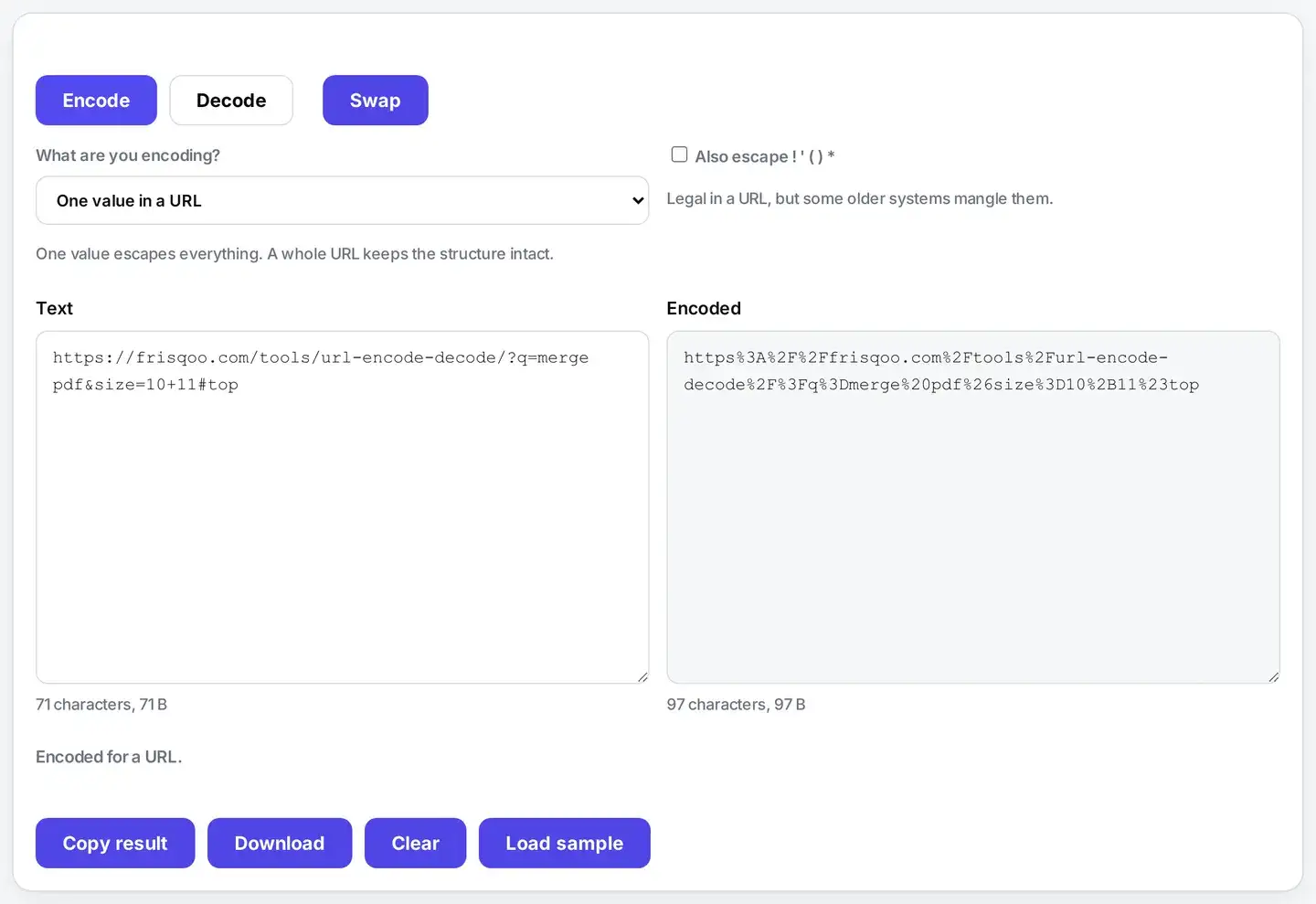
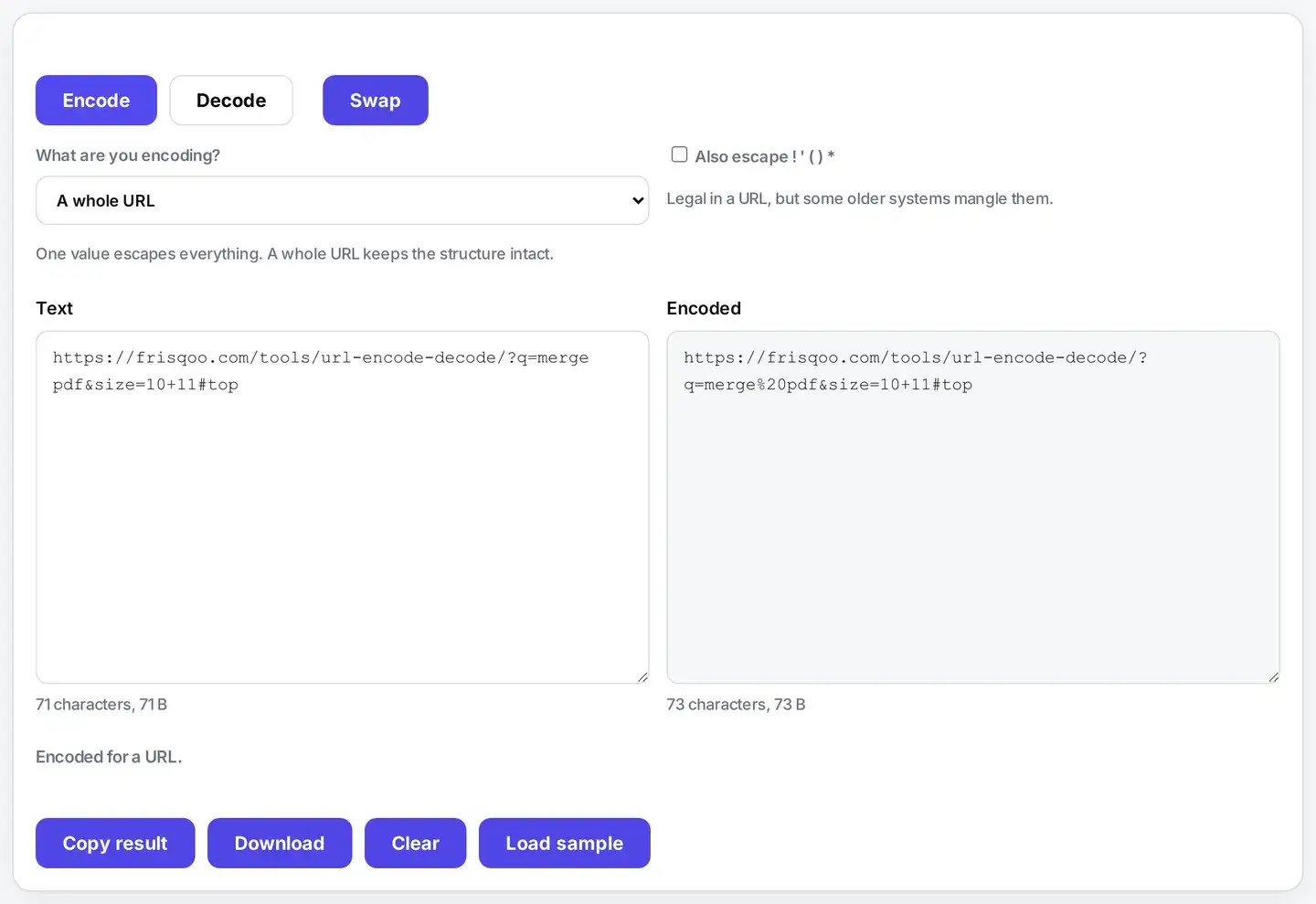
A whole URL is the opposite job. Here the colon, the slashes, the question mark and the ampersands are meant to be there, so they are left alone and only the genuinely unsafe characters inside the address are fixed. Reach for this when you already have a complete link that simply has a space or an accent in it.
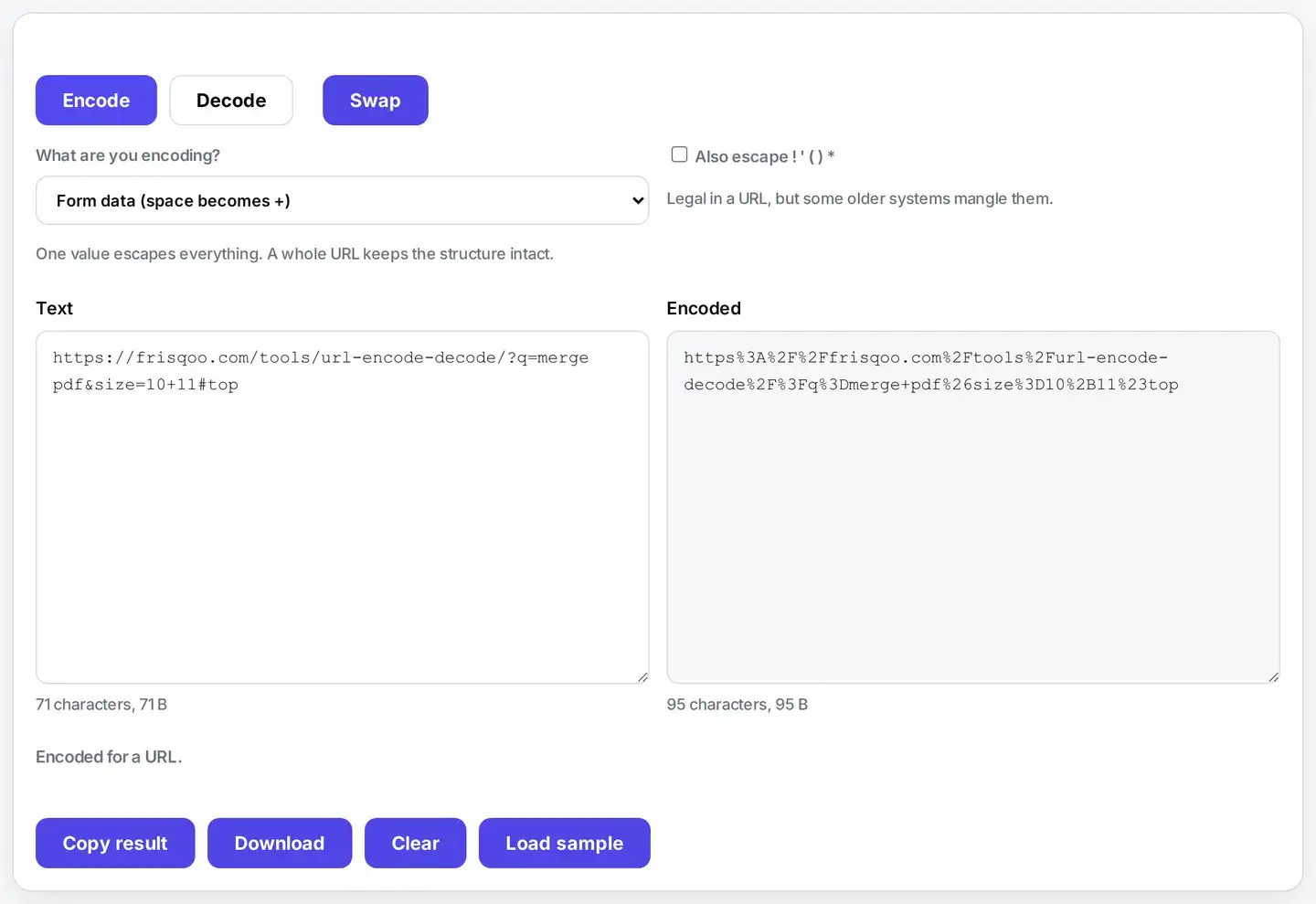
Form data follows the older HTML form rule, where a space becomes a plus sign rather than %20. Use it only for the body of a posted form, because using it for a path will put literal plus signs where you wanted spaces.
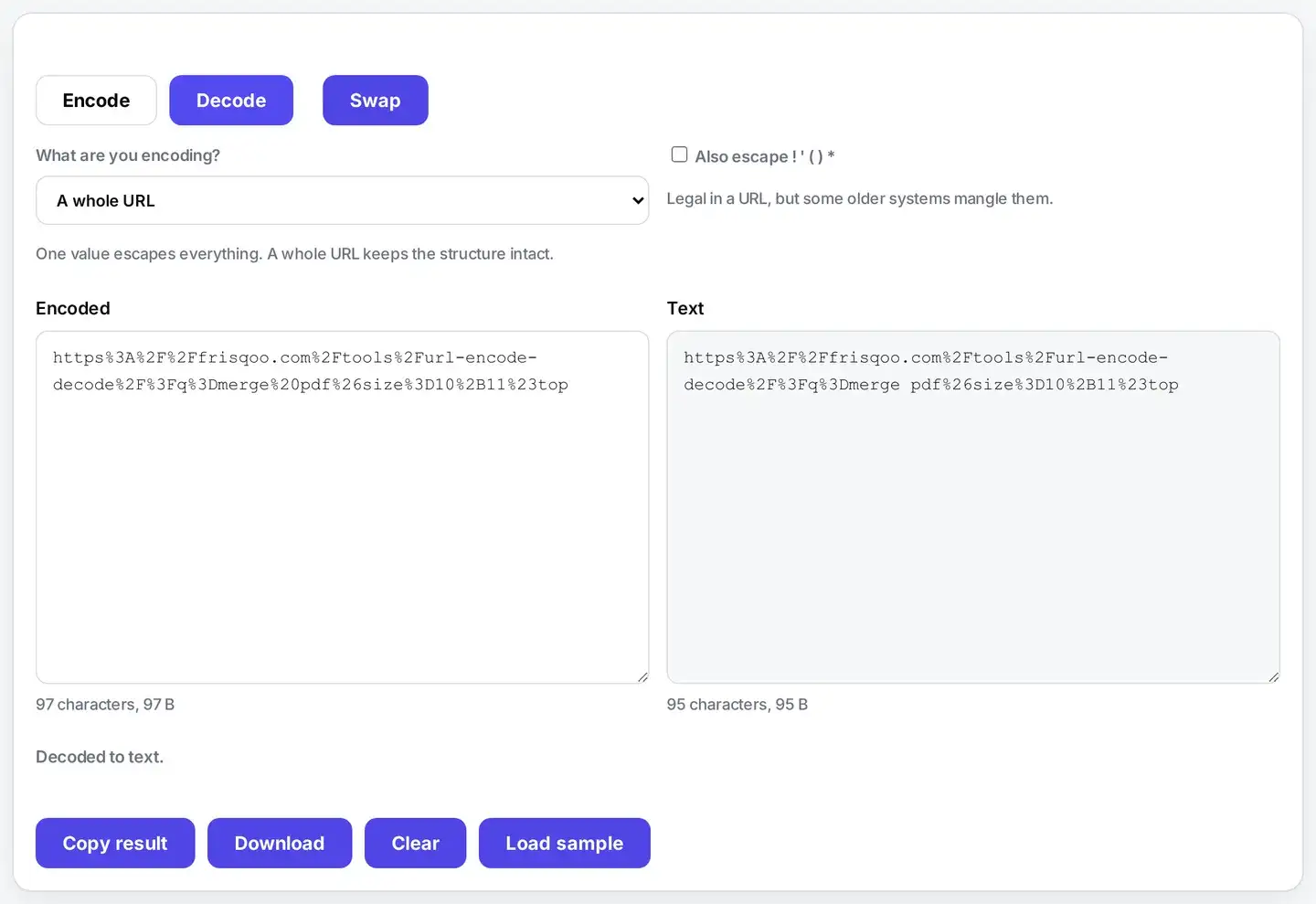
The mode matters when you decode too, which is easy to miss. Decode %2B and you get a plus sign under One value in a URL and under Form data. A whole URL leaves it as %2B on purpose, because the characters that give an address its shape, such as the plus, ampersand, question mark, hash, slash and colon, have to stay escaped or decoding could quietly break the link. Form data has one more habit of its own: it turns a plus back into a space. So if a decoded value looks wrong, check the mode before you blame the input.
You can work through several links at once, in either direction. Paste one link per line. Each line is handled on its own, so the results come back in the same order. The line breaks are left alone rather than escaped as %0A, so a list stays a list. One line behaves just as it always did, because splitting it gives one piece. For a batch of links this is much quicker than doing them one at a time.
Why does a space become a plus sometimes?
Because two different standards grew up side by side. The URL rules say a space is %20. The HTML form rules, which predate most of the modern web, say a space in submitted form data is a plus. Both are still in daily use, and a server that expects one and receives the other will usually just fail quietly and return nothing.
That quiet failure is why the choice here is a visible dropdown instead of something guessed for you. If a search or an API call is returning empty results for no obvious reason, switching this one setting is the first thing worth trying.
Why did my link break?
The most common cause by far is encoding the same text twice. A percent sign is itself an unsafe character, so it becomes %25. Run an already-encoded value through again and %20 turns into %2520, which a server reads as a literal percent, a two and a zero rather than a space.
The fix is to decode first and check you are looking at ordinary readable text, then encode exactly once. Tapping Swap does this in one move: it carries the result back into the left box and flips the direction, so double-encoding becomes obvious immediately.
The same three rules in code
The three modes are not invented here. Each one matches a function you already have.
In JavaScript, reach for encodeURIComponent when you are encoding a single value, and encodeURI when you already have a whole address in hand. Form data is what URLSearchParams builds for you, and decodeURIComponent reads a value back again.
Python follows the same pattern. Use quote with an empty safe list for one value, quote_plus for form data, and unquote to decode. All three live in urllib.parse.
These pairings were checked rather than assumed. The first pair turns a b&c=d into a%20b%26c%3Dd, which is the same string this page gives you. The form data pair returns a+b%26c%3Dd instead, with a plus standing in for the space.
So use this page to see what a value should look like, then let your own code produce it. When a link breaks, that comparison shows quickly whether the bug is yours or the encoding.
How is this different from Base64?
They solve different problems. Percent-encoding keeps your text readable and only touches the characters that would break a URL, so an encoded link is still something a human can scan. Base64 rewrites everything into an unbroken block of letters and numbers, which is what you need when a system cannot carry arbitrary bytes at all.
In practice you often use both: Base64 to turn data into safe text, then percent-encoding to put that text into a link. If you are moving structured data around instead, XML to JSON may be the tool you actually want.
Is it safe to paste a private URL here?
Yes, and it is worth being clear about why that matters for this particular tool. A real URL is often more sensitive than the page it points at: it can contain a session token, a password reset key, a signed download link, an internal hostname, or the exact thing somebody searched for. Many free encoders send whatever you paste to their server to do the work, which puts all of that into someone else’s logs.
This page does the conversion in your browser, so the link never leaves your device. One honest warning that has nothing to do with this site: encoding is not protection. It is instantly reversible by anyone who sees it. For more tools that work the same local way, see the developer tools.
FAQs about URL Encode and Decode
Is my text uploaded to a server?
No. The encoding runs inside your browser on your own device. A URL often carries a session token, a search someone typed, or an internal hostname, and none of that leaves your machine here. Closing the tab leaves nothing behind.
What is percent-encoding?
A web address is only allowed to contain a small set of characters. Percent-encoding rewrites anything outside that set as a percent sign followed by two hex digits, so a space becomes %20 and a question mark becomes %3F. It is the reason links with spaces or accents survive being pasted into a browser, an email or a chat message.
Which of the three modes should I pick?
If you are encoding one piece of a URL, such as a search term or a filename that is about to become part of a link, pick One value in a URL. If you already have a complete address and just want the unsafe characters inside it fixed, pick A whole URL, which leaves the colon, slashes, question mark and ampersands doing their job. Pick Form data only when you are building the body of a posted form.
Why does a space sometimes become %20 and sometimes a plus?
Both are correct, in different places. Inside the path of a URL a space must be %20. Inside posted form data, the old HTML form rules turn it into a plus instead. Mixing them up is one of the most common causes of a search that returns nothing, which is why the mode is a visible choice here rather than a guess.
Does it handle emoji, Hindi and accented letters?
Yes. Text is read as UTF-8 first, so a character outside the basic Latin range becomes several percent groups and decodes back to exactly what you started with. Emoji, Devanagari, Chinese and Arabic all round-trip correctly.
What does the option for ! ' ( ) * do?
Those five characters are legal in a URL, so they are normally left alone. A few older systems, some email clients and some SMS gateways still mangle them, and certain APIs insist on seeing them escaped. Turn the option on and they are encoded too. Leave it off for ordinary web use.
Why did my link break after encoding?
Usually because it was encoded twice. Once a percent sign has been encoded it becomes %25, so a second pass turns %20 into %2520 and the link stops working. Decode first, check you are back to plain text, then encode once. Swap makes that easy to see.
Is percent-encoding the same as Base64?
No. Percent-encoding keeps text readable and only rewrites the characters that would break a URL. Base64 rewrites everything into a solid block of letters and numbers. Use percent-encoding for links and query strings, and Base64 when a system can only carry plain text at all.
Does encoding hide or protect anything?
No. It is a formatting rule, not a security measure. Anyone can decode it instantly, and this page will do it in one tap. Never treat an encoded value as a hidden one.
Is it free?
Yes. No sign-up, no watermark, and no size limit beyond what your own device can hold. It works the same on phones, tablets and computers in any modern browser.