

JPG to PNG
Turn JPG photos into lossless PNG files. Add your images, press Convert, and each one is rebuilt as a PNG on your own device. The work runs in your browser, so Frisqoo does not upload the source files for processing.
100% private. Your files are processed entirely in your browser and never uploaded.
Why convert JPG to PNG with frisqoo
Local processing
Processing runs in your browser, and Frisqoo does not upload the source files for this task.
Lossless PNG output
PNG keeps every pixel exactly as it was decoded, so you can edit and re-save the file later without adding fresh compression damage each time.
No hidden data carried over
Each photo is repainted onto a clean canvas, so the GPS location, camera model and timestamp stored in the JPG never travel into the PNG.
A whole batch at once
Add many JPG files together, convert them in one pass, then save them one by one or all in a single zip.
Ready for strict uploads
Some sites, apps and print jobs accept PNG only. You get a clean PNG that will pass those checks without a fuss.
Free, with no caps
No sign-up, no watermark and no daily quota. The only real limit is how much your own device can hold in memory.
How to convert JPG to PNG
- Add your JPG images. Drop them on the box or pick them from your device, one or many.
- Press Convert. Each image is decoded and re-encoded as a lossless PNG on your device.
- Download your PNG files. Save each one on its own, or get them all together in a zip.

When to convert JPG to PNG
JPG is the right format for storing and sharing photographs, so moving to PNG is rarely about making a picture look better. It is about what you plan to do next. Convert when a website or app will only accept PNG files, when you want a lossless working copy that holds up through repeated edits, or when you need a base image that can carry a transparent background once you open it in an editor.
For sending or posting a photo as it stands, the original JPG is usually the smaller and more sensible choice. The tool leaves that decision with you and does the conversion the moment you actually need it, without pushing you toward a format that does not suit the job.
JPG and PNG, and what each format is good at
JPG and PNG solve different problems, so the better format depends on the image. JPG uses lossy compression that is tuned for photographs. It drops fine detail the eye tends to overlook, which keeps photo files small and quick to share. The cost is that a little quality is lost every time a JPG is saved again.
PNG uses lossless compression and keeps every pixel in full. It works best on screenshots, logos, icons, charts and anything with sharp edges, flat colour or text, where JPEG would leave a soft halo around the lines. PNG also supports a transparent background, something a JPG cannot store at all. Converting a photograph from JPG to PNG will not sharpen it, because the detail JPEG removed is already gone. What you gain is a clean, lossless copy you can edit and re-save without wearing the picture down a little more each time. You can drop a mix of .jpg and .jpeg files together, since both are the same format under two names.
What the tool does to each image
Each JPG is decoded into raw pixels, painted onto a canvas, and written back out as a PNG, all on your own device. PNG records every pixel exactly rather than approximating them the way JPEG does, so the picture that comes out matches the JPG you put in, down to the last pixel. Because the file is rebuilt from the decoded image alone, the extra data a camera tucks into a JPG does not come along with it.
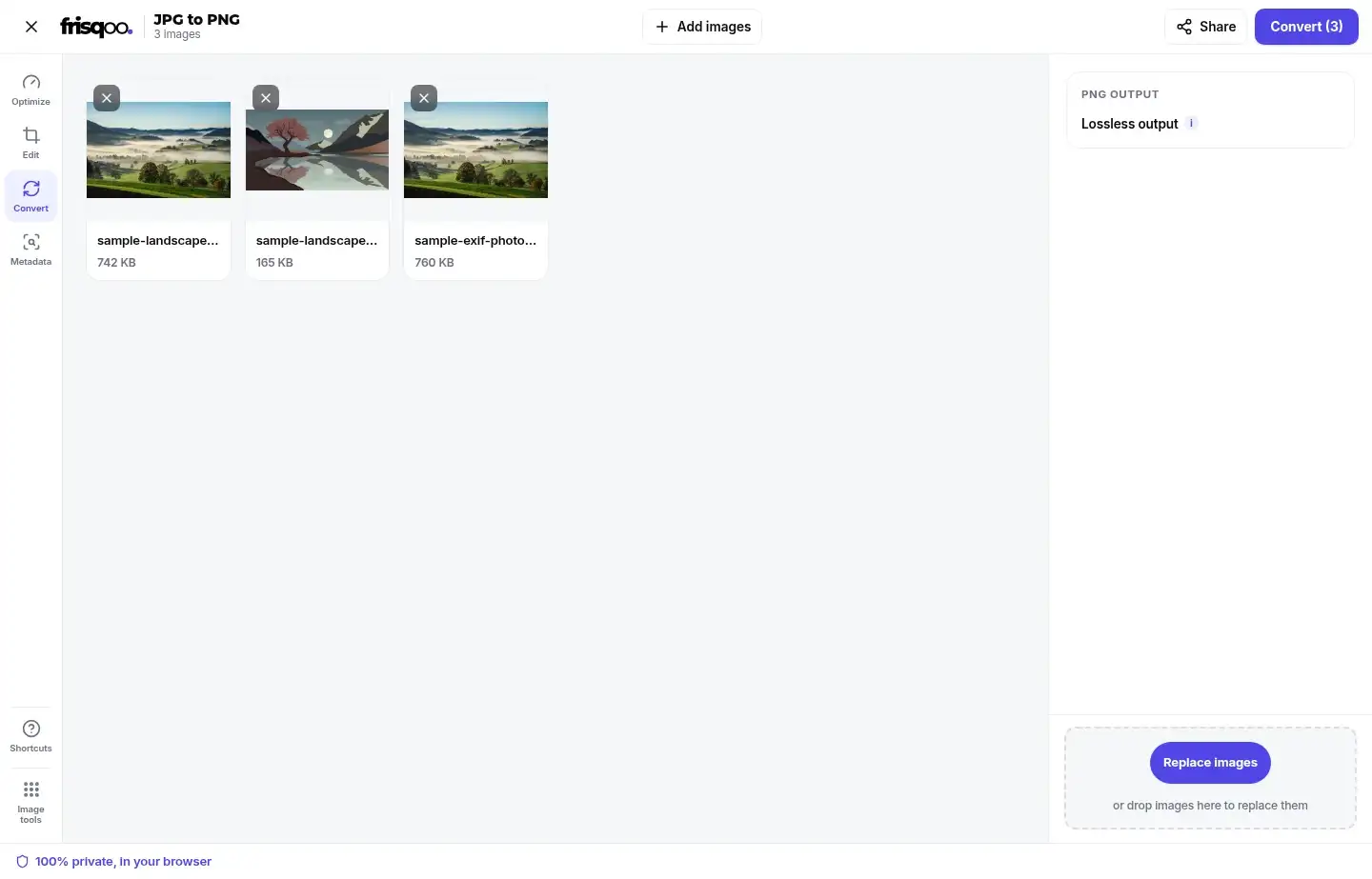
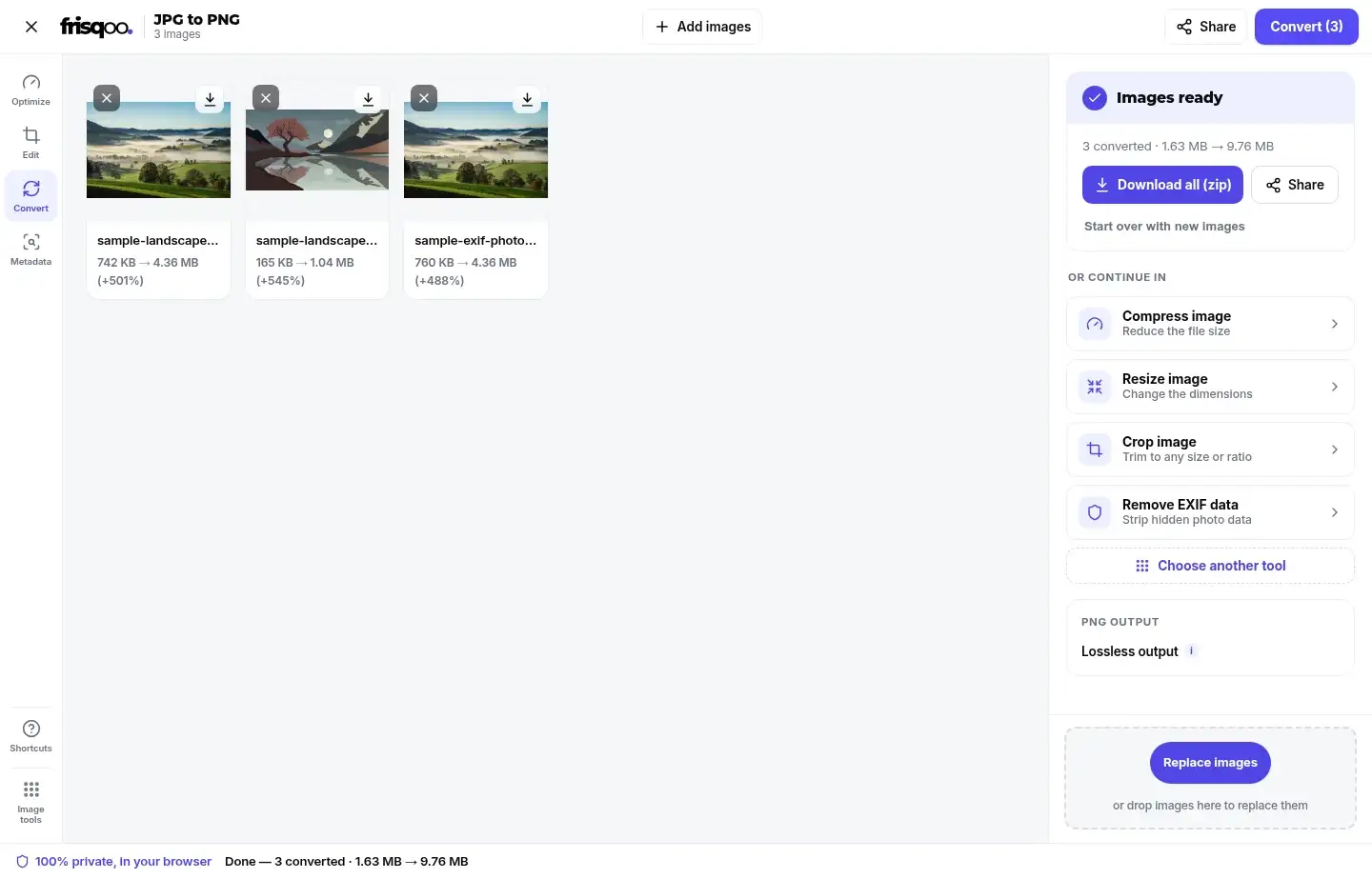
One thing to expect is a larger file. Each card in the workspace shows the size before and after, with a small plus-percentage badge when the PNG ends up heavier than the JPG, which is the usual result for a photograph. Nothing is sent anywhere while this happens, so even a long list of photos is handled entirely on your device. Each card keeps the file's own name, so you can tell the photos apart before you convert. The conversion starts only when you press Convert, so you can line up the whole set and remove any you change your mind about before running them.
Will the PNG keep my photo's location or camera data?
No. Rebuilding the photo through a canvas writes a fresh PNG that holds only the image, so the GPS location, camera model, lens and timestamp stored in the JPG are left behind. A converted PNG you share does not reveal where the photo was taken or which phone took it.
If you want to see what a file is carrying, open it in the EXIF data viewer and compare the JPG with the PNG. To clean a photo you plan to keep as a JPG, the remove EXIF data tool strips the hidden fields without changing the format.
Why is a PNG usually bigger than the JPG?
A PNG is bigger because it is lossless. JPEG was built to make photographs small by throwing away detail your eye is unlikely to miss, so a JPG is already heavily squeezed. PNG keeps every pixel in full and leans on lossless compression, which saves far less on a busy photograph.
Converting a detailed photo to PNG can multiply its size several times over, while a flat graphic with large areas of one colour may grow only a little. If a smaller file matters more to you than a lossless copy, staying with JPG or running the result through compress image is the better route.
Why PNG has no quality setting
With some formats the tool shows a quality slider, because you are trading a little detail for a smaller file. PNG has no such trade to make. It is lossless, so there is no quality dial to turn, and the side panel shows a single PNG output note that reads Lossless output. A small i beside that note explains what lossless means when you tap it.
Every pixel from the decoded JPG is written straight into the PNG. The only real influence on the final size is the picture itself, since a busy photograph packs less tightly than a flat graphic. If you do need a smaller file, the sound way to get one is to convert first, then reduce the size with a separate step rather than degrade the PNG here.
Convert a whole batch at once
A folder of photos is quicker to handle in one go. Add as many JPG files as you like, then press Convert once. The button carries the count, so it reads Convert followed by the number waiting. An Add images button at the top lets you drop in more before you start, and a small x on any card removes one you did not mean to include. Each photo reports its own size before and after, and the summary line adds up the whole set.
When more than one image is ready, the button becomes Download all (zip) and saves everything as frisqoo_jpg-to-png.zip, with each file keeping its original name and a .png ending inside the archive. A single image gives you a plain Download button instead. Once a batch is done, a short row of cards offers to pass the PNGs straight into another tool, so you can compress, resize, crop or remove EXIF data without saving and adding the files again. The whole set is handled one file after another, so a large batch will not freeze the page while it works. A Share option sits beside the download, so you can send a finished PNG straight on where your device supports it.
Convert JPG to PNG on an iPhone or Android phone
The page works the same on a phone as on a computer. Open it in Safari or Chrome, tap the box, choose the JPG photos from your camera roll, then press Convert. Every step runs on the phone itself, Frisqoo does not upload the source file for processing. There is no app to install or account to create.
Saving works the usual way for your phone, either straight to Files or Photos or through the share sheet. A big batch of high-resolution photos asks more of an older phone, since the whole job runs in its memory, so convert in smaller groups if the page starts to slow down.
Is it safe to convert images here?
Yes. Many free converters upload your images to their own servers to do the work. This tool does the conversion in your browser instead, so your photos are never uploaded, stored, or seen by anyone else. That makes it a sound choice for personal photos, screenshots, ID scans and anything else you would rather keep off a server you do not control. A private, in your browser note sits at the foot of the page and stays there the whole time you work.
You can check it for yourself. Open your browser's network panel before you convert, run a file through, and watch that no upload takes place while the PNG is made.
Common ways people use JPG to PNG
People reach for this conversion for a handful of everyday reasons.
- Meeting an upload rule on a site or form that accepts PNG files only.
- Making a lossless working copy before editing the same photo several times.
- Preparing a base image so a transparent background can be added in an editor.
- Turning a whole folder of JPG photos into PNG in one pass and saving them as a zip.
- Handing a clean PNG to a design tool that treats PNG as its default import.
FAQs about JPG to PNG
How do I convert JPG to PNG?
Add your JPG images, then press Convert. Each image is converted on your device, and you can save them one at a time or all together as a zip.
Is it free to use?
Yes. There is no sign-up, no watermark and no daily quota. Add as many images as you like. The only real limit is your device memory, since all the work happens on your own device.
Are my images uploaded anywhere?
No. They are read and converted by your own browser. Nothing is sent to a server, so even private photos stay with you.
Will converting to PNG improve the quality?
No. PNG is lossless, so it keeps exactly what the JPG holds, but it cannot rebuild detail that JPEG compression already discarded. The PNG looks the same as the JPG.
Does converting to PNG add transparency?
No. PNG can hold transparency, but a JPG has none to begin with, so the converted PNG is fully opaque. You can add a transparent area later in an image editor.
Can I convert many JPG files at once?
Yes. Add as many as you like, convert them together, then download them one by one or as a single zip named for this tool.
Does it work with .jpeg files too?
Yes. The .jpg and .jpeg endings are the same format, and both are accepted. You can drop a mix of them in one batch.
What is the biggest image I can convert?
There is no fixed cap. Because the work runs in your browser, the practical limit is your device memory. Very large photos and long batches ask more of an older phone or laptop.
Can I turn a PNG back into a JPG?
Yes. Use the PNG to JPG tool for that. Going back to JPG makes a smaller file, though it applies JPEG compression, so keep a PNG copy if you still want a lossless version.
Do I need to install an app?
No. The converter runs on a web page in your browser, with nothing to download or set up. It works the same on a phone, a tablet and a computer.