

Robots.txt Generator
Describe which crawlers may request which paths, and the file is written for you as you type. Every rule is checked as it is added, so a missing slash or a Disallow that would hide your whole site is flagged before you upload it. It all runs inside your browser, so nothing is uploaded.
100% private. Your file is built entirely in your browser and never uploaded.
Why build robots.txt with frisqoo
100% private
Your paths name admin logins and staging folders. They are read in your browser and never uploaded.
Checked as you type
Every rule is reviewed. A missing slash or a site-wide block is explained before you upload it.
Honest presets
WordPress, staging, noisy pages and AI crawlers. Each one is a starting point you can edit.
Edit a live file
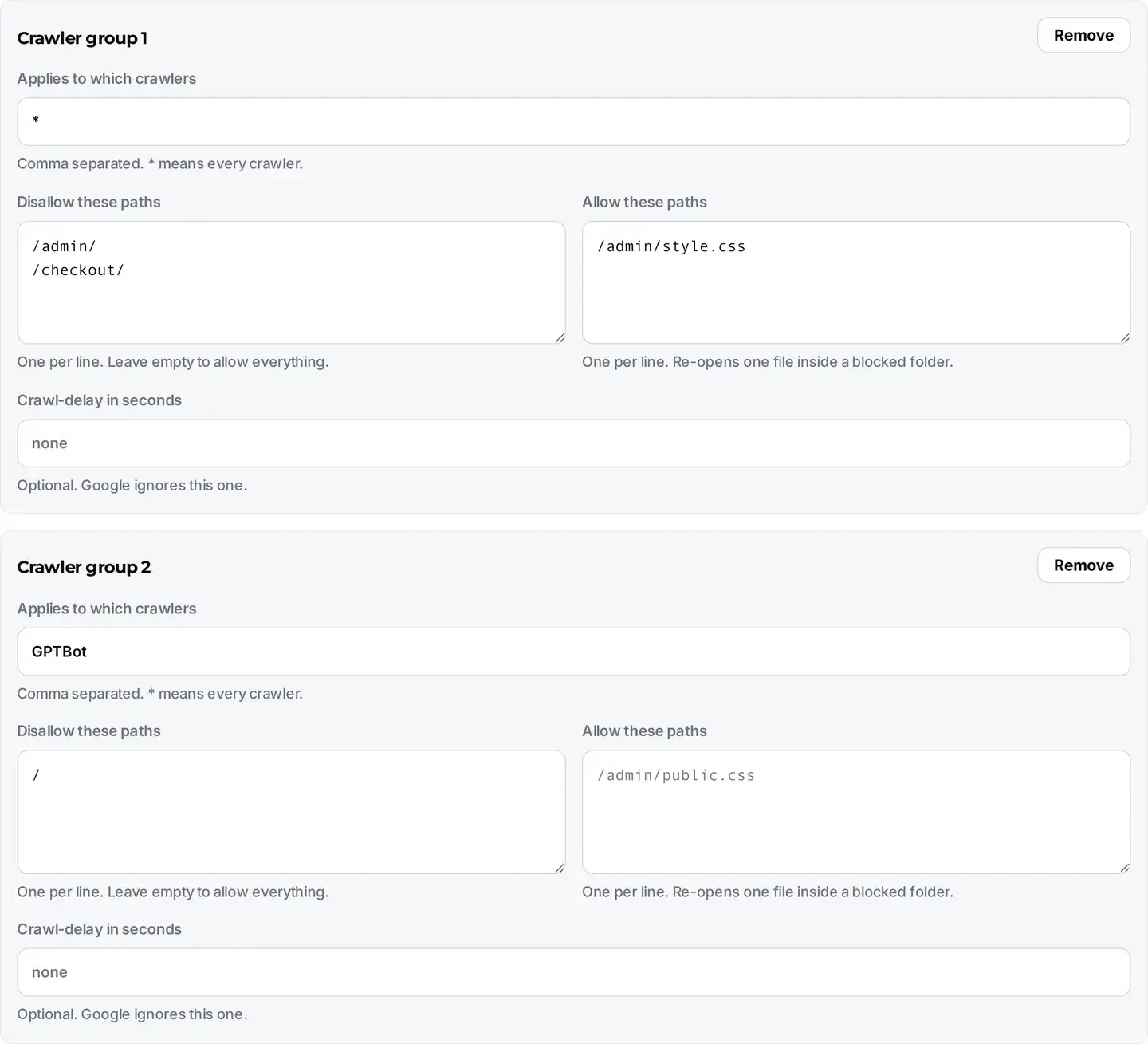
Paste the robots.txt you already have and it is read back into the form, so you can change one line.
No internet needed
Once this page has loaded, building and checking the file needs no connection at all.
Any device
Runs in any modern browser on a phone, tablet or computer. Nothing to install.
How to make a robots.txt file
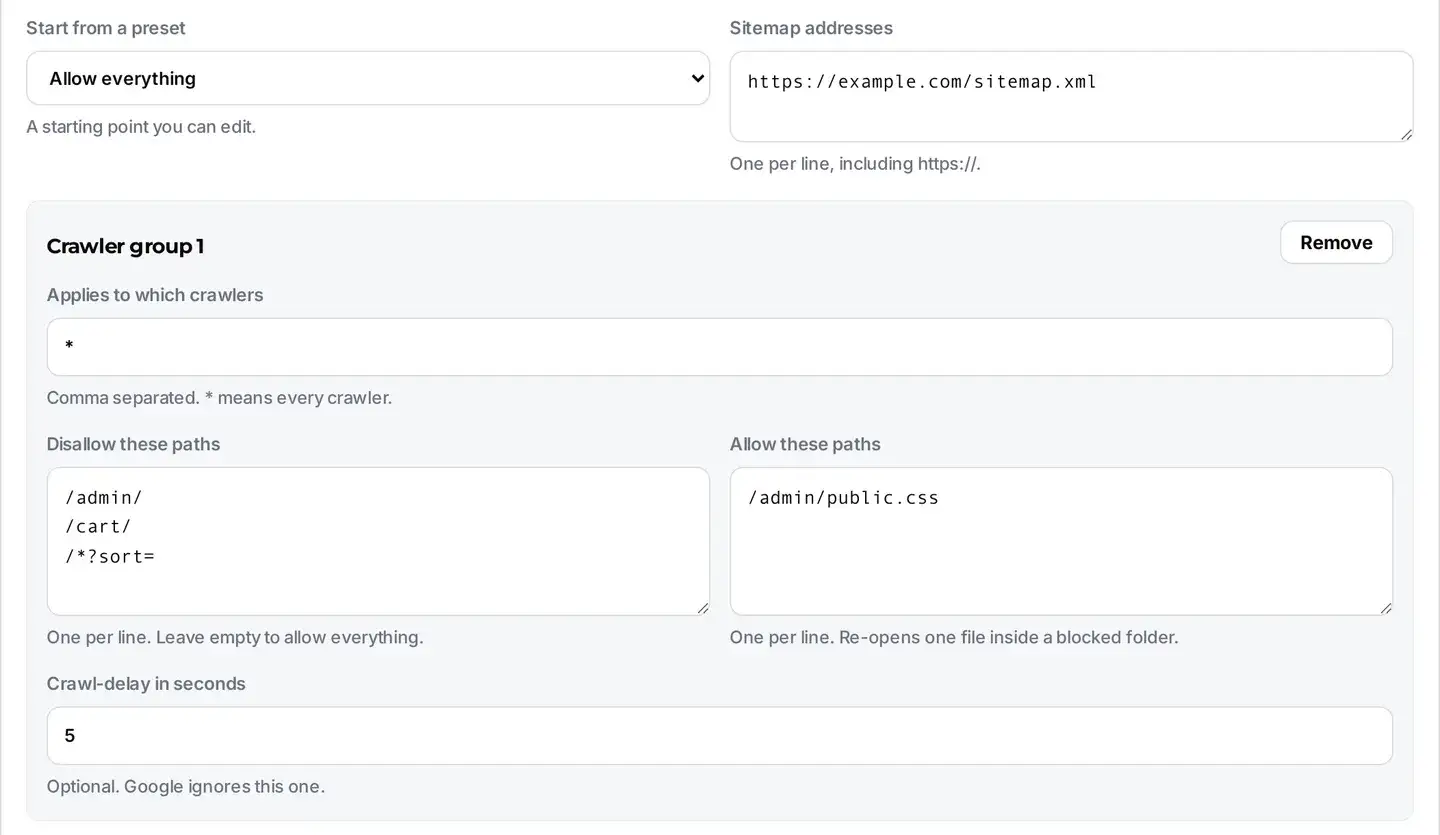
- Pick a preset that matches your site, or start from the empty group.
- Name the crawlers the group covers, then list the paths to disallow, one per line.
- Read the checks under the file, then tap Download and upload it to the top of your domain.
Everything runs on your device, so it is fast and your paths stay private, even with no internet once the page has loaded.
What is a robots.txt file?
It is a plain text file that sits at the top of your site and tells crawlers which paths they may request. A crawler asks for it before it asks for anything else, so it is the first thing Google, Bing and every AI bot reads about your site.
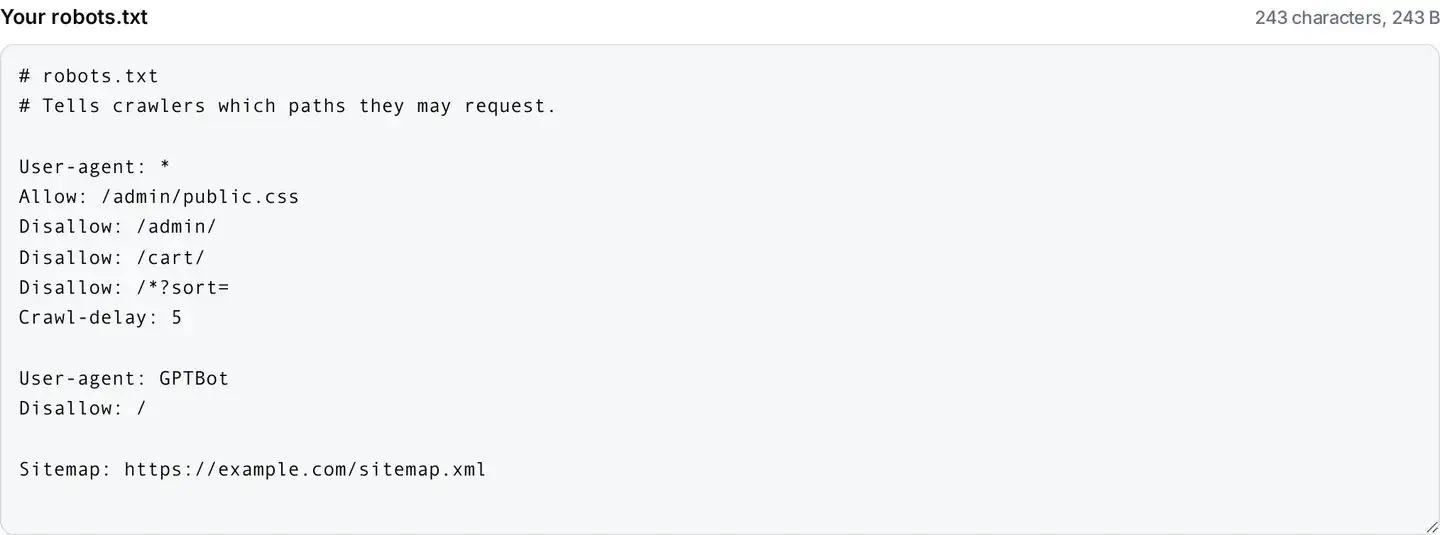
The whole format is only a handful of lines. A group starts with User-agent, naming the crawler the rules apply to, and an asterisk means every crawler. Under it, each Disallow line names a path they should not request, and each Allow line carves an exception back out. A Sitemap line points at your list of pages and stands on its own.
Because it is so short, the value of a generator is not the typing it saves. It is that a few of the rules mean the opposite of what they look like, and a single wrong character can quietly cost you every visitor from search.
The two lines that look the same
These are the two most important lines in the format, and they are one character apart:
Disallow: with nothing after it means allow everything. It is the documented way to say this crawler may request any path on the site.
Disallow: / means block the entire site. Every page, forever, for whichever crawlers that group names.
Sites disappear from search over this. The usual story is a staging server that correctly blocked everything, then went live with the file still in place. Nobody notices for weeks, because nothing breaks and no error appears anywhere. That is why this page writes the empty form deliberately and puts a loud warning on the other one the moment it applies to every crawler.

Blocking a page does not hide it
robots.txt controls crawling, not indexing. Those sound like the same thing and they are not, so it is worth being exact: crawling is a bot requesting your page, and indexing is a search engine listing it in results.
If you block a page here, you have stopped the request. You have not stopped the listing. When another site links to that page, its address can still appear in search results, usually with no description underneath, because the crawler was never allowed to read the page and write one.
So if your goal is to keep a page out of search, do the opposite of what feels right: let it be crawled, and add a noindex meta tag to the page itself. The crawler has to be able to read the page to see the instruction telling it to stay away. Blocking a page in robots.txt makes that instruction unreachable.
Should you block AI crawlers?
That is a business decision rather than a technical one, so here is the honest version of both sides. Blocking them keeps your writing out of the next round of model training. Allowing them means your pages can be quoted and cited by assistants that more and more people now ask instead of searching.
The preset for this adds a second group naming the user-agents these companies publish, including GPTBot, ClaudeBot, CCBot, Google-Extended and PerplexityBot, and leaves ordinary search crawlers completely alone. That separation matters: blocking Google-Extended keeps you out of AI training while keeping you in Google Search, because they are deliberately two different names.
One limit worth knowing. robots.txt is a request, not a lock. Well-behaved crawlers obey it and the major companies state that they do, but nothing in the file can force a badly behaved bot to comply. If you need a real block, that is a job for your server or your CDN.
Where the file goes
At the root of your domain, answering at example.com/robots.txt. That exact address is the only one crawlers check. A file in a subfolder is ignored, and so is one with a different name or a capital letter in it.
Each subdomain is treated as a separate site, so blog.example.com needs its own file and inherits nothing from the main domain. This catches people out often, because a blog or shop on a subdomain can sit uncrawled for months behind a file nobody remembered to write.
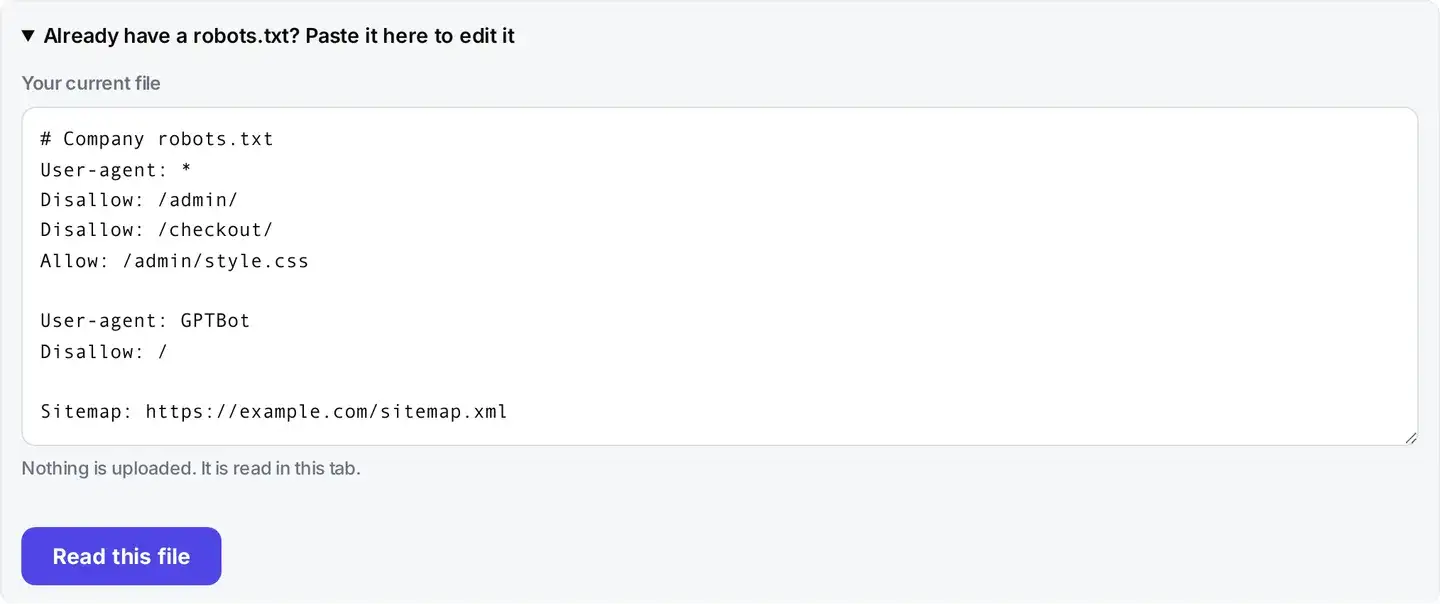
After uploading, open the address in your own browser. If you see your rules as plain text, crawlers see the same thing. If you see your site’s 404 page instead, the file is in the wrong place. You can also paste your live file back into the box on this page to check and edit it without starting again.
Is it safe to paste your live file here?
Yes, and it is worth explaining why that is not a throwaway reassurance for this particular tool. A real robots.txt is a map of the parts of your site you would rather people did not visit. It names admin logins, staging directories, internal dashboards, export scripts and customer areas. Attackers read robots.txt files precisely because owners list their soft targets in them.
Many free generators post whatever you type to their own server to do the work, which puts that map into somebody else’s logs. This page does the whole job in your browser: the file is built, checked and saved on your device, and nothing is sent anywhere.
If you are working on the technical side of a site, the other tools here run the same local way. XML to JSON is useful when you are reading a sitemap or an API response, URL encode and decode fixes links with spaces or accents in them, and the full set lives in developer tools.
FAQs about Robots.txt Generator
Is my file uploaded to a server?
No. The file is built and checked inside your browser on your own device. Your paths often reveal an admin login, a staging folder or an internal tool, and none of that leaves your machine here. Closing the tab leaves nothing behind.
Where does robots.txt go?
At the very top level of your domain, so it answers at example.com/robots.txt. That exact address is the only place crawlers look. A file in a subfolder, such as example.com/blog/robots.txt, is ignored completely. Each subdomain needs its own file, so blog.example.com does not inherit the rules from example.com.
Does blocking a page in robots.txt remove it from Google?
No, and this is the single most expensive misunderstanding about the file. robots.txt controls crawling, not indexing. If another site links to a page you have blocked, the address can still appear in search results, usually with no description because the crawler was never allowed to read it. To keep a page out of results, let it be crawled and add a noindex meta tag instead.
What does Disallow with nothing after it mean?
It means allow everything, which is the opposite of what it looks like. An empty Disallow is the documented way to say this crawler may request any path. Disallow followed by a single slash is the one that blocks the entire site. The two lines look almost identical and are the most common serious mistake in the file, so this tool writes the empty form deliberately and warns you loudly about the other.
Why does my rule need a leading slash?
Because paths are matched from the root of your site. A rule written as admin/ never matches anything at all, so the folder you meant to protect stays open. Write it as /admin/ instead. The checks below flag a missing slash rather than silently rewriting what you typed, so you can see the mistake and learn it.
Can I block ChatGPT, Claude and other AI crawlers?
Yes. The block common AI crawlers preset adds a group for the user-agents these companies publish, including GPTBot, ClaudeBot, CCBot, Google-Extended and PerplexityBot, while leaving ordinary search crawlers free to index you. Be aware that robots.txt is a request, not a lock. Well-behaved crawlers obey it and the major AI companies say they do, but nothing forces a badly behaved one to.
Should I add my sitemap?
Yes, if you have one. A Sitemap line gives crawlers the full list of pages you want found, which helps a new or large site get discovered faster. It has to be the complete address including https://, because that line is read on its own rather than relative to your domain. It also sits outside every group, which is why this tool always writes it last and unindented.
Does Crawl-delay work?
Partly. Bing and Yandex read it. Google ignores it entirely, so if Google is crawling too hard you need to set the rate in Search Console instead. That is why the field is optional here and the checks say so plainly rather than letting you believe a line is doing something it is not.
Can I use wildcards?
Yes. An asterisk stands for any run of characters, so a rule like /*?sort= blocks every sorted version of a listing page, which is a genuinely useful way to stop crawlers wasting their time on thousands of near-identical URLs. A dollar sign at the end anchors the match, so /*.pdf$ covers PDFs only. All the major crawlers support both, though they are not part of the original 1994 rules.
Is it free?
Yes. No sign-up and no limit on how many files you build. It works the same on phones, tablets and computers in any modern browser.